
mfdeklaldohihacjmckidgphclafeaaa
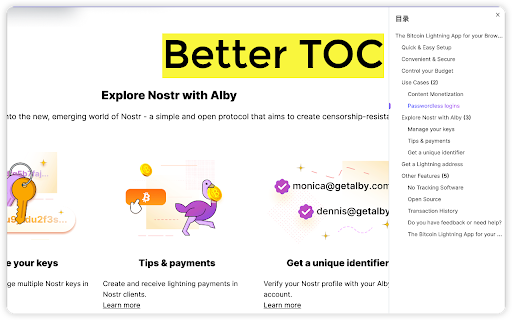
Auto generate toc for readme, article, more, support llm Q&A

显示页面大纲目录
## What is this? A lightweight browser extension that helps you understand webpage structure and navigate long content easily. View page outline instantly with a keyboard shortcut (Alt+O) or right-click menu. ## Core Features - ⌨️ **Keyboard Shortcut**: Press Alt+O to quickly show/hide outline - 📑 **Smart Outline**: Auto-generates clear, hierarchical table of contents - 🎯 **Quick Navigation**: Smooth scroll to target section with one click - 🎨 **Elegant Design**: Modern interface with smooth animations - 📱 **Non-intrusive**: Shows when needed, hides when not, never interrupts reading ## Use Cases - Quickly grasp structure of long articles and documents - Navigate technical documentation efficiently - Easy content location in news and blog posts - Better comprehension of article flow while studying

Smart TOC
Displays a table of contents for any website, making it easier to read and navigate long articles, documentations, and online books. - Auto detects article and headings, with our smart algorithm - Highlights current heading - Click to jump to heading - Expand/fold headings, or to specified level - Floating panel, drag, resize, or dock to side - Mouse hover while holding Alt/Option key to glance - Copy to clipboard - Clean user interface - Only runs when you use it The Pro version offers extra features: - Dark mode, automatically - Up to 6 heading levels (free version capped to 3) - Quickly go to headings, with full-keyboard support Click the browser button to toggle table of contents for the current site Any website that conforms to the HTML standard and uses HTML heading tags properly (e.g. Wikipedia.com). You can also enable Smart TOC for local html in the extension settings.

Extension Manager
A simple way to manage your browser extensions A simple way to manage your browser extensions Actions: Enable when match, Close when match, Enable only when match, Disbale only when match, Custom; Support automatically refreshing the page after enabling or disabling extensions. * Bulk Export/Import and Share Extensions Bulk export extension information, support sharing text, json, custom markdown format; share or record your extension installation information. Bulk import extensions from shared text or json, simplifying the process of migrating or installing multiple extensions. * One-click enable or disable extensions. * Batch enable or disable extensions through grouping. * Quick search extensions by extension name, description, alias, or note. * Extension management: Quickly navigate to settings page, homepage, uninstall extensions. * List view and grid view. * One-click launch for app-type extensions. * Set custom aliases and notes. * History: Extension installation, update, uninstall, enable, and disable. - Rich configurable options for customizing style and functionality. - Open-source code with no collection of any user privacy data. github: https://github.com/JasonGrass/auto-extension-manager

Peek Pop: Link Preview
Instantly preview links with a simple double-click, without breaking your workflow For more information, see: https://github.com/u-Sir/peek-pop?tab=readme-ov-file#peek-pop
