
fhohcpjlbgchehjpejkdlecpafdlldfi

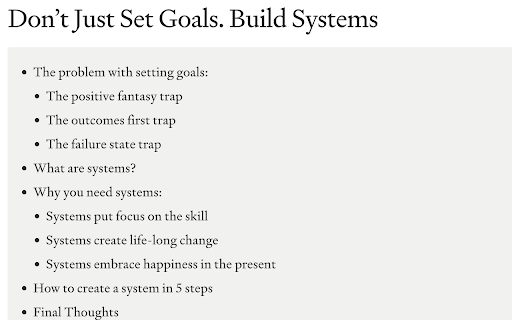
AI Summary for your Medium Blog Post Are you tired of spending hours reading through lengthy articles on medium.com, trying to get the main points? Do you want a quick and easy way to understand the content of a blog post without having to read through the entire thing? Look no further! Our Chrome Extension for summarizing medium articles - Summr.io - Medium Blog Summarizer is here to help. With this extension, you can get a summary of any medium blog post with just one click of a button. Simply click the "Summarize" button within the Chrome browser and a summary of the blog post will be displayed. This is an incredibly useful tool for busy individuals who want to get information from the blog posts but may not have the time to read through every article in full. Not only is this extension convenient and time-saving, but it's also easy to use. Simply install it on your Chrome browser and you'll be ready to quickly and easily understand the main points of any medium blog post. Don't waste any more time struggling to understand lengthy articles – try our Chrome Extension for summarizing medium blog posts today!

Fractions - Medium Partner Dashboard
A Better Partner Dashboard for Medium In this build, you'll find a dark mode for fractions. Note that, this extension can be buggy sometimes as I only have a chance to try it on my own account but no other. Fractions is a fully featured Chrome extension that helps you analyze and visualize your Medium Partner Program earnings. It is way powerful than default Partner Program Dashboard, Medium provides. Using this extension, you can inspect the data about your, - lifetime earnings since you enrolled in to Medium Partner Program, - monthly earnings, - daily total member reading time, - realtime currency conversion, - yesterday's total earnings, - yesterday's top earning post, - estimated earnings by the end of the month---_with a special algortihm_, - daily average earnings, - percent difference from the previous month, - this month's top earning post, - total tax you pay, - monthly predicted tax, - net earnings. In Partner Dashboard, all we get is monthly and referred member earnings. There's no stat about what I earned yesterday, total member time, or the net earnings without taxes. So, I made this Chrome extension as a total replacement for Partner Dashboard. It includes everything Partner Dashboard, but adds more features on top of them, using the data scattered around.

Medium Any Author Stats
The statistics of any Medium author. Enter Medium author's page and click a button to see their detailed statistics! Medium Any Author Stats is a tool to see detailed statistics of all the authors on the Medium website. All you need to do is to enter the Medium author's page, load their data and enjoy insightful statistics! 🔥FEATURES ✔️ Number of followers ✔️ Total posts number ✔️ How many posts are locked for medium subscribers ✔️ Number of newsletter subscribers ✔️ If the author is a medium subscriber (and how long) ✔️ Claps, responses and amount of clappers in the aggregated view ✔️ Claps, responses and amount of clappers graph for individual posts. 📗RESOURCES 📖 Introduction article: https://medium.com/@bsalwiczek/i-made-a-chrome-extension-for-medium-users-b8789a7ba204 ⚙️ Step-by-step article on how this extension was built using React and Typescript: https://medium.com/@bsalwiczek/how-to-develop-react-chrome-extension-for-medium-in-26-steps-d0401149e3a2 📜 Github repository: https://github.com/BSalwiczek/medium-any-author-stats

Degen Reply
Adds buttons to Twitter for easy replies using spintax and AI-generated responses. ⚡ Degen Reply AI Tool: Amplify Your X/Twitter Engagement with AI Magic ⚡ Unleash the power of AI in your X/Twitter conversations with the Degen Reply AI Tool, a revolutionary Chrome extension that takes your Twitter engagement to uncharted territories. Supercharge your X experience, be it casual chats, heated debates, or enlightening discussions - the Degen Reply AI Tool is your ultimate Twitter sidekick. 💡 AI-Powered Responses: Don't know what to say? Stuck in a conversation? Use the AI Reply button powered by the cutting-edge ChatGPT technology. With this feature, craft compelling, relevant, and razor-sharp responses to any tweet in a snap. 🌀 Spintax Text Support: Customize your replies with our preconfigured spintax text option. With this, you can make your responses more dynamic and personalized, taking your Twitter interactions to the next level. 🔮 AI Personality Configuration: Stay true to your unique style! Configure an AI Personality that mirrors your tone and language preferences, ensuring your responses never lose your personal touch. The Degen Reply AI Tool is not just an extension - it's a game-changer. Engage in meaningful interactions, build connections, influence conversations, all while saving time and effort. Let your personality shine through your tweets while the AI handles the heavy lifting. Start your Twitter revolution today with the Degen Reply AI Tool. Remember, the art of conversation is one click away! Download now and make every tweet count! Disclaimer: The Degen Reply AI Tool operates in adherence to Twitter's policy and respects user privacy.

Instant Medium Analytics - MediumStats.com
Swiftly track Medium's trending articles & profiles, with data storage for offline viewing. Elevate your Medium experience with the go-to analytics companion, MediumStats.com, an essential Chrome extension for writers, readers, and content marketers. This powerful tool offers you a seamless and instant insight into the bustling world of Medium articles and authors. Why should you install MediumStats.com? Efficient Content Discovery: Uncover the most popular and trending articles on Medium at a glance. Stay ahead of the curve by knowing what topics capture the most attention and engagement from readers. With MediumStats.com, you can effortlessly identify high-performing content that resonates with your interests or your audience's preferences. Profile Analytics: Gain a deeper understanding of your favorite authors or monitor your own impact on Medium. The extension highlights essential statistics for Medium profiles, helping you to track followers, story performance, and overall reach. Whether you're looking to build your network or find inspiration, MediumStats.com provides the metrics that matter. Local Data Storage: Ever wanted to access your Medium stats but had no internet connection? MediumStats.com has got you covered with its local data storage feature. Review your previously fetched statistics anytime, anywhere — perfect for offline productivity and analysis. User-Friendly Interface: With just a click, watch the MediumStats.com extension integrate effortlessly into your browsing experience. Its intuitive design means no learning curve; you'll be navigating and interpreting your stats like a pro from the moment you install. Time-Saving Tool: No more manual tracking or guesswork. MediumStats.com saves you time by aggregating the data you need in one convenient location, allowing you to make informed decisions on your reading and content strategy without the hassle. Join the community of savvy Medium users who have transformed the way they interact with content. Install the MediumStats.com Chrome extension today and unlock the full potential of your Medium journey with data-driven insights at your fingertips.
