
ahepaemleacieeongldddhambknoomof

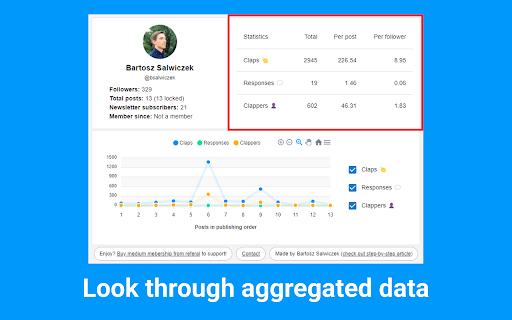

The statistics of any Medium author. Enter Medium author's page and click a button to see their detailed statistics! Medium Any Author Stats is a tool to see detailed statistics of all the authors on the Medium website. All you need to do is to enter the Medium author's page, load their data and enjoy insightful statistics! 🔥FEATURES ✔️ Number of followers ✔️ Total posts number ✔️ How many posts are locked for medium subscribers ✔️ Number of newsletter subscribers ✔️ If the author is a medium subscriber (and how long) ✔️ Claps, responses and amount of clappers in the aggregated view ✔️ Claps, responses and amount of clappers graph for individual posts. 📗RESOURCES 📖 Introduction article: https://medium.com/@bsalwiczek/i-made-a-chrome-extension-for-medium-users-b8789a7ba204 ⚙️ Step-by-step article on how this extension was built using React and Typescript: https://medium.com/@bsalwiczek/how-to-develop-react-chrome-extension-for-medium-in-26-steps-d0401149e3a2 📜 Github repository: https://github.com/BSalwiczek/medium-any-author-stats

Medium Enhanced Stats
Your total reach & summary of your articles and responses stats with a single click and many improvements of the Medium stats page! ⚠️ Please keep in mind, this extension works only if you have and are logged into your Medium.com account, without that, the extension can NOT retrieve your Medium stats 📊 Get overview about your total Medium reach and stats for articles and responses! ☕ Do you like this extensions? 🤝 Get me a coffee to show your appreciation and provide fuel for new features 😉 🔗 https://www.buymeacoffee.com/tomastrajan 📦 EXTENSION POPUP (in Chrome Toolbar) ✔️ Total reach indicator and milestones ✔️ Milestone reached celebration animation ✔️ Summary article and responses table ✔️ Total article count, views, reads, fans, claps and claps per fan ✔️ User / publication selector (click user avatar in popup) ✔️ Download as an image and share with friends ✔️ Export and download stats as csv file 📦 MEDIUM STATS PAGE ✔️ Bar chart article and response markers ✔️ Bar chart article contribution to daily total ("Show in chart" button) ✔️ Claps per article and claps per fan for every article ✔️ Summary row with total article count, views, reads, ... 📦 MEDIUM PARTNER PROGRAM EARNINGS PAGE ✔️ Total payed out earnings ✔️ Breakdown of earning types ✔️ Breakdown of withheld earnings ⚠️ TROUBLESHOOTING 🔥 Sometimes, using extension can cause NOT being able to log into your Medium account, in that case you can disable / remove the extension, log into your Medium account on that device and install extension again 📖 ARTICLE 🤝 Introduction: https://medium.com/free-code-camp/medium-hates-him-see-how-he-improved-their-stats-page-with-this-one-simple-trick-1ce0898381a8 🐳 In-depth guide: https://medium.com/1-one-infinity/medium-statistics-medium-enhanced-stats-extension-for-chrome-1357baaf20ac v7.0.1 - Remove redundant permission (activeTab) v7.0.0 - NEW MAJOR FEATURE - Total earnings (an breakdown of earned / withheld earnings) v6.1.0 - Handle additional notification types v6.0.0 - Use new Chrome Extension manifest v3, fix notification layout & add missing type v5.6.0 - Handle new "email subscribers" & "referred users" notifications v5.5.1 - Fix "Today" stiles in the summary row on the stats page v5.5.0 - New "Today" sortable column for the Medium stats page, thx @Nilmadhabmondal v5.4.5 - Medium notification API fix, buy me a coffee link in popup v5.4.3 - Enable followers resolution using new Medium GraphQL API v5.4.2 - Remove unnecessary permission v5.4.1 - Disabled followers resolution (Medium removed REST endpoint) v5.4.0 - Add support for more than 100 articles ( or responses ) v5.3.0 - Add "Export and download as csv" button to extension popup v5.2.0 - Add "Fans per Reads ratio" to stats page (based on user feedback) v5.1.6 - Add missing notification type v5.1.5 - Fix initial notification popup position on macOS v5.1.4 - Fix unknown notifications by adding another follower notification type v5.1.3 - Refresh notification popup on page navigation v5.1.2 - Fix notification popup location on windows resize and navigation v5.1.1 - Refresh notifications when navigating to various Medium pages v5.1.0 - Refresh notifications after opening of the notifications list v5.0.0 - Add notifications count popup v4.10.4 - Fix "Download as an image" scaling on various monitors / resolutions v4.10.3 - Fix "Download as an image" for some users (tainted canvas) v4.10.2 - Fix critical bug with overwriting functions in global scope v4.10.1 - Fix "Download as an image" for macOS Chrome v4.10.0 - Add popup "Download as an image" and share functionality v4.9.0 - New Claps per Views ratio in stats table (claps column) v4.8.0 - Increase popup number precision v4.7.0 - Membership indicator and requests performance logging v4.6.0 - Add milestone description tooltip in the total reach indicator v4.5.0 - Show date of publishing when hovering over article title v4.4.0 - Add feedback form v4.3.1 - Add anonymous remote error logging v4.2.0 - Add followers count to total reach popup v4.1.1 - Fix various stats calculations for missing or zero values v4.1.0 - Add claps per fan in the stats table and total reach popup v4.0.0 - Add toggle for article contribution to total daily views in bar chart v3.3.0 - Add milestone reached animation v3.2.0 - Add additional milestones v3.1.0 - Update marketing assets v3.0.1 - Support for publications v2.4.5 - Show article markes in the bar chart v2.3 - Show claps in stats table, show user info in popup, fix popup animation v2.2 - Add reach indicator and milestones v2.1 - Various small UI improvements and fixes v2.0 - Show total articles and responses stats in popup and bottom of the stats page v1.4 - Total articles count stats tracking v1.3 - Extension popup with open stats button and total stats when applicable v1.2 - Total stats for additional (syndicate) views of the Responses v1.1 - Total stats for Responses and Series v1.0 - Initial Release 🤲🏻 OPEN SOURCE 👨🏻💻️ Did you know that the Medium Enhanced Stats is open source project? ⌨️ Check out source code - https://github.com/tomastrajan/medium-enhanced-stats 🔀 Check out latest changes - https://github.com/tomastrajan/medium-enhanced-stats/commits/master 👨💻️ CONTRIBUTORS Nil Madhab @Nilmadhabmondal - "Today" column idea and initial implementation 🎉 On-demand confetti ⭕ Works in Opera too! 📦 With the help of this amazing addon https://addons.opera.com/en/extensions/details/install-chrome-extensions/

MediumLytics - Awesome Medium Stats
Everything missing from Medium Stats and other Tools to know about your Medium Audience and Traffic is only a few clicks away! Table of Contents: - Introduction - "Classic" tools - Know your Audience with MediumLytics (totally different than Medium's built-in "audience stats" tool) - Better traffic to know on which sources to work on - Removing the all-time-earnings headache by seeing a sum of all your monthly earnings in one number I've built this Must-Have Stats web extension because as a Medium Top Writer myself, I've always felt that the Stats page on Medium does fine on telling you your views/reads numbers with pretty charting, but missed some key points about your audience. Something was missing, and being a Developer who appears to like testing APIs, I began examining Medium's, and not the one well-documented on Github but the one the Medium Web App actually uses. My "studies" highlighted that there is much more potential for Stats given the information provided by the API, so I decided to quickly build something that could take advantage of it. Besides a classic total views/reads page, I've decided to bring up also: Now is when things start getting interesting with the following tools: The Audience Page will tell you the following about your Medium Audience of the last few Months: - Followers - Fans - "Loyal Fans" - Member Fans (with percentages) This was a game changer for me as I could have finally viewed - how many people liked my work more than once("Loyal Fans") - If my fans are mostly Members or not. Because Medium Members make you money with their reading time, and you want to make sure your Audience mostly contains Medium Members (IMPORTANT NOTE: this page will take a few seconds to load as Medium made my job harder to check which fans where members) The Traffic page is another Game Changer. You already can see the traffic for each one of your stories, what's missing is a global traffic, so I built it. With this tool you'll see what sources globally take more readers to your work, and what sources you need to work on in order to get more readers. Last but not least, the earnings page will display your all-time earnings(without bonuses) all in one number without the need of going trough each month calculating them. Thanks for downloading, and if you have questions, shoot me an email at tommasodeponti@zohomail.eu

Medium Blog Summarizer - Summr.io
AI Summary for your Medium Blog Post Are you tired of spending hours reading through lengthy articles on medium.com, trying to get the main points? Do you want a quick and easy way to understand the content of a blog post without having to read through the entire thing? Look no further! Our Chrome Extension for summarizing medium articles - Summr.io - Medium Blog Summarizer is here to help. With this extension, you can get a summary of any medium blog post with just one click of a button. Simply click the "Summarize" button within the Chrome browser and a summary of the blog post will be displayed. This is an incredibly useful tool for busy individuals who want to get information from the blog posts but may not have the time to read through every article in full. Not only is this extension convenient and time-saving, but it's also easy to use. Simply install it on your Chrome browser and you'll be ready to quickly and easily understand the main points of any medium blog post. Don't waste any more time struggling to understand lengthy articles – try our Chrome Extension for summarizing medium blog posts today!

TOC of Medium
Create a table of contents on the edit screen of Medium. When you add this plugin, you can create a table of contents at the input position by pressing the Ctrl + t key! Also, you can copy a table of contents by clicking on the clipboard icon that appears in the upper right corner of the screen. You can embed a table of contents in an article by pasting it where you want to insert it. To update the table of contents, click on the clipboard icon again to copy the latest table of contents, or press Ctrl + t key at the position where you want to create the latest table of contents. How to use: https://medium.com/@nikaera/8c8d344313fe GitHub Repository: https://github.com/nikaera/toc-medium-extension
