
jnomnfoenpdinfkpaaigokicgcfkomjo
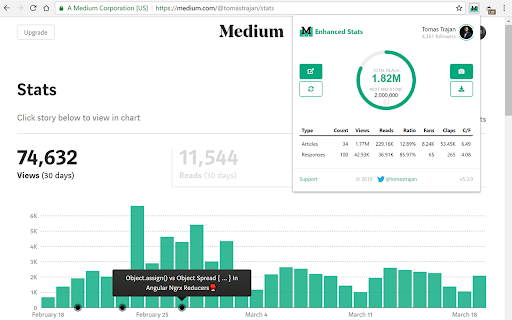


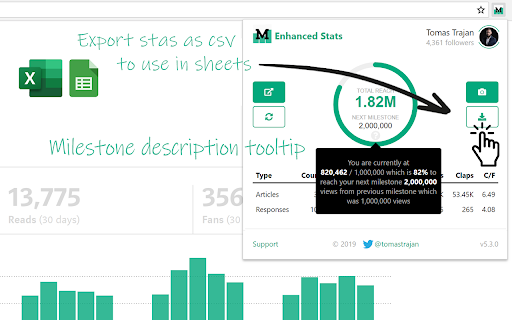

Your total reach & summary of your articles and responses stats with a single click and many improvements of the Medium stats page! ⚠️ Please keep in mind, this extension works only if you have and are logged into your Medium.com account, without that, the extension can NOT retrieve your Medium stats 📊 Get overview about your total Medium reach and stats for articles and responses! ☕ Do you like this extensions? 🤝 Get me a coffee to show your appreciation and provide fuel for new features 😉 🔗 https://www.buymeacoffee.com/tomastrajan 📦 EXTENSION POPUP (in Chrome Toolbar) ✔️ Total reach indicator and milestones ✔️ Milestone reached celebration animation ✔️ Summary article and responses table ✔️ Total article count, views, reads, fans, claps and claps per fan ✔️ User / publication selector (click user avatar in popup) ✔️ Download as an image and share with friends ✔️ Export and download stats as csv file 📦 MEDIUM STATS PAGE ✔️ Bar chart article and response markers ✔️ Bar chart article contribution to daily total ("Show in chart" button) ✔️ Claps per article and claps per fan for every article ✔️ Summary row with total article count, views, reads, ... 📦 MEDIUM PARTNER PROGRAM EARNINGS PAGE ✔️ Total payed out earnings ✔️ Breakdown of earning types ✔️ Breakdown of withheld earnings ⚠️ TROUBLESHOOTING 🔥 Sometimes, using extension can cause NOT being able to log into your Medium account, in that case you can disable / remove the extension, log into your Medium account on that device and install extension again 📖 ARTICLE 🤝 Introduction: https://medium.com/free-code-camp/medium-hates-him-see-how-he-improved-their-stats-page-with-this-one-simple-trick-1ce0898381a8 🐳 In-depth guide: https://medium.com/1-one-infinity/medium-statistics-medium-enhanced-stats-extension-for-chrome-1357baaf20ac v7.0.1 - Remove redundant permission (activeTab) v7.0.0 - NEW MAJOR FEATURE - Total earnings (an breakdown of earned / withheld earnings) v6.1.0 - Handle additional notification types v6.0.0 - Use new Chrome Extension manifest v3, fix notification layout & add missing type v5.6.0 - Handle new "email subscribers" & "referred users" notifications v5.5.1 - Fix "Today" stiles in the summary row on the stats page v5.5.0 - New "Today" sortable column for the Medium stats page, thx @Nilmadhabmondal v5.4.5 - Medium notification API fix, buy me a coffee link in popup v5.4.3 - Enable followers resolution using new Medium GraphQL API v5.4.2 - Remove unnecessary permission v5.4.1 - Disabled followers resolution (Medium removed REST endpoint) v5.4.0 - Add support for more than 100 articles ( or responses ) v5.3.0 - Add "Export and download as csv" button to extension popup v5.2.0 - Add "Fans per Reads ratio" to stats page (based on user feedback) v5.1.6 - Add missing notification type v5.1.5 - Fix initial notification popup position on macOS v5.1.4 - Fix unknown notifications by adding another follower notification type v5.1.3 - Refresh notification popup on page navigation v5.1.2 - Fix notification popup location on windows resize and navigation v5.1.1 - Refresh notifications when navigating to various Medium pages v5.1.0 - Refresh notifications after opening of the notifications list v5.0.0 - Add notifications count popup v4.10.4 - Fix "Download as an image" scaling on various monitors / resolutions v4.10.3 - Fix "Download as an image" for some users (tainted canvas) v4.10.2 - Fix critical bug with overwriting functions in global scope v4.10.1 - Fix "Download as an image" for macOS Chrome v4.10.0 - Add popup "Download as an image" and share functionality v4.9.0 - New Claps per Views ratio in stats table (claps column) v4.8.0 - Increase popup number precision v4.7.0 - Membership indicator and requests performance logging v4.6.0 - Add milestone description tooltip in the total reach indicator v4.5.0 - Show date of publishing when hovering over article title v4.4.0 - Add feedback form v4.3.1 - Add anonymous remote error logging v4.2.0 - Add followers count to total reach popup v4.1.1 - Fix various stats calculations for missing or zero values v4.1.0 - Add claps per fan in the stats table and total reach popup v4.0.0 - Add toggle for article contribution to total daily views in bar chart v3.3.0 - Add milestone reached animation v3.2.0 - Add additional milestones v3.1.0 - Update marketing assets v3.0.1 - Support for publications v2.4.5 - Show article markes in the bar chart v2.3 - Show claps in stats table, show user info in popup, fix popup animation v2.2 - Add reach indicator and milestones v2.1 - Various small UI improvements and fixes v2.0 - Show total articles and responses stats in popup and bottom of the stats page v1.4 - Total articles count stats tracking v1.3 - Extension popup with open stats button and total stats when applicable v1.2 - Total stats for additional (syndicate) views of the Responses v1.1 - Total stats for Responses and Series v1.0 - Initial Release 🤲🏻 OPEN SOURCE 👨🏻💻️ Did you know that the Medium Enhanced Stats is open source project? ⌨️ Check out source code - https://github.com/tomastrajan/medium-enhanced-stats 🔀 Check out latest changes - https://github.com/tomastrajan/medium-enhanced-stats/commits/master 👨💻️ CONTRIBUTORS Nil Madhab @Nilmadhabmondal - "Today" column idea and initial implementation 🎉 On-demand confetti ⭕ Works in Opera too! 📦 With the help of this amazing addon https://addons.opera.com/en/extensions/details/install-chrome-extensions/

TOC Medium
Table Of Contents generator for Medium stories This extensions adds a new action to Medium's editor: "Add a Table of Contents". Upon selection, the extension finds all the heading tags and creates a list with their titles and links. Once created the TOC won't be updated, if headings change, a new TOC will need to be generated. Github repo: https://github.com/vdeantoni/toc-medium Pull requests and feature requests via Issues are appreciated.

Headline Studio by CoSchedule
The headline analyzer from CoSchedule enables you to create headlines that drives maximum traffic, clicks, & SEO Headline Studio is a headline analyzer from CoSchedule that improves your blog headlines wherever you write them, from WordPress to Wix. So you can finally feel confident that every headline drives maximum traffic, engagement, and SEO rankings. Just click the Headline Studio button on any website where you want to analyze a headline, like in your WordPress blog post. The Headline Studio extension will open directly in your browser, letting you write and analyze your headlines side-by-side. ★ Score your headlines instantly Analyze your blog titles 10x faster with an all-new algorithm. See which types of changes will strengthen your score based on proven data from 4+ million of headlines. ★ Improve your headlines with data-driven suggestions Instantly improve your headline score with actionable suggestions that tell you exactly HOW to write better headlines. Feel confident that your headline is written to drive maximum traffic. ★ Outperform your toughest competition See the top-performing headlines that compete with yours in search engine results. Find out how your headline stacks up and get the leading edge over the competition. ★ Revisit your past headlines Access a history of the headlines you’ve previously written. Easily find, tweak, or reuse past headlines that have performed well. ★ Break through creative blocks Access power + emotional word banks and a full dictionary, right in Headline Studio. Find word definitions, synonyms, and alternative options to increase your score. By installing this extension, you agree to CoSchedule’s Terms & Policies (https://coschedule.com/terms).

Code Medium
Extends the Medium and Substack writer interfaces to quickly create and edit Github Gists, without having to leave the editor. - Adds a button in the text toolbar for creating a new Gist and adding it to the post. - Gists can be created as either public or secret (unlisted). - Double click on an existing Gist to edit or delete it. - Deleting a gist will remove both the embed from the post and the gist from your account. To only remove the embed, just click on it and press the delete key as usual. - Syntax highlighting for the most popular programming languages thanks to react-ace! - Fixes the height of the Gists in the editor, to display them without being cut and without the extra padding (https://github.com/Maluen/code-medium/issues/3). Substack specific: - Fix gist embedding by preventing the fake "hidden unicode warning" messages. Authorizing the application -------- This extension uses the GitHub Gist API to create and edit gists, this means that you'll have to authorize the OAuth application for the "gist" permission. Once the extension is installed, toggle the extension modal by clicking the toolbar button or by double clicking on an existing gist to show the login button. Gists composed of multiple files aren't fully supported: - Currently, only single-file gists can be created. - When double clicking on an existing multi-file gist, only the first file will show up in the modal. However, you can still edit that file normally and delete the whole gist.

TOC of Medium
Create a table of contents on the edit screen of Medium. When you add this plugin, you can create a table of contents at the input position by pressing the Ctrl + t key! Also, you can copy a table of contents by clicking on the clipboard icon that appears in the upper right corner of the screen. You can embed a table of contents in an article by pasting it where you want to insert it. To update the table of contents, click on the clipboard icon again to copy the latest table of contents, or press Ctrl + t key at the position where you want to create the latest table of contents. How to use: https://medium.com/@nikaera/8c8d344313fe GitHub Repository: https://github.com/nikaera/toc-medium-extension
