
dganoageikmadjocbmklfgaejpkdigbe
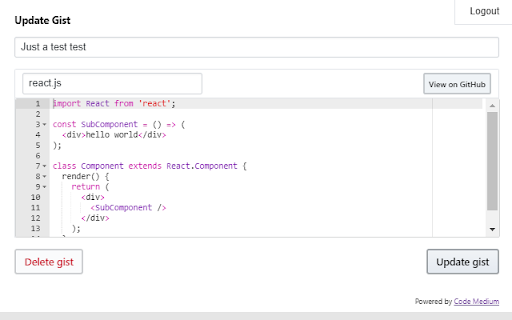
Extends the Medium and Substack writer interfaces to quickly create and edit Github Gists, without having to leave the editor. - Adds a button in the text toolbar for creating a new Gist and adding it to the post. - Gists can be created as either public or secret (unlisted). - Double click on an existing Gist to edit or delete it. - Deleting a gist will remove both the embed from the post and the gist from your account. To only remove the embed, just click on it and press the delete key as usual. - Syntax highlighting for the most popular programming languages thanks to react-ace! - Fixes the height of the Gists in the editor, to display them without being cut and without the extra padding (https://github.com/Maluen/code-medium/issues/3). Substack specific: - Fix gist embedding by preventing the fake "hidden unicode warning" messages. Authorizing the application -------- This extension uses the GitHub Gist API to create and edit gists, this means that you'll have to authorize the OAuth application for the "gist" permission. Once the extension is installed, toggle the extension modal by clicking the toolbar button or by double clicking on an existing gist to show the login button. Gists composed of multiple files aren't fully supported: - Currently, only single-file gists can be created. - When double clicking on an existing multi-file gist, only the first file will show up in the modal. However, you can still edit that file normally and delete the whole gist.

Cacher
Save code snippets from anywhere on the web. Companion extension to Cacher, the code snippet organizer for pro developers. Save code snippets from anywhere on the web! Save any code block – Use the "Save to Cacher" button it to quickly save code examples from sites like StackOverflow and Medium. Save any selected text – Select a block of text, right-click and save it with the Cacher context menu. Save any Gist – Save any GitHub Gist as a snippet with the "Save to Cacher" button. Cacher is a cross-platform, cloud-based app used to curate a snippet library for you and your team. – Desktop clients for Windows, macOS and Linux. – Full-featured web app: app.cacher.io – Support for editing and viewing 100+ programming languages. – Flexible, nest-able color-coded labels to categorize snippets. – Shareable snippet pages via Cacher's code-sharing community: snippets.cacher.io – Team and organization features like shared libraries, notifications, role management and code reviews. Supercharged with integrations for: Note that certain features of Cacher require a plan subscription. View plans and features at: https://www.cacher.io/pricing

Refined GitHub
Simplifies the GitHub interface and adds useful features Highlights: - Linkifies issue/PR references and URLs in code. - Makes whitespace characters visible. - Reduces tabs’ size to 4 spaces instead of 8. - Adds one-click merge conflict fixers. - Adds reaction avatars showing who reacted to a comment. - Adds a button to revert all the changes to a file in a PR. - Adds a build/CI status icon next to the repo’s name. - Adds a button to view the source of Markdown files. - Shows PRs that touch the current file. - Highlights the most useful comment in conversations. - Shows the first Git tag a merged PR was included in. - Adds a link to an automatic changelog for each tag/release. - Adds possible related pages and alternatives on 404 pages. - Displays the age of the repository in the sidebar. And so much more! 200+ features. See the website for a full list of features. The GITHUB and REFINED GITHUB trademarks are owned by GitHub, Inc. and used under license.

GitHub Recommender
Get similar repositories on GitHub page

Open GitHub in IDE
Open GitHub files links in your IDE This extension allows you to open files in your IDE directly from GitHub, assuming the repository you are working on is cloned on your computer. When a fragment of a file is displayed, your IDE opens the file and puts the cursor at the desired line. WSL with the Ubuntu distribution is also supported on VS Code, VSCodium and VS Code Insiders for Windows. Feel free to open an issue on GitHub if you detect a bug or a missing feature!
