
aiiaandmkmekfhembfoghdnfiiiedhhk


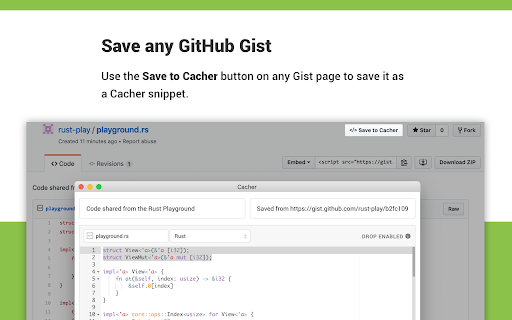
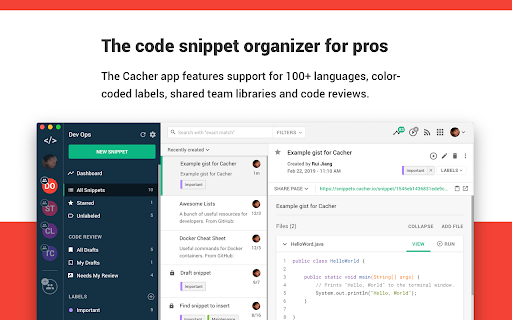

Save code snippets from anywhere on the web. Companion extension to Cacher, the code snippet organizer for pro developers. Save code snippets from anywhere on the web! Save any code block – Use the "Save to Cacher" button it to quickly save code examples from sites like StackOverflow and Medium. Save any selected text – Select a block of text, right-click and save it with the Cacher context menu. Save any Gist – Save any GitHub Gist as a snippet with the "Save to Cacher" button. Cacher is a cross-platform, cloud-based app used to curate a snippet library for you and your team. – Desktop clients for Windows, macOS and Linux. – Full-featured web app: app.cacher.io – Support for editing and viewing 100+ programming languages. – Flexible, nest-able color-coded labels to categorize snippets. – Shareable snippet pages via Cacher's code-sharing community: snippets.cacher.io – Team and organization features like shared libraries, notifications, role management and code reviews. Supercharged with integrations for: Note that certain features of Cacher require a plan subscription. View plans and features at: https://www.cacher.io/pricing

Snippet Buddy: Text Expander for Chrome
The ultimate text expander for Chrome! Whether you're sending emails, filling out forms, or typing repetitive messages, Snippet Buddy helps you save time by inserting your custom text and email templates on any website. How it works: Create your own shortcuts for frequently used text. Type shortcuts on any website and Snippet Buddy instantly expands them into full content. 📄 Customize snippets with fields, rich-text formatting, links 📁 Organize your snippets into folders 🌐 Works on any website 🔐 Secure and privacy-first – your data stays on your device ☁️ Cloud sync (optional) for backup and access across devices Perfect for anyone tired of typing the same thing over and over! ✅ Install Snippet Buddy now and start typing smarter, not harder.

Python Code Runner
Python playground and script runner. Run Python code snippets from any website using our free online Python compiler and IDE. Python Code Runner by Cliprun lets you easily run Python code online. Execute Python snippets from any website with a right-click, or use the free online Python IDE as your coding playground. Perfect for learning, testing, and running Python scripts - no installation needed. Main Features: ✔️ Execute Python code from any webpage ✔️ Start coding in seconds - zero setup ✔️ Full-featured online Python editor ✔️ Schedule automated script runs ✔️ Use popular Python libraries (Requests, pandas, NumPy, Matplotlib, and more) ✔️ Create data visualizations in your browser ✦ Run Python Code From Any Website Transform any webpage into your Python workspace. Execute code directly from ChatGPT, Claude, DeepSeek, GitHub, or documentation with a simple right-click. Our online Python script runner runs code instantly without leaving your browser. ✦ Simple Yet Powerful Editor The online Python compiler and IDE make coding easy and comfortable: → Code completion and syntax highlighting → Light and dark themes → Save favorite scripts as reusable "Clips" ✦ Popular Python Libraries All essential Python packages are ready to use: → Data & analysis: pandas, NumPy, SciPy → Web scraping: Requests, BeautifulSoup4 → Visualization: Matplotlib, seaborn, Plotly → No setup needed - just import Python packages and run ✦ Process Data Simply Transform data right in your browser: → Handle CSV, JSON, Excel and other formats → Clean and analyze with pandas → Create charts and interactive graphs → Export in multiple formats ✦ Automation & Scheduling Run Python scripts automatically on your schedule: → Set intervals (minutely, hourly, daily, weekly) or use cron syntax → Track script runs with status logs → Get email alerts if anything goes wrong → Perfect for Python web scraping and data collection 📌 Do I need to install Python? No! Python Code Runner runs Python in your browser using Pyodide & WebAssembly. No Python install or environment setup needed. 📌 Which Python libraries can I use? Popular Python packages are ready to go. You can also install any other pure Python, Pyodide-compatible libraries in the Python playground. 📌 Can I run Python scripts offline? Yes! The Python script runner uses Pyodide to run code in your browser - fast and secure with no internet required. Premium users only need internet for scheduling automated runs and backing up their code. 📌 How do I run Python code online? Two ways: Right-click on any Python code snippet you find on the web to run it instantly, or use our online Python editor to write and test your own scripts. 📌 Is my code secure? Yes! All Python code runs securely in an isolated Web Worker, without access to your browser or local machine. Premium users get encrypted cloud storage for their Python scripts, and isolated cloud environments for scheduled runs. Python Code Runner transforms your browser into a powerful Python environment. Whether you want to run Python scripts online, need a Python compiler, or want a completely free online Python IDE - we've got you covered. Run Python code in seconds, with no setup required!

Codeanywhere
Cloud IDE · Online Code Editor · Codeanywhere - this extension enables opening Codeanywhere workspaces from Git provider sites. Codeanywhere is a AI Cloud IDE. Our AI Cloud IDE saves you time by deploying a development environment in seconds, enabling you to code, learn, build, and collaborate on your projects. With this extension, you can easily launch a development environment directly from your GitHub, GitLab, or Bitbucket projects with a single click. ## How it works: 1. **Install the browser extension.** 2. **Navigate to your project** on GitHub, GitLab, or Bitbucket. 3. **Click the Open in Codeanywhere button** to instantly launch a fully configured development environment for your project. Codeanywhere makes developers forget what device they are working on and let them concentrate on getting work done - all you need is a web browser. Key Features: • Syntax highlighting of more than 100 languages • Autocomplete for HTML, XML, CSS, JavaScript, Python and PHP • Cloud based FTP and SFTP Client • Web based Terminal, connect to remote servers via SSH • Git Client • Tools - Pre-installed language runtimes and tools for all popular programming languages. • Share your projects with other developers in real-time • Live Collaboration - Team up with your fellow developers and collaborate on your projects • Linter analyses your code constantly during the coding process.using pair programming or live terminal sessions. • Debug -With integrated debugger add break points, inspect call stacks, and see output using interactive console The extension requires scripting, contextMenus, and activeTab permissions to add quick repository opening functionality (a button to open in Codeanywhere next to the clone button) from git provider pages to CodeAnywhere IDE, streamlining the development workflow by providing one-click access from repository pages. Remote Code Use: The extension contains all code locally and does not execute remote code. Storage Use: No user data or preferences are stored locally or remotely. Data & Privacy: No personal information is collected. The extension only reads repository URLs when activated and only connects to CodeAnywhere when explicitly opening a repository. No analytics or tracking is implemented.

Coding Contest Tracker
A browser extension to track upcoming coding contests Update: Google Sign Up isn't working as of now, it will be fixed in next update. But you can sign Up via email and password. Welcome to Coding Contest Tracker, the ultimate coding companion designed with students in mind! 🚀 Are you a coding enthusiast always on the lookout for exciting contests and challenges? Look no further! Coding Contest Tracker is here to transform your coding journey into a seamless and organized experience. 🔗 Google Sign Up & Sync: Sign up effortlessly with your Google account, allowing you to sync your progress and achievements across devices. Your coding journey stays with you, anytime, anywhere. 📊 LeetCode Stats at Your Fingertips: Dive into your LeetCode statistics directly within the extension. Track your progress, celebrate your accomplishments, and stay motivated as you climb the coding ranks! 🗓️ Calendar Integration: Plan your coding contests smartly! With Coding Contest Tracker, you can add specific contests directly to your Google or Apple calendar. Never miss an important event again – stay organized and ahead of the game. ✨ Made for Students: Coding Contest Tracker understands the unique needs of students. We've crafted this extension to be your virtual coding buddy, providing tools that align with your academic journey. 🎓 Seamless Experience: Whether you're a beginner or a seasoned coder, Coding Contest Tracker ensures a smooth and intuitive experience. Focus on coding while we take care of the rest. 🌟 Personalized Learning: Receive tailored insights and recommendations based on your coding preferences. Level up your skills and tackle challenges that matter to you. Join our community of passionate coders and embark on a coding adventure like never before! Download Coding Contest Tracker now and let your coding dreams take flight. Happy coding! 🚀 Feel free to contribute here: https://github.com/akshat-samdani/Coding-Contest-Tracker
