
kinhfkialnlpoomgdpolokhholkofeke
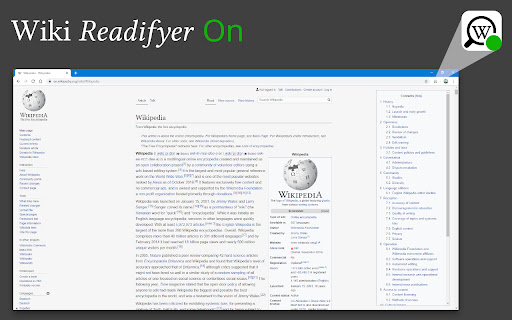
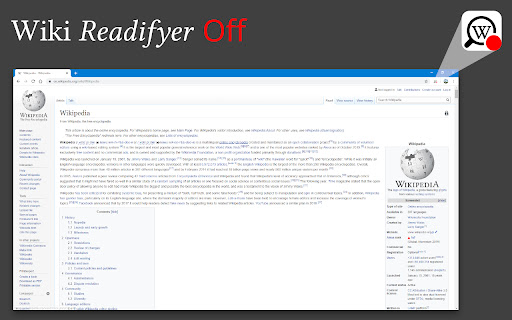

Have you ever tried to read an Wikipedia article, trying to gain knowledge but the page's design just hindered your eyes from locating the words that held the desired wisdom? Well, worry no more! Wiki Readifyer makes the knowledge you are searching for pleasantly readable. The wisdom you desire to read is just one installation away! And the best thing: It doesn't remove anything from the page it only changes the layout while staying 100% faithful* to the original contents. The following changes are applied to guarantee the best possible experience: • responsive layout: articles are pleasantly readable at any window size • slight reduction of text-background-contrast • reduction of article width • moving the table of contents to the right where it stays even when scrolling • the title also stays visible when scrolling down • some other little adjustments *However, if the window width is too small the extension will hide the left sidebar, only to guarantee the best use of your precious screen space. To make it visible again, just make the window wider. In 2023, many Wikipedias changed their default theme to Vector 2022, a more modern and user-friendly theme. Wiki Readifyer does not touch Wikipedia's layout if any theme other than the old (legacy) Vector theme is active. This means, to get the advertised layouts on Wikipedias with the new theme, you have to turn off the new skin.

Webmapper
Constructs a map of the web using the user's browser history. Webmapper uses your browsing history to construct an interactive, personalized "map of the web as you see it". Every webpage you visit is placed on the map and sized by how often you visit it. Similar pages are grouped into clusters. **Interactive -- click on text to visit pages, or zoom in on domain names** **Zoomable -- use mousewheel / scrolling to zoom in and out on clusters** **Searchable** **Site-Specific -- click on polygons to construct a map specific to a site, e.g. a map of all your Google searches, or Wikipedia entries** **6 quality color palettes** **Map sites visited in the last 10, 20, 30, 50, or 100 days** Developers: Ryan Hamerly, Scott Chung, Sheta Chatterjee, and Milinda Lakkam

WikiMapper
WikiMapper - Track and graph your adventures down the Wikipedia rabbit hole. WikiMapper creates a historical tree of your Wikipedia browsing so that you can see just exactly how you spontaneously wasted 45 minutes and ended up reading about the history of Agriculture in Uzbekistan. Once installed, you do not have to do anything special to use WikiMapper. It runs passively in the background and only on the wikipedia.org/wiktionary.org domains. It stores your Wikipedia browsing sessions locally so you can view them later at any time by clicking in the WikiMapper icon in your browser toolbar. WikiMapper is free and open source software and does not collect any personal information, serve any ads, or transmit any data of any kind to anyone. For full version history and current issues, or to submit an issue or request, see the project homepage on Github by clicking on the Website link below.

Bookmark Manager per Domain and Page
A Bookmark Manager to list all bookmarks for the domain or page of the current URL as hyperlinks. This Bookmark Manager is special, it displays only bookmarks belonging to the current domain. ie. https://gist.github.com or https://docs.github.com/en will be displayed if you have it as a bookmark and navigate to https://www.github.com Open any URLs from Domains that you have saved within *.domain.com* We will show you only the ones from that domain. The extension does not work across domains from the same brand, such as pinterest.de or pinterest.at, etc. we might add this functionality in a near future update if there is demand. So if you are looking for that best next app to open pages in a new tab, while simply organizing your url in this awesome quick software, with our bookmark manager you will not need more bookmarking apps on your sidebar, forget all the other addons. Save webpages that you find popular, then navigate there with speed, have a look at your bookmarklet and use our free extension to view your custom starred urls, search through them with ease. Updates / Change log: 22.06.2024 / V 1.0.7 - Responsive pop-up added, Extension Icons added, fixed folder view, deleting and editing the URL 25.05.2024 / V 1.0.6 - Updated Manifest to v3 19.07.2021 / V 1.0.5 - Removed "Storage" permission, not needed. 22.12.2020 / V 1.0.4 - Added FOLDER view buttons 14.12.2020 / V 1.0.3 - We added DELETE and EDIT buttons

Modern for Wikipedia
Enhance your Wikipedia experience with a beautiful, clean, modern design that's fully customizable. Once installed, Modern will simply apply the new look and features to existing Wikipedia article pages, without you having to do anything. All current features on Wikipedia are supported, this extension simply builds upon the existing interface to offer many improvements, including: ✔ Themes (light, dark, sepia, slate, black) ✔ Fonts (sans, serif, change font size) ✔ Styles (column width, line height) ✔ Languages (menu to switch, fully translated interface) ✔ User accounts (all wikipedia account features accessible from menu) ✔ History (quickly jump to articles you've previously viewed) ✔ Search (powerful autocomplete with preview text & images) ✔ Trending (see today's most read articles) ✔ Contents (fixed to left side for easy navigation, can be hidden) ✔ Editing (full editing controls, history, watch etc) ✔ Switch back to the old design (if needed) with one click ✔ More improvements planned for upcoming releases! If you have any questions, need help or have any suggestions, please get in touch: support@modernwiki.app Note: If you're logged into Wikipedia, you must use the default skin for the extension to work. ---------- Wikipedia™ is a registered trademark of the Wikimedia Foundation, Inc. This extension is not endorsed by, affiliated with, or sponsored by Wikipedia™. v1.40 - Listen to articles with new text-to-speech feature - Fixed redirect bug on wikipedia home page v1.23 - Fix for mobile wikipedia pages (redirect to non-mobile version) - Fixes for image viewer - Style fixes for Italian articles - Scrollbar style fixes for dark themes on mac - New icon v1.22 - Contents sidebar settings (set font size, line height & width) - Better support for large screens (more width settings) - New settings --- Auto dark theme (changes to your last used light/dark theme) --- Fixed header (turn off to hide when scrolled down) --- Open links in new tab --- Hide article links --- Justify text --- Show bullet points on contents - Fixed bugs with article width / centering - Brought back red links for articles that don't exist v1.20 - Search box for languages menu - Nicer scrollbar styles - Centered article text when contents hidden (removed left padding) - Added left padding to article text when contents visible - Fixed french dark theme + languages menu - Fixed user menu for non-english languages - Fixed font size not changeable for Chinese, Japanese, and Korean - Removed system-ui font (fix for east-asian windows fonts) - Fixed display of math equations in dark mode - Made search box usable at narrow widths
