
feiheebgoilmbkaddngcoocjbogfchlb

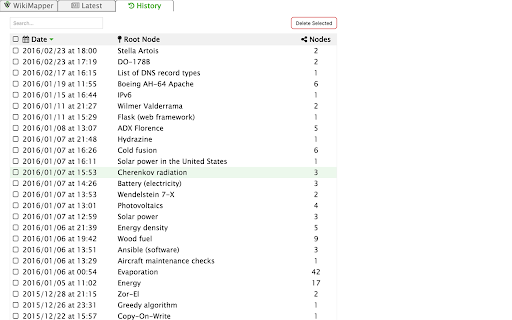
WikiMapper - Track and graph your adventures down the Wikipedia rabbit hole. WikiMapper creates a historical tree of your Wikipedia browsing so that you can see just exactly how you spontaneously wasted 45 minutes and ended up reading about the history of Agriculture in Uzbekistan. Once installed, you do not have to do anything special to use WikiMapper. It runs passively in the background and only on the wikipedia.org/wiktionary.org domains. It stores your Wikipedia browsing sessions locally so you can view them later at any time by clicking in the WikiMapper icon in your browser toolbar. WikiMapper is free and open source software and does not collect any personal information, serve any ads, or transmit any data of any kind to anyone. For full version history and current issues, or to submit an issue or request, see the project homepage on Github by clicking on the Website link below.

Ultra Button
A button for everything. You can now access most of chrome features in one Ultra Button. Functions Including: Bookmarks, Extensions, Downloads, History and Tabs. Mouse Middle Button Behaviors Bookmarks: Open bookmark in background Extensions: Remove extension Downloads: Remove download record History: Open history in background Tabs: Close tab or window ~~~~~~~~~~~~~~~~~~~~~~~~~~~~~~~~~ The icons in this extension were downloaded from Noun Project. https://thenounproject.com/ v 0.9.0 add download notification You can enable it in the options v 0.4.1 add session control You can now restore closed tab or windows

Awesome Button Bar
Button bar, combining downloads, bookmarks, extensions, history, view source, print, and more from a single button. Awesome! Extensions, history, downloads, bookmarks, view source, options, new window, and print are all here. Recently added buttons are duplicate tab, second home, and refresh all tabs. Showing each button on the bar is optional so you don’t have to have them all if you don’t want them all. Also, each button can be configured to open either in the current window or in a new window. Note: print to a new window now works too!

Extentie - extension manager
A simple and elegant Chrome extension manager allows you manage your extensions in a popup window. Extentie is a simple and beautiful tool that allows you to toggle and manage Chrome extensions in a popup. Latest update: - Now you can create your own groups to manage your extensions - Revamped from ground up, added more features

Wikipedia Search
Search Wikipedia in every language from the address bar and context menu. Wikipedia Search is an extension that adds multiple ways to search Wikipedia, the free encyclopedia, right in your web browser. You can type "wiki" in the browser search bar, then the Space or Tab key, to start a search with live suggestions as you type. Also, selecting a word or phrase in a web page and opening the context menu will show a Wikipedia search option. You can change the default search language to any language Wikipedia supports, and the optional multi-language search feature can override it with a different choice. Search results can be opened in the desktop Wikipedia site, the mobile site, or Wikiwand. Wikipedia is a trademark of the Wikimedia Foundation. Wikipedia Search is in no way affiliated with Wikipedia or the Wikimedia Foundation.
