
emdkdnnopdnajipoapepbeeiemahbjcn
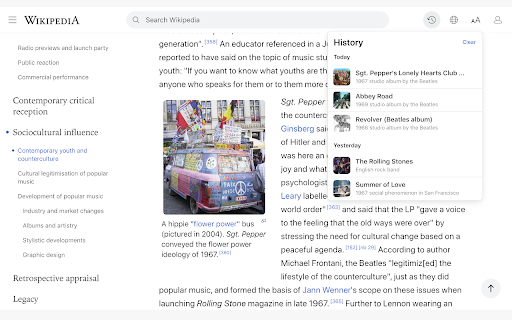
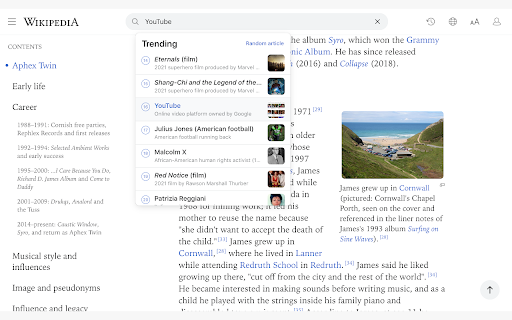
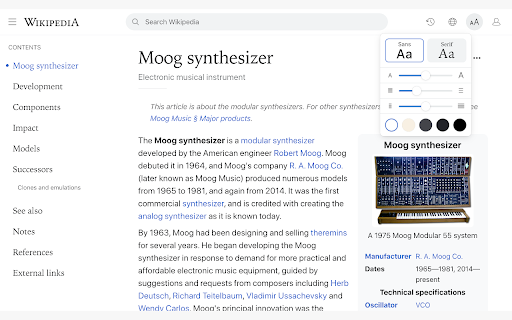


Enhance your Wikipedia experience with a beautiful, clean, modern design that's fully customizable. Once installed, Modern will simply apply the new look and features to existing Wikipedia article pages, without you having to do anything. All current features on Wikipedia are supported, this extension simply builds upon the existing interface to offer many improvements, including: ✔ Themes (light, dark, sepia, slate, black) ✔ Fonts (sans, serif, change font size) ✔ Styles (column width, line height) ✔ Languages (menu to switch, fully translated interface) ✔ User accounts (all wikipedia account features accessible from menu) ✔ History (quickly jump to articles you've previously viewed) ✔ Search (powerful autocomplete with preview text & images) ✔ Trending (see today's most read articles) ✔ Contents (fixed to left side for easy navigation, can be hidden) ✔ Editing (full editing controls, history, watch etc) ✔ Switch back to the old design (if needed) with one click ✔ More improvements planned for upcoming releases! If you have any questions, need help or have any suggestions, please get in touch: support@modernwiki.app Note: If you're logged into Wikipedia, you must use the default skin for the extension to work. ---------- Wikipedia™ is a registered trademark of the Wikimedia Foundation, Inc. This extension is not endorsed by, affiliated with, or sponsored by Wikipedia™. v1.40 - Listen to articles with new text-to-speech feature - Fixed redirect bug on wikipedia home page v1.23 - Fix for mobile wikipedia pages (redirect to non-mobile version) - Fixes for image viewer - Style fixes for Italian articles - Scrollbar style fixes for dark themes on mac - New icon v1.22 - Contents sidebar settings (set font size, line height & width) - Better support for large screens (more width settings) - New settings --- Auto dark theme (changes to your last used light/dark theme) --- Fixed header (turn off to hide when scrolled down) --- Open links in new tab --- Hide article links --- Justify text --- Show bullet points on contents - Fixed bugs with article width / centering - Brought back red links for articles that don't exist v1.20 - Search box for languages menu - Nicer scrollbar styles - Centered article text when contents hidden (removed left padding) - Added left padding to article text when contents visible - Fixed french dark theme + languages menu - Fixed user menu for non-english languages - Fixed font size not changeable for Chinese, Japanese, and Korean - Removed system-ui font (fix for east-asian windows fonts) - Fixed display of math equations in dark mode - Made search box usable at narrow widths

Minimal Theme for Twitter / X
Refine and declutter the 𝕏/Twitter web experience. Minimal Theme for Twitter (now X) refines and cleans up the x.com interface, and adds useful features and customizations: - Remove Promoted posts and suggestions - Remove any unwanted element from the left navigation, like the Premium or Grok buttons - Hide the annoying View Counts - Remove the Timeline tabs like "For you / Following" - Remove the distracting trends sidebar - Customize your Timeline width - Remove borders for a more minimalistic look - Customize the left navigation - Hide vanity counts under tweets - Hide the Search Bar - Hide the Tweet button It also includes a beautiful "Writer Mode" that adds the whole 𝕏 interface but the composer, so you can write tweets and threads, without distractions. We're the makers of Typefully, and we're always adding new features and refinements to improve your Twitter experience even more. The X / TWITTER trademark is owned by X Corp. and used under license.

Wikipedia: Dark Mode
Now read your favorite articles on Wikipedia in Dark Mode. If you are a night owl and you want to read your articles without any kind of eye strain then this is the best chrome extension for you. 🚀 We present you an extension which will allow you to read your Wikipedia articles in Dark Mode. 💻 Now, read your favorite Wiki articles hassle-free. 👩🏻💻👨🏻💻 What's new? 🆕 Dark mode for mathematical equations. NOTE: This chrome extension is 🆓🆓🆓!!!

Unclutter — Modern Reader Mode
Read, bookmark, and highlight articles with style. Unclutter is a new kind of reader mode that keeps the visual style of articles intact. Plus it automatically saves articles for you. Instantly in your browser. ➤ Focus: Remove remove everything that's not text from a page. ➤ Customise: Change the text size or enable dark mode everywhere. ➤ Save for later: Manage your reading queue directly in your browser. ➤ Highlight: Select any text to save it. Then search across it later. This project is Open-Source! Follow the development, suggest features, or contribute at github.com/lindylearn/unclutter

Modern for Hacker News
A redesigned web interface for Hacker News. Enhance your Hacker News experience with a beautiful, clean, modern design that's fully customizable. Once installed, this extension will simply apply the new look and features to existing Hacker News pages, without you having to do anything. All current features on Hacker News are supported, this extension simply builds upon the existing interface to offer many improvements, including: ✔ Themes – light, classic HN, slate, dark, black ✔ Fonts – sans, serif, change font size ✔ Styles – adjust column width, line height, justify text ✔ History – quickly jump to stories you've previously viewed ✔ Comments – inline reply + many other improvements ✔ Index – switch between list / table view, customize columns ✔ Profiles – new design with tabs, clickable links etc ✔ Accounts – all HN account features supported ✔ Switch back to the old design (if needed) with one click ✔ More improvements planned for upcoming releases! If you have any questions, need help or have any suggestions, please get in touch: support@modernhn.com ---------- This extension is not endorsed by, affiliated with, or sponsored by Y Combinator. v1.14 - Fixed bugs due to HTML changes on HN - Fixed score not being shown for your own comments
