
dabkegjlekdcmefifaolmdhnhdcplklo

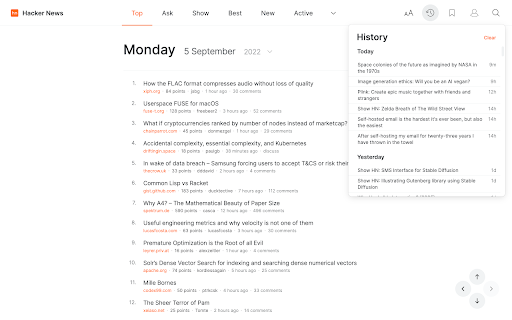
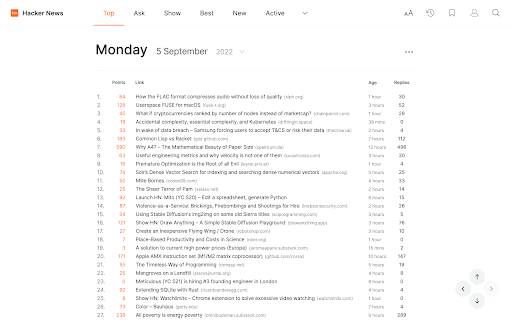
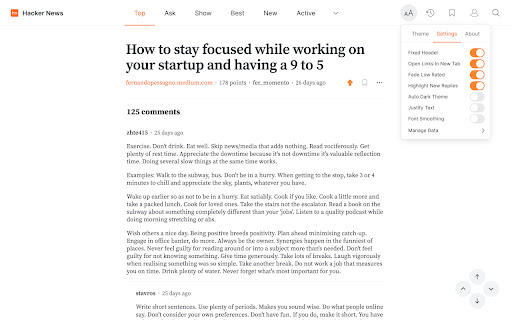
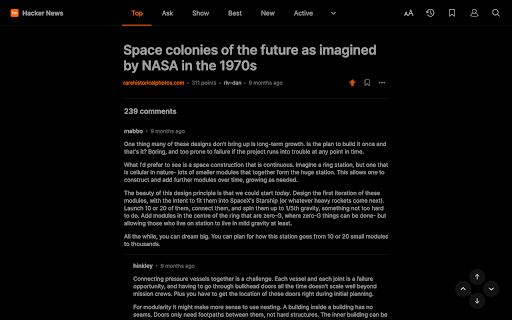
A redesigned web interface for Hacker News. Enhance your Hacker News experience with a beautiful, clean, modern design that's fully customizable. Once installed, this extension will simply apply the new look and features to existing Hacker News pages, without you having to do anything. All current features on Hacker News are supported, this extension simply builds upon the existing interface to offer many improvements, including: ✔ Themes – light, classic HN, slate, dark, black ✔ Fonts – sans, serif, change font size ✔ Styles – adjust column width, line height, justify text ✔ History – quickly jump to stories you've previously viewed ✔ Comments – inline reply + many other improvements ✔ Index – switch between list / table view, customize columns ✔ Profiles – new design with tabs, clickable links etc ✔ Accounts – all HN account features supported ✔ Switch back to the old design (if needed) with one click ✔ More improvements planned for upcoming releases! If you have any questions, need help or have any suggestions, please get in touch: support@modernhn.com ---------- This extension is not endorsed by, affiliated with, or sponsored by Y Combinator. v1.14 - Fixed bugs due to HTML changes on HN - Fixed score not being shown for your own comments

Omni - Bookmark, History, & Tab Manager
Supercharge Chrome with commands, shortcuts, and more With Omni you can use Chrome like a pro. Manage tabs, bookmarks, your browser history, perform all sorts of actions and more with a simple command interface. FEATURES 🗄 Switch, open, close, and search your tabs 📚 Browse and manage your bookmarks 🔍 Search your browsing history ⚡️ 50+ actions to improve your productivity 🔮 Special commands to filter and perform more actions 🧩 Integrations with Notion, Figma, Docs, Asana... ⌨️ Shortcuts for actions such as muting, pinning, bookmarking... ⚙️ Advanced settings to help troubleshoot browsing issues 🌙 Dark mode ...and much more - all for free & no sign in needed! Want to self-host, add new features to Omni, or even make your own omnisearch extension? Feel free to check out the code on GitHub! 👉 https://github.com/alyssaxuu/omni Omni is built and maintained by Alyssa X (https://alyssax.com)

Octotree - GitHub code tree
Browser extension that enhances GitHub code review and exploration. Features * Fast IDE-like code tree * Quick search in tree format * Bookmark repos, issues, PRs, files * Support GitHub themes * Support private repositories * High performance, working with repositories of any size NO BS POLICY: Octotree doesn't track you or share/care about your data at all. GitHub tokens are only needed when you want to access private repositories or exceed GitHub API rate limit. Octotree stores tokens in your browser storage and only uses them to authenticate with GitHub.

V2EX Polish
专为 V2EX 用户设计,提供了丰富的扩展功能。 为原网站添加了众多便捷的功能,让你的 V2EX 页面焕然一新 ! ―――――― ◉ 扩展功能 🪄 界面美化 UI 设计更现代化,为你带来愉悦的视觉体验。 📥 评论回复嵌套层级 主题下的评论回复支持层级展示,更轻松地跟踪和回复其他用户的评论。 🔥 热门回复展示 自动筛选出最受欢迎的回复,第一时间了解热评。 😀 表情回复支持 评论输入框可以选择表情,让回复更加生动和有趣。 📃 长回复优化 智能折叠长篇回复,一键展开查看完整内容。 📰 内置主题列表 无需打开网页,插件内即可快速获取最热、最新的主题列表和消息通知。 更多实用功能: ⊙ 便捷回复操作:上传图片、预览回复内容、文字转 Base64。 ⊙ 添加用户信息卡片,快捷查看用户信息。 ⊙ 右键菜单扩展:支持解析页面中 Base64 编码内容。 ⊙ 在主题列表中即可预览内容,无需再进入主题页面。 ⊙ 自动领取每日签到奖励。 ⊙ 用户标签设置,快速标记各类用户。 ⊙ 支持备份个人配置,方便跨设备、跨脚本同步配。 ⊙ 支持自动跟随系统切换浅色/深色主题。 ⊙ 支持预加载多页回复,让嵌套回复更完美。 ⊙ “稍后阅读”功能:添加感兴趣的主题,方便日后浏览。 ⊙ 支持水平分区展示主题内容。 ―――――― ◉ 更多信息 ⊙ 代码开源,在 GitHub 中查看:https://github.com/coolpace/V2EX_Polish ⊙ 任何想法、新功能需求?在此反馈:https://github.com/coolpace/V2EX_Polish/discussions/1 ⊙ 浏览我们的主页,发现更多:👉 https://v2p.leoku.dev 👈 ―――――― 喜欢我们的扩展吗?请在应用商店给我们好评!🥰

Modern for Wikipedia
Enhance your Wikipedia experience with a beautiful, clean, modern design that's fully customizable. Once installed, Modern will simply apply the new look and features to existing Wikipedia article pages, without you having to do anything. All current features on Wikipedia are supported, this extension simply builds upon the existing interface to offer many improvements, including: ✔ Themes (light, dark, sepia, slate, black) ✔ Fonts (sans, serif, change font size) ✔ Styles (column width, line height) ✔ Languages (menu to switch, fully translated interface) ✔ User accounts (all wikipedia account features accessible from menu) ✔ History (quickly jump to articles you've previously viewed) ✔ Search (powerful autocomplete with preview text & images) ✔ Trending (see today's most read articles) ✔ Contents (fixed to left side for easy navigation, can be hidden) ✔ Editing (full editing controls, history, watch etc) ✔ Switch back to the old design (if needed) with one click ✔ More improvements planned for upcoming releases! If you have any questions, need help or have any suggestions, please get in touch: support@modernwiki.app Note: If you're logged into Wikipedia, you must use the default skin for the extension to work. ---------- Wikipedia™ is a registered trademark of the Wikimedia Foundation, Inc. This extension is not endorsed by, affiliated with, or sponsored by Wikipedia™. v1.40 - Listen to articles with new text-to-speech feature - Fixed redirect bug on wikipedia home page v1.23 - Fix for mobile wikipedia pages (redirect to non-mobile version) - Fixes for image viewer - Style fixes for Italian articles - Scrollbar style fixes for dark themes on mac - New icon v1.22 - Contents sidebar settings (set font size, line height & width) - Better support for large screens (more width settings) - New settings --- Auto dark theme (changes to your last used light/dark theme) --- Fixed header (turn off to hide when scrolled down) --- Open links in new tab --- Hide article links --- Justify text --- Show bullet points on contents - Fixed bugs with article width / centering - Brought back red links for articles that don't exist v1.20 - Search box for languages menu - Nicer scrollbar styles - Centered article text when contents hidden (removed left padding) - Added left padding to article text when contents visible - Fixed french dark theme + languages menu - Fixed user menu for non-english languages - Fixed font size not changeable for Chinese, Japanese, and Korean - Removed system-ui font (fix for east-asian windows fonts) - Fixed display of math equations in dark mode - Made search box usable at narrow widths
