
foachceonkmkeiigdbkjcihnaabppicf
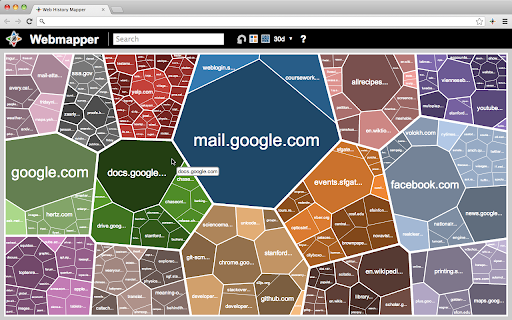


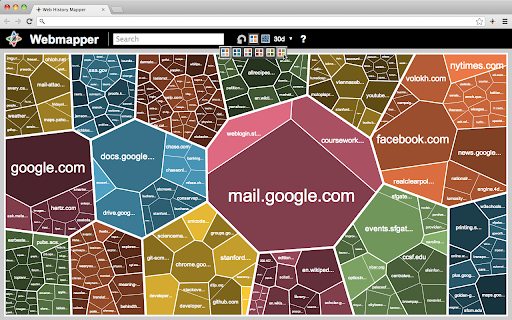
Constructs a map of the web using the user's browser history. Webmapper uses your browsing history to construct an interactive, personalized "map of the web as you see it". Every webpage you visit is placed on the map and sized by how often you visit it. Similar pages are grouped into clusters. **Interactive -- click on text to visit pages, or zoom in on domain names** **Zoomable -- use mousewheel / scrolling to zoom in and out on clusters** **Searchable** **Site-Specific -- click on polygons to construct a map specific to a site, e.g. a map of all your Google searches, or Wikipedia entries** **6 quality color palettes** **Map sites visited in the last 10, 20, 30, 50, or 100 days** Developers: Ryan Hamerly, Scott Chung, Sheta Chatterjee, and Milinda Lakkam

TabMate
TabMate helps you manage the tab clutter. Easily switch between tabs, save & restore set of tabs or windows, and more. TabMate helps you manage tab clutter and be more productive. Stash a set of tab/windows that you want to save for later and easily restore them when needed. Use quick switcher to search among open tabs and stashes and switch to them. Drag and drop the tabs to rearrange them with in windows or stashes. Name stashes so you can easily remember the purpose for each set of tabs. Easily send tabs to named stashes through right click context menu. Common usages: - Quickly search and switch between all the open tabs and stashes - Save the pages you've visited during your research session and restore all of them later. - Logically group all the pages you visit often and load each group when needed. - Easily manage existing open tabs by saving unnecessary tabs as a session.

Awesome Button Bar
Button bar, combining downloads, bookmarks, extensions, history, view source, print, and more from a single button. Awesome! Extensions, history, downloads, bookmarks, view source, options, new window, and print are all here. Recently added buttons are duplicate tab, second home, and refresh all tabs. Showing each button on the bar is optional so you don’t have to have them all if you don’t want them all. Also, each button can be configured to open either in the current window or in a new window. Note: print to a new window now works too!

Extentie - extension manager
A simple and elegant Chrome extension manager allows you manage your extensions in a popup window. Extentie is a simple and beautiful tool that allows you to toggle and manage Chrome extensions in a popup. Latest update: - Now you can create your own groups to manage your extensions - Revamped from ground up, added more features

Extension List
Extension List
