
kepghmionbgdajcmmckifnfcdcgpbjah
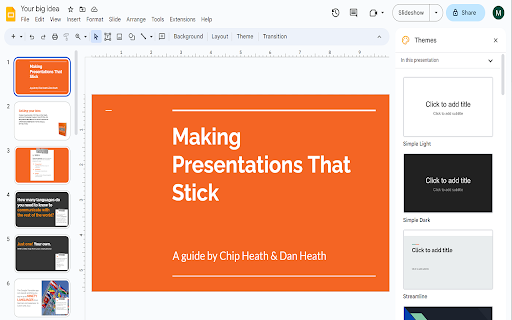

Extends Google Slides™ to the Full Screen. Want to make your Google Slides full screen while you're in edit mode? You can do so today when you use our extension. Here are the steps needed to allow Google Slides to turn into full screen mode while you can still edit the slides. 1) Install our software extension 2) Go to your Google Slide presentation 3) Click on the extension icon and choose full screen mode. The main benefits of being able to edit Google Slides while you're in full screen are - If you are in a Zoom call/Google Meet call, the other particpants in the call are able to view the slides more clearly in full screen mode.

MagicSchool AI - AI Assistant for Teachers
Your favorite MagicSchool AI tools are now just a click away, anytime, anywhere. Founded by a lifelong Teacher and Principal, MagicSchool is the leading generative AI platform for educators - fighting burnout and helping teachers thrive in the classroom. MagicSchool contextualizes the power of AI for educators to tools that are immediately relevant in their world and eliminates the need for complex prompting. It helps them be more effective and more efficient - with the magic of AI! Unlock the Power of AI—Right Where You Need It With our Chrome browser extension, your favorite MagicSchool AI tools are just a click away, anytime, anywhere. Say goodbye to the hassle of switching between multiple tabs and copying-pasting. We've packed MagicSchool AI with over 50 specialized Magic Tools that help you: Craft engaging lesson plans Give feedback on student work Create personalized math problems Generate rubrics Draft comprehensive IEPs Differentiate instruction effortlessly Generate quizzes and assessments Streamline email communication with families And so much more! Your Toolkit, Your Platforms Get instant access to our expansive library of 50+ templates across various platforms you use daily: Gmail and other Web Email: Communicate efficiently with parents and staff. Google Docs: Create and edit lesson plans on the fly. Google Classroom: Update your class effortlessly. Canvas, Schoology and Blackboard: Design engaging educational material in a snap. So, are you ready to revolutionize your teaching workflow? Install the Chrome browser extension today and bring the magic of MagicSchool AI to your classroom.

spotlight-viewer
Spotlight curssor effect Spotlight effect that follows mouse movement

Google Slides & Docs - Download Image
🟦 𝐆𝐫𝐞𝐚𝐭 𝐧𝐞𝐰𝐬! You can now use our extension with Google Docs! To save an image (JPG, PNG, or GIF), simply right-click it and select Download Image. Your file will appear in your downloads folder as "google-docs-image". If prompted, please click Allow for clipboard permissions to let the magic happen! 𝗥𝗲𝗺𝗲𝗺𝗯𝗲𝗿! After installing, you should refresh any docs or slides you already have open otherwise this extension won't work. 🎨 Finally! Download images from Google Slides without the headache. You know the frustration: you see a perfect image in a Google Slides presentation, you right-click to save it... and nothing happens. Google Slides simply doesn't let you download images. At all. This extension fixes that glaring oversight by adding a proper "Download image" option to your right-click menu. ✨ What it does: - Adds a "Download image" option when you right-click any image in Google Slides - Downloads JPEGs, PNGs, and GIFs at their original quality and dimensions - Works on any image in any presentation you can view - No more screenshots, no more hunting for original files, no more workarounds 🚀 Why you'll love it: Google Slides is fantastic for presentations, but terrible for image management. Want to reuse an image from a colleague's presentation? Screenshot and crop it (ugh). Need that graphic at full resolution? Hunt down the original file or publisher (if you can). This extension eliminates all of that by giving you the one-click download that should have existed from day one. Perfect for designers, educators, marketers, content creators, and anyone who's ever been baffled by Google's decision to make image downloading impossible. 💡 Use cases: - Grabbing assets from team presentations for reuse - Downloading images from templates and shared decks - Saving graphics at full quality instead of taking screenshots - Building image libraries from presentation content ⚠️ Important: Refresh any open Google Slides presentations after installing for the extension to work properly. Stop screenshotting. Start downloading. Your workflow (and your image quality) will thank you. 𝟬.𝟰.𝟭 - Support for Google Docs - Right click JPG, PNG, or GIF for Download Image option 𝟬.𝟯.𝟭 - Menu option now appears for non-English languages - Translations for 10 common languages including: Spanish, French, German, Italian, Portuguese, Russian, Japanese, Korean, Chinese, and English 𝟬.𝟮.𝟬 - Add support for Control+Click

Templates for Google Slides™ by cloudHQ
Professionally designed free templates for Google Slides™ These free templates for Google Slides™ are for commercial and non-commercial use, and are fully integrated with Google Slides™ UI. The templates are professionally designed and include: ✅ Tourism presentations ✅ Product presentations ✅ Healthcare-related presentations ✅ Food presentations ✅ Fitness presentations ✅ Event presentations ✅ Educational presentations And much more! ~~~ What you need to do to access Free Templates for Google Slides ~~~ 1) Install this extension 2) Find the templates in Google Drive by tapping on "New" --> "Google Slides" --> "Template by cloudHQ" 3) Make a copy of the template to make it your own, and edit it as you see fit! This is an extremely effective template app for anyone looking to create awesome presentation. When using a Google Slides theme template, you will save time and will quickly get over any anxiety caused by creating something from scratch. All templates have royalty-free stock images, illustrations, and photographs. They can be used in both personal and commercial projects. cloudHQ. Helping your productivity, 1 click at a time. cloudHQ website: https://www.cloudhq.net/ App website: https://www.google-slides-theme-templates.com/ Pricing: https://www.google-slides-theme-templates.com/pricing Support page: https://support.cloudhq.net/category/browser-extensions/google-slides--theme-templates/ Blog: https://blog.cloudhq.net
