
afeblchodacmkncajakgjhfobkpbadnd
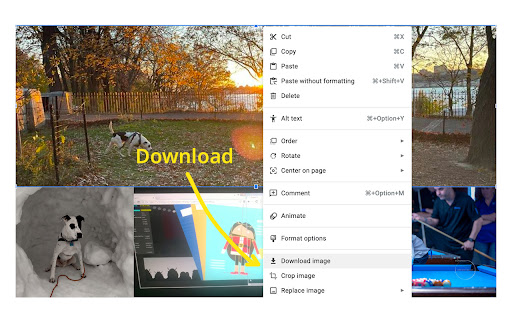
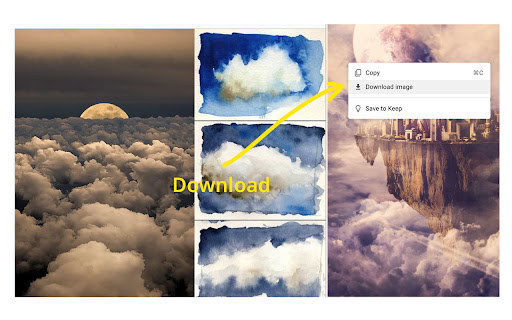
🟦 𝐆𝐫𝐞𝐚𝐭 𝐧𝐞𝐰𝐬! You can now use our extension with Google Docs! To save an image (JPG, PNG, or GIF), simply right-click it and select Download Image. Your file will appear in your downloads folder as "google-docs-image". If prompted, please click Allow for clipboard permissions to let the magic happen! 𝗥𝗲𝗺𝗲𝗺𝗯𝗲𝗿! After installing, you should refresh any docs or slides you already have open otherwise this extension won't work. 🎨 Finally! Download images from Google Slides without the headache. You know the frustration: you see a perfect image in a Google Slides presentation, you right-click to save it... and nothing happens. Google Slides simply doesn't let you download images. At all. This extension fixes that glaring oversight by adding a proper "Download image" option to your right-click menu. ✨ What it does: - Adds a "Download image" option when you right-click any image in Google Slides - Downloads JPEGs, PNGs, and GIFs at their original quality and dimensions - Works on any image in any presentation you can view - No more screenshots, no more hunting for original files, no more workarounds 🚀 Why you'll love it: Google Slides is fantastic for presentations, but terrible for image management. Want to reuse an image from a colleague's presentation? Screenshot and crop it (ugh). Need that graphic at full resolution? Hunt down the original file or publisher (if you can). This extension eliminates all of that by giving you the one-click download that should have existed from day one. Perfect for designers, educators, marketers, content creators, and anyone who's ever been baffled by Google's decision to make image downloading impossible. 💡 Use cases: - Grabbing assets from team presentations for reuse - Downloading images from templates and shared decks - Saving graphics at full quality instead of taking screenshots - Building image libraries from presentation content ⚠️ Important: Refresh any open Google Slides presentations after installing for the extension to work properly. Stop screenshotting. Start downloading. Your workflow (and your image quality) will thank you. 𝟬.𝟰.𝟭 - Support for Google Docs - Right click JPG, PNG, or GIF for Download Image option 𝟬.𝟯.𝟭 - Menu option now appears for non-English languages - Translations for 10 common languages including: Spanish, French, German, Italian, Portuguese, Russian, Japanese, Korean, Chinese, and English 𝟬.𝟮.𝟬 - Add support for Control+Click

Google Docs Image Zoom
Docs Image Zoom is a Chrome extension that enables image zoom in Google Docs Docs Image Zoom is a chrome extension that enables image zoom/downloads in Google Products such as Docs/Spreadsheets/Slides. Instruction: In the opened document, click the image you want to zoom. You will see the zoom icon in the right top corner of the image. Click it. The popup with the zoomed image will appear. To close the zoomed image popup, simply click outside of the zoomed image popup or click the close icon in the right top corner of the zoomed image popup. Disclaimer: The developer of this extension owns no rights or related in any way to the "Google Docs" software and related trademarks. This extension is not endorsed by any legal entities owning the rights to the "Google Docs" software and related trademarks. Use this extension at your own risk and discretion.

Background Image for Google Docs™ & Slides™
Add a beautiful image to Google Docs™ and Google Slides™ background while editing. Not affiliated with Google. Add an image to the background of your Google Slides™ and Google Docs™. Enjoy stunning images from Unsplash.com while you are writing an editing, making your work less boring and more enjoyable. OPEN OPTIONS TAB TO: ⇨ Enter image categories you would like to select curated photos from ⇨ Specify standard definition or high definition preference ⇨ Enter a custom image url ⇨ Disable on slides or docs or both Not affiliated with Google.

Download Images for Google Search
This extension helps by implementing the Google Images' "View Image" button. Adds a 'View Image' button back to let users view the image in a new chrome tab. It restores the "View Image" button to Google Image Search™ results again. When you select an image, you may choose to download or view the image. These additional buttons will appear next to the usual buttons. Google Search is a trademark of Google Inc. The use of the trademark is subject to Google’s permission. This extension is neither endorsed by or affiliated with Google.

Google Docs Image Download and Save Tool
Download, save and export all images in Google Docs files with one click Tired of all the hassle of saving just one Google Docs image? Say goodbye to the old methods of complicated right-click menus, screenshots, and "Publish to Web." "Image Downloader and Save Tool for Google Docs" is the ultimate simplification tool designed to save you time and effort. Our lightweight and secure extension integrates seamlessly into your browser, allowing you to extract and download any and all images from Google Docs with just a few clicks. Whether you need one or a hundred, get them instantly in their original, high-quality versions. Key Features: Easy One-Click Download: Select the images you want and download them directly to your computer. It's that simple. Select All & Batch Download: Save time with our powerful "Select All" button. Download multiple or all images at once, no compression required. Original High Quality: No need to compromise on quality. This extension extracts images in their original resolution, perfect for professional work and presentations. Fast and Lightweight: Built with pure, efficient code, our extension won't slow down your browser or your workflow. It's activated only when you need it. Security and Privacy: Your privacy is paramount. This extension runs entirely within your browser and does not read, store, or transmit your document contents or any personal information. Recommended for: Students, researchers, marketers, designers, writers, and anyone who needs to quickly export visual assets from Google Docs. Stop wasting time on complicated methods. Instantly streamline your workflow and boost your productivity. Install the Image Downloader and Save Tool for Google Docs and get the simple yet powerful tool you've been looking for!
