
oplfencnkfofaoeedbmphcbplaceplim


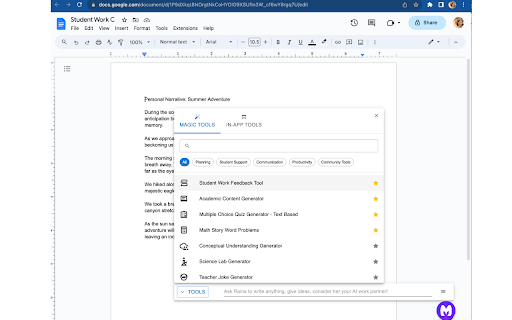
Your favorite MagicSchool AI tools are now just a click away, anytime, anywhere. Founded by a lifelong Teacher and Principal, MagicSchool is the leading generative AI platform for educators - fighting burnout and helping teachers thrive in the classroom. MagicSchool contextualizes the power of AI for educators to tools that are immediately relevant in their world and eliminates the need for complex prompting. It helps them be more effective and more efficient - with the magic of AI! Unlock the Power of AI—Right Where You Need It With our Chrome browser extension, your favorite MagicSchool AI tools are just a click away, anytime, anywhere. Say goodbye to the hassle of switching between multiple tabs and copying-pasting. We've packed MagicSchool AI with over 50 specialized Magic Tools that help you: Craft engaging lesson plans Give feedback on student work Create personalized math problems Generate rubrics Draft comprehensive IEPs Differentiate instruction effortlessly Generate quizzes and assessments Streamline email communication with families And so much more! Your Toolkit, Your Platforms Get instant access to our expansive library of 50+ templates across various platforms you use daily: Gmail and other Web Email: Communicate efficiently with parents and staff. Google Docs: Create and edit lesson plans on the fly. Google Classroom: Update your class effortlessly. Canvas, Schoology and Blackboard: Design engaging educational material in a snap. So, are you ready to revolutionize your teaching workflow? Install the Chrome browser extension today and bring the magic of MagicSchool AI to your classroom.

VibeGrade: AI Teaching, Grading Assistant in Google Docs, Canvas, and more
VibeGrade is your AI-powered teaching assistant designed to save teachers 10+ hours a week, directly in your existing tools. VibeGrade is the AI Teaching and Grading Assistant essay learns from you to create materials and grade papers where you work, including Google Docs, Canvas, and more, to help teachers save time, deliver better feedback, and reduce bias. Just click the microphone and chat with Vibe to create and differentiate any resource including lesson plans, quizzes, worksheets, reading passages, DOK questions, IEP/504 Plans. All just by chatting with the Vibe smiley on any website, article, or video, in the bottom of your screen! ➜ Beautiful Materials • Talk to Vibe to create resources to share with your students, right in your Google Doc! • Supercharge your grading and feedback writing process in one click! Make adjustments to the feedback and watch VibeGrade learn your style and apply it to all the feedback. It grades just like you, with the click of a button! ➜ Effortless Grading • VibeGrade analyzes essays based on your custom rubric criteria. • Supercharge your grading and feedback writing process in one click! ➜ Effortless Grading • VibeGrade analyzes essays based on your custom rubric criteria. • Supercharge your grading and feedback writing process in one click! ➜ Personalized Feedback • AI-generated annotations guide students toward improvement. • Enhance learning outcomes with constructive feedback. ➜ AI Detection and Plagiarism Detection • VibeGrade flags potential plagiarism, promoting academic integrity. • Keep your classroom fair and transparent. ➜ Grade Estimates • Get preliminary grade estimates (within ±3% accuracy). • Use them as a starting point for your final evaluation. ➜ Playback Writing • Rewind and replay the student’s writing process to see how they crafted their essay. • Identify revisions, struggles, and potential AI assistance to provide more insightful feedback. ➜ Streamlined Workflow: • Open VibeGrade while working in Google Docs. • Seamlessly grade essays with the click of a button. ➜ Advanced Classroom & Student Insights • Track your students' academic progress in their writing. • Instantly get actionable steps to help them improve their work. Install VibeGrade today and supercharge your grading experience with the world's first AI essay grading agent! 🚀🖍️ ~ Free The free version of VibeGrade delivers a criteria breakdown and annotations designed to help you speed up grading, for up to 10 essays/month. • Grade Estimates • Criteria Breakdown • Smart Annotations • Playback Writing ~ Premium VibeGrade Premium includes everything available for free, plus an expanded range of tools designed to help you deliver the best high-quality targeted feedback that drives student success and academic integrity. • Plagiarism Check • AI Writing Detection • Grade Estimates • Criteria Breakdown • Smart Annotations • Playback Writing • Advanced Classroom & Student Insights • 24/7 Founder + Technical Support ➜ Works where you work VibeGrade is constantly evolving to support more teachers across various platforms, which is why it is now supported on Google Docs, Canvas, and more to come! Demo video: https://VibeGrade.ca/demo Made with 💙 from the VibeGrade Team What is VibeGrade? VibeGrade is the world's first AI essay grading agent for teachers. Work smarter with your own customized rubric criteria, personalized AI feedback and annotations, plagiarism check, grade estimate and AI writing detection on essays. Why do teachers choose VibeGrade over other tools like ChatGPT? VibeGrade Agent has advanced features for teachers that other products lack, such as the Chrome Extension Agent for grading essays in a single click, integrated plagiarism checking, and AI detection, and Playback Writing. Unlike other products, which requires manual essay uploads, VibeGrade operates directly in your browser, saving valuable time. How is it different from ChatGPT? VibeGrade is a specialized platform of tools designed to assist educators in grading essays with responsible and secure use of AI, whereas ChatGPT is a general purpose chatbot. Although ChatGPT can provide general feedback on essays, it makes it hard to pinpoint specific areas for improvement. ChatGPT's performance is inconsistent and often requires tweaking prompts, leading to varied results. VibeGrade offers consistent outcomes instantly without any complicated setup and annotations so teachers can instantly see successes and issues, saving hours of time. How does it know the criteria? VibeGrade adapts to your unique rubric, analyzing student work solely based on the criteria you provide, ensuring accurate, personalized grading. Simply provide the level 4 section of your rubric, and VibeGrade will take care of the rest! How accurate is the grade estimate? Our Grade estimates are designed for precision, typically within ±5% of the final grade. Doesn't AI introduce more bias? We take pride in VibeGrade being the most fair and objective grading tool available. We believe that the professional judgement of teachers is key to fair grading, which is why our tools only use the criteria and grade level provided by the teacher to evaluate work. We acknowledge the biases that generative AI technology may introduce, which is why we rigourously test our systems, and always remind our users that teachers are the final decision-makers. Will VibeGrade replace teachers? Absolutely not. VibeGrade enhances your ability to provide fair and efficient grading, reinforcing the essential role of teachers in providing the best guidance and growth for students.

Mote for Google Chrome™
Your AI-powered learning companion - Mote helps everyone to read, write & be heard across Google Workspace and the web. AI-powered tools for reading, writing, and communication—anywhere students learn online. Trusted by millions of educators and students worldwide, Mote empowers students to read, write, and communicate with confidence across any webpage, with seamless Google Workspace integration. What's new? The Mote Sidebar now features three powerful modes that adapt to every learner's needs AND has a Focus Mode to remove visual clutter from web articles, helping readers to stay focused. READING MODE Read Aloud with natural human voices Picture Dictionary & Vocabulary Builder – Click any word for instant definition, illustration, audio pronunciation, and one-click "Add to My Words" for personalized vocabulary growth. Smart Highlighting & Auto-Organization – Five color-coded highlighters (with accessible labels) automatically funnel key terms into your personal vocabulary bank and highlight collections, or export directly to Google Docs. Focus Mode – Adjustable screen mask that reduces visual clutter for better reading focus and comprehension. Instant Translation & Read-Aloud – Highlight to translate and hear natural AI voices in 50+ languages - even when text appears in images. WRITING MODE AI Voice Typing – Fast, punctuation-smart dictation that works in any text box, with context-aware predictive text that grows smarter as you write. Auto-pastes into most websites. Intelligent Text Prediction – Purpose-built for K-12 learners, Mote's AI text prediction supports phonetic spelling and adapts to writing context. CREATING MODE Voice Recording & Transcription – Record your voice, auto-transcribe with AI, and share via link or let Mote read it back in expressive voices or translate to another language. AUDIO UPLOAD Upload pre-recorded audio files and embed them directly into assignments, presentations, and educational content. Core features students and teachers love 🎤 AI Voice Tools – Natural-sounding text-to-speech in 60+ languages, voice typing, and voice recording for human-centered feedback in Google Docs, Slides, Canvas SpeedGrader, or anywhere. 🌍 Multilingual Support – Instant translation and read-aloud in 50+ languages builds confidence and independence for all learners. 🧠 Personalized Learning – Picture dictionary, vocabulary mastery tools, and adaptive text prediction that help students read, write, and comprehend at their own pace. 🔒 Admin & Teacher Controls – Toggle features, view usage analytics, and manage rosters via Classlink, Google Classroom, or CSV upload. ♿ Universal Design – Built-in support for diverse learners including dyslexic, ADHD, multilingual, and students who benefit from assistive technology - no special setup required. How to get started 1. Install the extension 2. Sign up with Google or email 3. Refresh your tab and click the Mote icon 4. Press Play on any text — or try a 5-second voice note in a Google Docs comment Perfect for: - Google Workspace for Education users - Multilingual classrooms and ELL support - Personalized and self-paced learning - Universal Design for Learning (UDL) implementation - Students who benefit from assistive technology

Draftback
Watch the writing process unfold - play back a Google Doc as if it were a movie Draftback is a Chrome extension that lets you replay the revision history of any Google Doc you can edit. It’s mostly used by teachers to detect plagiarism and to find out when students are using ChatGPT. It has more than 500,000 users. * Draftback lets you play, pause, and rewind a Google Doc’s revision history. It can be used retroactively on existing documents. * After you install the extension, a Draftback button appears in the toolbar in Google Docs. Click to see the doc's full replay. Pause, rewind, skip ahead—you can even play back at actual speed, as if looking over the author's shoulder. * A page shows you at-a-glance insights into writing patterns and time spent. For more information, see draftback.com You can try Draftback free for 30 days, with no credit card required. Just try it right away and take your time seeing whether it's useful to you. “I have been relying on draftback for the past couple of years as a tool to monitor my student writing - to say that this app has been a game changer, not just for me, but for my colleagues AND students, is not giving it enough credit. Students have become better writers as they realize that their work is being checked for AI use, and my colleagues and I have seen huge increases in their learning and skills as a result.” “My teachers, especially my English teachers, use your Draftback Chrome extension and it has become invaluable to their teaching and their student's learning. It is a wonderful way for them to keep up with students' writing to evaluate the writing process, not just the final outcome.” “At the school where I teach, we have determined that it is the only tool we can find that allows us to determine if AI plagiarism using Grammarly or ChatGPT is taking place, by seeing whole blocks of text be replaced faster than they could be re-written. We are considering requiring all typed work to be submitted in the original Google Doc so Draftback can see the changes. Congratulations on inventing exactly the tool every teacher needs now.” Draftback was designed to be as careful as possible about user privacy. No document data is collected by or sent to any remote service by the extension. All such data is stored locally on the user’s own computer, by their Chrome browser, and is only stored there so that future replays of an already-replayed document will go faster. (Draftback is a Chrome Extension instead of a standalone app specifically so that it doesn't get access to sensitive document data.) No one, including the extension’s developer, has access to any document processed by Draftback or to its revision history. The extension uses Google Analytics; this data is anonymized and doesn't include personally identifiable information. To manage subscriptions and free trials, the extension does collect the active user’s email address and a unique id identifying their browser, but only after the user has explicitly consented to share their email. Draftback will then “phone home” when it loads to find out if the given email address / id is a subscriber or within a free trial window. (Note that the extension does not collect the email address of document authors, if these are different from the active user.) - With Draftback, your data is kept entirely private. Draftback was purposely designed so that you could play back your own docs without having to share them with a third party. This is -your- data; Draftback just lets you see it in a new way. - Draftback only needs access to docs.google.com to get the revision data for playback—but that data never leaves your own browser. It also uses this access to get your email address from the Docs page if the regular "Sign in with Google" flow fails. SUPPORT AND FEEDBACK

Revision History: Writing Process Visibility for Google Docs & Slides
Built for teachers: See how students write, not just what they wrote. View the writing process in Google Docs & Slides. Revision History helps 200k+ teachers see students' writing process in Google Docs and Slides - especially useful in the AI age. Track authentic writing development and guide meaningful revisions while ensuring academic integrity. Key Features: ✍️ Complete Writing Timeline: Track editing sessions, time spent writing, and revision patterns in Google Docs & Google Slides. 🎥 Video Replay: Watch documents being written from start to finish with large paste/deletion moments highlighted 📋 Copy/Paste Detection: See what content was pasted from external sources 🏫 Google Classroom Integration: Works seamlessly with submitted assignments, so long as they were written in Docs. 🔍 Enhanced Video Navigation: Important paste/deletion events now highlighted with icons for quick access 💡 Unusual Writing Pattern Detection: Identify atypical writing patterns that may benefit from additional guidance (these patterns are NOT evidence of any specific behavior and may have perfectly reasonable explanations) 📑 Multi-document tab detection: See writing analytics that occur within an individual Google document tab. 🔑 Google SSO 👥 User contribution breakdown in Video Replay This version includes RH for Google Slides Beta release as well as Teacher Tools for Google Docs Beta (Writing Report Download & Docs Templates) Perfect for writing instruction, formative assessment, and supporting authentic student work. We’re designed for with privacy in mind: Revision History collects ZERO document or student data collection. All revision analysis occurs locally. Contact us for details. With 200k+ educators now using Revision History, we've introduced Plus subscriptions to unlock unlimited document analysis and fund ongoing support and improvements. Free tier includes analysis of 150 unique documents per month. We never imagined so many educators would use our product. We're grateful, to say the least. Works with any document created in Google Docs, including those submitted through Google Classroom. Draftback, Originality.ai, Process Feedback, and Grammarly Authorship all work in Docs only. Revision History works in Docs & Slides -- and provides Summary Stats, Unusual Writing Flags, PDF Report Downloads, and much more. Please email info@revisionhistory.com with any questions.
