
bniifnajcfhipaemdbbodnegpdhegkik
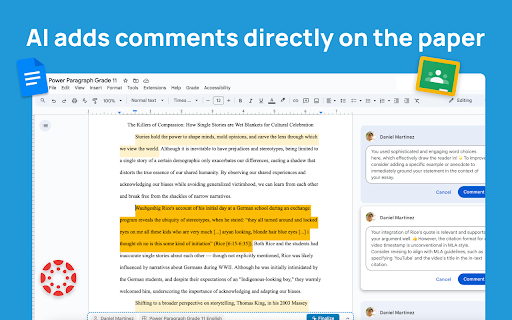


VibeGrade is your AI-powered teaching assistant designed to save teachers 10+ hours a week, directly in your existing tools. VibeGrade is the AI Teaching and Grading Assistant essay learns from you to create materials and grade papers where you work, including Google Docs, Canvas, and more, to help teachers save time, deliver better feedback, and reduce bias. Just click the microphone and chat with Vibe to create and differentiate any resource including lesson plans, quizzes, worksheets, reading passages, DOK questions, IEP/504 Plans. All just by chatting with the Vibe smiley on any website, article, or video, in the bottom of your screen! ➜ Beautiful Materials • Talk to Vibe to create resources to share with your students, right in your Google Doc! • Supercharge your grading and feedback writing process in one click! Make adjustments to the feedback and watch VibeGrade learn your style and apply it to all the feedback. It grades just like you, with the click of a button! ➜ Effortless Grading • VibeGrade analyzes essays based on your custom rubric criteria. • Supercharge your grading and feedback writing process in one click! ➜ Effortless Grading • VibeGrade analyzes essays based on your custom rubric criteria. • Supercharge your grading and feedback writing process in one click! ➜ Personalized Feedback • AI-generated annotations guide students toward improvement. • Enhance learning outcomes with constructive feedback. ➜ AI Detection and Plagiarism Detection • VibeGrade flags potential plagiarism, promoting academic integrity. • Keep your classroom fair and transparent. ➜ Grade Estimates • Get preliminary grade estimates (within ±3% accuracy). • Use them as a starting point for your final evaluation. ➜ Playback Writing • Rewind and replay the student’s writing process to see how they crafted their essay. • Identify revisions, struggles, and potential AI assistance to provide more insightful feedback. ➜ Streamlined Workflow: • Open VibeGrade while working in Google Docs. • Seamlessly grade essays with the click of a button. ➜ Advanced Classroom & Student Insights • Track your students' academic progress in their writing. • Instantly get actionable steps to help them improve their work. Install VibeGrade today and supercharge your grading experience with the world's first AI essay grading agent! 🚀🖍️ ~ Free The free version of VibeGrade delivers a criteria breakdown and annotations designed to help you speed up grading, for up to 10 essays/month. • Grade Estimates • Criteria Breakdown • Smart Annotations • Playback Writing ~ Premium VibeGrade Premium includes everything available for free, plus an expanded range of tools designed to help you deliver the best high-quality targeted feedback that drives student success and academic integrity. • Plagiarism Check • AI Writing Detection • Grade Estimates • Criteria Breakdown • Smart Annotations • Playback Writing • Advanced Classroom & Student Insights • 24/7 Founder + Technical Support ➜ Works where you work VibeGrade is constantly evolving to support more teachers across various platforms, which is why it is now supported on Google Docs, Canvas, and more to come! Demo video: https://VibeGrade.ca/demo Made with 💙 from the VibeGrade Team What is VibeGrade? VibeGrade is the world's first AI essay grading agent for teachers. Work smarter with your own customized rubric criteria, personalized AI feedback and annotations, plagiarism check, grade estimate and AI writing detection on essays. Why do teachers choose VibeGrade over other tools like ChatGPT? VibeGrade Agent has advanced features for teachers that other products lack, such as the Chrome Extension Agent for grading essays in a single click, integrated plagiarism checking, and AI detection, and Playback Writing. Unlike other products, which requires manual essay uploads, VibeGrade operates directly in your browser, saving valuable time. How is it different from ChatGPT? VibeGrade is a specialized platform of tools designed to assist educators in grading essays with responsible and secure use of AI, whereas ChatGPT is a general purpose chatbot. Although ChatGPT can provide general feedback on essays, it makes it hard to pinpoint specific areas for improvement. ChatGPT's performance is inconsistent and often requires tweaking prompts, leading to varied results. VibeGrade offers consistent outcomes instantly without any complicated setup and annotations so teachers can instantly see successes and issues, saving hours of time. How does it know the criteria? VibeGrade adapts to your unique rubric, analyzing student work solely based on the criteria you provide, ensuring accurate, personalized grading. Simply provide the level 4 section of your rubric, and VibeGrade will take care of the rest! How accurate is the grade estimate? Our Grade estimates are designed for precision, typically within ±5% of the final grade. Doesn't AI introduce more bias? We take pride in VibeGrade being the most fair and objective grading tool available. We believe that the professional judgement of teachers is key to fair grading, which is why our tools only use the criteria and grade level provided by the teacher to evaluate work. We acknowledge the biases that generative AI technology may introduce, which is why we rigourously test our systems, and always remind our users that teachers are the final decision-makers. Will VibeGrade replace teachers? Absolutely not. VibeGrade enhances your ability to provide fair and efficient grading, reinforcing the essential role of teachers in providing the best guidance and growth for students.

Brisk Teaching – AI Assistant for Teachers
More than 1 million teachers have installed Brisk. Here's what they use it for: More than 1 million teachers have installed Brisk. Here's what they use it for: Create Build lesson plans, quizzes, Google Docs, Forms, and Slides in 30+ languages. Everything saves straight to your Google Drive. Give Feedback Write personalized, rubric-aligned feedback on student work for one student or the whole class at once. Inspect Writing See how students built their work. Replay their writing process to understand their thinking beyond the final draft. Boost Student Activities Create interactive, standards-aligned activities with AI guardrails you set. You monitor progress while students work. Brisk reads the page you're on and works with what's there. Nothing to export, copy, or paste. Why teachers stick with Brisk It fits how you already teach. You don't have to learn a new platform or rework your process. Creating a quiz from a slide deck takes minutes. So does turning a YouTube video into a lesson plan, or writing feedback for 30 students. You stay in control. You set the rubric, the standards, the guardrails. 1. Add the Brisk extension to Chrome and pin it to your toolbar. 2. Open any Google Doc, Slide, or webpage. 3. Click the Brisk icon and start building. Ready to save time and boost your teaching game? Visit www.briskteaching.com and join the 1 million+ teachers who’ve made teaching Brisk!

Grading Assistant: Grade transferer tool
Transfer grades from Classroom, Teams and many edtech platforms to PowerSchool, Infinite Campus and other gradebooks. Grading Assistant is a professional time-saving tool for teachers designed to streamline the grading process by providing the ability to transfer grades quickly, accurately, and with the protection of student data privacy, all through the convenience of an easy-to-use interface within your browser. Teachers can sync grades between various platforms, like Classroom, Teams, Quizizz and many others, to preferred gradebook, including Google Classroom, Infinite Campus, PowerSchool (PowerTeacher Pro), and more. Every educator will find education technology tool he/she already use, supported edtech platforms, and grade books listed on this page: https://grade-assistant.com/integrations One of the most effective ways to boost teacher productivity is using Chrome extensions, and the Grading Assistant is one of the must-have productivity grading apps for teachers in 2023. The Grading Assistant is more than just a grader or tool for transferring grades it’s a complete teacher assistant. The tool offers a range of features to effectively improve your classroom management. Benefits – Saving time and effort on syncing and scaling grades. – Preventing errors and typos compared to manual copying grades. – Protecting student data privacy compared to using third-party integrations. – Saving money with cost-effective pricing, for the price of a single cup of coffee, enjoy hours saved each month. Grading Assistant features: – Auto-detection platforms supported to export grades and grade books supported to import grades. – Auto-detection of supported grade books on school domains, including , PowerTeacher Pro, Canvas, and Schoology. – Copy grades from popular edtech platforms. – Copy and paste grades into Grading Assistant from any spreadsheet software like Google Sheets or Excel. – Grade scale to different grading systems. – Replacements and filters in names. – Export grades into CSV. Grade scale feature scales student grades on the fly to: – Percentage grading system. – Points grading system. – Letter grading system. – GPA grading system. – Your custom grading system. Replacements and filters in transfer student names – Save auto-replacements in names to fix typos or discrepancies. – Remove everything starting with a letter, number, symbol, or word in each student's name. – Remove everything up until a letter, number, symbol, or word in each student's name. – Filter out a letter, number, symbol, or word in each student's name. ⭐️ How extension works: When you open the supported platform, the extension icon in the chrome toolbar becomes green, which means that Grading Assistant can find student names and grades on the pages of this platform. When you click on the Grading Assistant icon, the extension tries to find student names and grades on the page, and when found at least one grade, it offers to grab data from the page by clicking the Grab data button. After data is grabbed from the page, you can scale grades, apply filters or do replacements in name, and save settings for future grade transfers. When data is ready to fill in the gradebook, you open an assignment page on the preferred gradebook, and click fill data in Grading Assistant extension. The grade transferer fills in grades by matching student names from the source with your grade book. That's it. Everything happens in your browser. Student data is stored temporarily, encrypted on your browser storage, and cleared after filling. In the same way, teachers can export grades from 30+ supported platforms and import grades to 9 supported grade books with a few clicks in grading app Grading Assistant. Quickly, accurately and securely. 🔐 Privacy We do not collect student names, grades, scaled grades, or any other student data transferred using the grade transferer feature in Grading Assistant Chrome Extension. All temporary data, grades, and student names during the transferring process are stored encrypted in your browser and are irrevocably cleared from your browser each time you click the clear button. Permissions Grading Assistant grade sync tool requires next permission to provide educators with a streamlined and efficient way to transfer grades: – "activeTab" and "tabs": These permissions allow the extension to access the currently active tab and get information about the tabs in the browser. The Grading Assistant uses these to detect when a supported platform is open, and to export grades from assignments or import them to a grade book. – "scripting": This permission allows the extension to inject code into a web page helps to get grades from the education technology platforms or import grades to gradebook. – "clipboardRead": This permission allows the extension to read the clipboard's contents when pasting student grades from Google Sheets or Excel. – "storage": This permission allows the extension to store and access data in the browser's storage. The Grading Assistant uses this permission to store temporary data, grades, and encrypted student names while transferring by the grade transferer. – "notifications": This permission allows the extension to display notifications to the user about grader updates and supported teacher tools. – "host_permissions" section of the manifest allows the extension to access all URLs. This permission is required for the extension to work with various edtech platforms and grade books. In conclusion, Grading Assistant is a powerful tool that can help teachers simplify the grading process and improve their overall productivity with grade transferer, and it suits any platform you prefer. Whether you're a seasoned teacher or just starting out, Grading Assistant can help you manage your classroom more effectively and ensure that your grading scale is accurate and consistent. With its powerful features and cost-effective pricing, Grading Assistant is the perfect tool for any educator looking to streamline the grading process and change it to automated grading. Ready to save time on grade transferring? Sign up today for free – grade-assistant.com. 📨 Info / Contact Us: More information and documentation: https://grade-assistant.com Version log: https://grade-assistant.com/changelog Privacy policy: https://grade-assistant.com/privacy For questions about Grading Assistant, please email us at support@grade-assistant.com or reach out on Twitter: @grade_assistant.

Wayground AI
Create interactive activities, presentations, videos, flashcards, and passages from a website or generative AI in one click. Wayground (formerly Quizizz) helps you turn websites, articles, YouTube videos, Google Docs, and even your ChatGPT conversations into ready-to-use learning activities. No more copying and pasting or starting from scratch. See an article your students would benefit from? Highlight a passage and generate questions based on that text. Watching a YouTube video for class? Add comprehension checks at key moments to keep students accountable. Generated great content in ChatGPT or Gemini? Import it directly into Wayground with one click. Have existing lesson plans in Google Docs or Slides? Turn them into interactive practice without rebuilding anything. Once your content lands in Wayground, you can edit, customize, and assign it however you want. Auto-grading, built-in accommodations, and actionable reports come standard. Getting started takes about 30 seconds: 1. Download the extension 2. Pin it to your browser (click the puzzle icon in the top right, find Wayground, and pin it) 3. Visit any website, article, or video 4. Click the extension and generate Formative assessments, bell ringers, exit tickets, review activities—whatever you need, create it from the content you're already using.

Curriculum Genie
Your free, all-in-one AI teaching tool - saving time and enhancing your teaching effectiveness. ✨ Adapt Lessons with Ease Transform your existing materials into tailored, enriched lesson plans. Choose from a range of adaptation options to precisely match your classroom needs. ✔️Lesson Adapter: Transform lessons with your ideas and context, tailored to your unique location and perspective; ✔️Personalized Lesson: Tailor plans to meet the diverse needs of your students, including IEP/ELD and culturally diverse learners; ✔️DEI Best Practices: Get practical tips to seamlessly integrate diversity, equity, and inclusion into every lesson. ✨ Create All-in-One Teaching Resources Effortlessly generate high-quality educational resources from scratch, saving time and enhancing your teaching effectiveness. ✔️Lesson Plan: Turn third-party lesson plans or concise ideas into detailed, standards-aligned lesson plans; ✔️Quiz: Create Bloom-based quizzes to assess student understanding; ✔️Decodable Text: Create texts that build and reinforce students’ literacy skills; ✔️Worksheet: Develop targeted worksheets to strengthen and consolidate learning; ✔️More: Complete your all-in-one resources with multilingual translations. ✨ Unit Planner Transform unit planning with magic, boosting efficiency and effectiveness—so you can focus on what matters most: your students. ✔️Standard Alignment: Aligns with state standards to create an interdisciplinary approach to learning using Al recommendations. ✔️Assessment Integration: Strengthens the link between instruction and assessment using a diversified and balanced assessment system. ✔️Localized Curriculum: Localizes curriculum to engage students in meaningful and relevant learning experiences about what matters most to them. ✔️Inclusive and Equitable Instruction: Personalizes curriculum and differentiates instruction to address the unique learning needs of all children. ✔️Culturally Responsive Teaching: Integrates children's cultures and languages to create inclusive learning and foster cultural identity. ✔️Classroom Interaction & Efficiency: Integrates EduProtocols templates to enhance engagement and streamline teaching. ✨ Insight Genie Instantly analyzes your dashboard data (such as attendance, child ratings, and progress) for data-driven decisions. ✔️Effortless Insights: Automatically analyze your attendance, ratings, and progress data, giving you instant insights at your fingertips; ✔️Data-driven Decisions: Unlock AI-powered insights to make smarter decisions, backed by real-time data that drives results. 🚀 Effortlessly Connect with Curriculum Resources Simplify your teaching by integrating Curriculum Genie with Google Drive, Google Classroom, allowing you to seamlessly store, access, and share your generated content. Turn your existing PDFs into tailored lesson plans, and upload web links for automatic content recognition and transformation. Streamline your workflow while staying flexible and in control. 💡 Download & Next Steps 1. Download the Curriculum Genie Chrome extension - FREE! 2. Click on the extensions icon in your browser toolbar (it looks like a puzzle piece) 3. An extensions menu will drop down. Find Curriculum Genie and click on the corresponding pushpin icon. 4. Curriculum Genie should now be on your toolbar! Click on the Curriculum Genie icon in your toolbar to see Curriculum Genie appear in the bottom right corner of your browser window. 5. Your extension is ready for use! Use Curriculum Genie on any Google doc, website, article, and more.
