
nlgjbkohnabomkgcfgihkacllbbdfoca

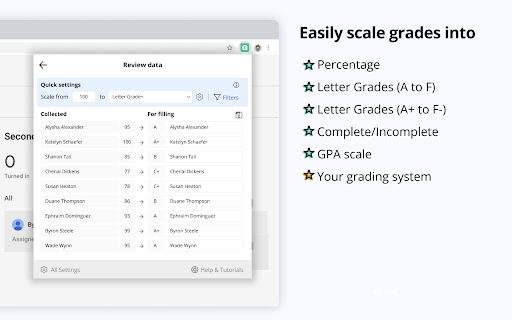
Transfer grades from Classroom, Teams and many edtech platforms to PowerSchool, Infinite Campus and other gradebooks. Grading Assistant is a professional time-saving tool for teachers designed to streamline the grading process by providing the ability to transfer grades quickly, accurately, and with the protection of student data privacy, all through the convenience of an easy-to-use interface within your browser. Teachers can sync grades between various platforms, like Classroom, Teams, Quizizz and many others, to preferred gradebook, including Google Classroom, Infinite Campus, PowerSchool (PowerTeacher Pro), and more. Every educator will find education technology tool he/she already use, supported edtech platforms, and grade books listed on this page: https://grade-assistant.com/integrations One of the most effective ways to boost teacher productivity is using Chrome extensions, and the Grading Assistant is one of the must-have productivity grading apps for teachers in 2023. The Grading Assistant is more than just a grader or tool for transferring grades it’s a complete teacher assistant. The tool offers a range of features to effectively improve your classroom management. Benefits – Saving time and effort on syncing and scaling grades. – Preventing errors and typos compared to manual copying grades. – Protecting student data privacy compared to using third-party integrations. – Saving money with cost-effective pricing, for the price of a single cup of coffee, enjoy hours saved each month. Grading Assistant features: – Auto-detection platforms supported to export grades and grade books supported to import grades. – Auto-detection of supported grade books on school domains, including , PowerTeacher Pro, Canvas, and Schoology. – Copy grades from popular edtech platforms. – Copy and paste grades into Grading Assistant from any spreadsheet software like Google Sheets or Excel. – Grade scale to different grading systems. – Replacements and filters in names. – Export grades into CSV. Grade scale feature scales student grades on the fly to: – Percentage grading system. – Points grading system. – Letter grading system. – GPA grading system. – Your custom grading system. Replacements and filters in transfer student names – Save auto-replacements in names to fix typos or discrepancies. – Remove everything starting with a letter, number, symbol, or word in each student's name. – Remove everything up until a letter, number, symbol, or word in each student's name. – Filter out a letter, number, symbol, or word in each student's name. ⭐️ How extension works: When you open the supported platform, the extension icon in the chrome toolbar becomes green, which means that Grading Assistant can find student names and grades on the pages of this platform. When you click on the Grading Assistant icon, the extension tries to find student names and grades on the page, and when found at least one grade, it offers to grab data from the page by clicking the Grab data button. After data is grabbed from the page, you can scale grades, apply filters or do replacements in name, and save settings for future grade transfers. When data is ready to fill in the gradebook, you open an assignment page on the preferred gradebook, and click fill data in Grading Assistant extension. The grade transferer fills in grades by matching student names from the source with your grade book. That's it. Everything happens in your browser. Student data is stored temporarily, encrypted on your browser storage, and cleared after filling. In the same way, teachers can export grades from 30+ supported platforms and import grades to 9 supported grade books with a few clicks in grading app Grading Assistant. Quickly, accurately and securely. 🔐 Privacy We do not collect student names, grades, scaled grades, or any other student data transferred using the grade transferer feature in Grading Assistant Chrome Extension. All temporary data, grades, and student names during the transferring process are stored encrypted in your browser and are irrevocably cleared from your browser each time you click the clear button. Permissions Grading Assistant grade sync tool requires next permission to provide educators with a streamlined and efficient way to transfer grades: – "activeTab" and "tabs": These permissions allow the extension to access the currently active tab and get information about the tabs in the browser. The Grading Assistant uses these to detect when a supported platform is open, and to export grades from assignments or import them to a grade book. – "scripting": This permission allows the extension to inject code into a web page helps to get grades from the education technology platforms or import grades to gradebook. – "clipboardRead": This permission allows the extension to read the clipboard's contents when pasting student grades from Google Sheets or Excel. – "storage": This permission allows the extension to store and access data in the browser's storage. The Grading Assistant uses this permission to store temporary data, grades, and encrypted student names while transferring by the grade transferer. – "notifications": This permission allows the extension to display notifications to the user about grader updates and supported teacher tools. – "host_permissions" section of the manifest allows the extension to access all URLs. This permission is required for the extension to work with various edtech platforms and grade books. In conclusion, Grading Assistant is a powerful tool that can help teachers simplify the grading process and improve their overall productivity with grade transferer, and it suits any platform you prefer. Whether you're a seasoned teacher or just starting out, Grading Assistant can help you manage your classroom more effectively and ensure that your grading scale is accurate and consistent. With its powerful features and cost-effective pricing, Grading Assistant is the perfect tool for any educator looking to streamline the grading process and change it to automated grading. Ready to save time on grade transferring? Sign up today for free – grade-assistant.com. 📨 Info / Contact Us: More information and documentation: https://grade-assistant.com Version log: https://grade-assistant.com/changelog Privacy policy: https://grade-assistant.com/privacy For questions about Grading Assistant, please email us at support@grade-assistant.com or reach out on Twitter: @grade_assistant.

Edform for Teachers
Import any PDF to Edform and transform it into interactive auto-graded activity. Edform for Chrome allows you to upload PDF documents to Edform in just a few clicks. After installing Chrome Extension, any PDF file opened in Chrome will have an Open With Edform button. By clicking the button, the file is immediately imported to the Edform, and you can continue working with it by creating an interactive worksheet. The teacher can upload the document into the builder to modify it by adding different question types, video, and audio materials, combining with pages from another document. Then set the assignment in student-paced or live mode when the activity is ready to use, depending on the specific lesson objectives. Moreover, teachers can monitor students` progress, grade their work instantly and provide meaningful written, audio, or video feedback to improve students` knowledge. Edform allows users to integrate with tools they already use, such as Google Drive, Dropbox, and One Drive, and share assignments in Google Classroom and other Learning Management Systems. The platform's interactive features save teachers' time and increase students' productivity.

Google Classroom Tweaks
On the Google Classroom tab: (with all of the columns for your assigments, tests, quizzes, etc., etc.) 1. you can filter the columns to show just those that match a particular text string - e.g., you can show just your tests. You can also exclude columns (e.g., hide all columns that do not contain the text `bonus`, etc.) The filter supports `or` capabilities (e.g., enter `test|quiz` to match both tests and quizzes) and it also allows regular expressions (e.g., enter `out of (1)?4` to match columns that are marked out of 4 or 14... cool, eh?) 2. with the click of a button, you can highlight entries that have been resubmitted, are missing, have not been marked, have been marked but not returned, etc., etc. 3. you can also click a student name and all others in the class will be hidden... so now you can get a good view of the results for that child. Click the name again to show the rest of the class On the Google Classroom tab: 4. when you are looking at student submissions, a new dialog appears and allows you to quickly select pre-defined feedback from a `pick-list`. The comments that you've selected in the dialog are automatically copied to the clipboard (and then can be pasted as a private comment in the assignment or into any other interface you want - e.g., report cards!). You have full control to create your own comment banks that are specific to your classes and/or assessments. I have extended the feedback comments capabilities so that you can now have comment `headings` that are auto selected, radio button comments (where you can pick one entry from a number of choices), and select button comments (where you can pick as many that apply to the current assignment. Again, you have full control over what is included in as many comment banks as you require. To do: add more documentation of this feature... `cause there's a lot of functionality in it! On the Classwork tab: 5. you have the option to `float` the `+ Create` button (so if you scroll will down the page and then realize that you want to add an entry, you don't have to scroll back to the top to click the button). Support: Post your questions, feedback and/or wish list to the Facebook page: https://www.facebook.com/GoogleClassroomTweaks Privacy: This extension does *not* collect, share, transfer or do anything at all with personal information. That is the full extent of my privacy policy... if that is not sufficient for your purposes, do not use this extension. Permissions: The extension uses the Tab and ActiveTab permissions to detect when you change between tab in your Google Classroom It also uses the `Storage` permission so that your class names and comment banks are synced to your Google profile (and therefore are available on any device where you are logged in with the same credentials - e.g., on your laptop and chromebook) This extension is free... however, if you find it particularly useful, I wouldn't mind a small contribution via Paypal: https://paypal.me/AlCaughey

GradeTransferer - Transfer, Scale & Sort Grades | Save Time, Reduce Errors
Transfer, scale, and sort grades between 40+ LMS platforms and gradebooks. Automate grade entry, reduce errors, and save hours. GradeTransferer saves teachers hours and eliminates typos by letting them grab grades from their digital assignments and fill them directly into their district gradebook. Just two clicks – grab, fill – done. With the ability to round, scale, and convert scores, you’ll never want to grade without it! GT supports nearly 40 major LMS and SIS systems, including Google Classroom, Schoology, Canvas, PowerSchool, Aspen, and Infinite Campus. View all supported platforms: https://support.gradetransferer.com/post/supported-platforms KEY FEATURES 💸 7-day free trial for new users ✨ Grab and fill grades instantly between platforms 🥰 Round, scale, and map scores to meet your unique grading needs 🔧 Easy solutions for name differences, rostering issues, and incompatible data 📋 Retrieve data from any spreadsheet using Clipboard Grab 📊 Supports ~40 major LMS and SIS 🤯 Combine data sets to accommodate differing roster organization 👏 Support differentiated instruction effortlessly 💻 Works on any computer with a Chrome browser, including Chromebooks 🍎 No training required — get started in seconds ⏰ Saves hours each week by eliminating manual data entry and typos 🔐 Designed with privacy first — student data never leaves your device 🧠 Knowledge base & responsive customer support TRY IT FREE GradeTransferer offers a 7-day free trial for new users. After the trial, you can subscribe individually or choose a plan for your entire school or district. Learn more at: https://gradetransferer.com HOW IT WORKS 1. Navigate to your assignment page and click "Grab Data" to collect assignment scores. 2. Navigate to your gradebook and click "Fill Data" to paste them into your gradebook. 3. Review and submit — it’s that easy. Everything happens locally in your browser. No student information ever leaves your computer. DATA PRIVACY AND SECURITY GradeTransferer was built with around one core principle: student personally identifiable information never leaves the teacher’s computer. We do not store, collect, sell, receive, or share any personally identifiable student data. Temporary data is encrypted and stored securely under the authenticated teacher's Chrome profile locally on their computer under their account. USE OF DATA DISCLOSURE For account authentication and service improvement, the following limited data is transmitted securely: – Name, username, and email (for teacher login and identity verification) – Number of grades successfully transferred (for development metrics) – Website URLs used (to detect platform compatibility) Use of information received from Google APIs adheres to the Chrome Web Store User Data Policy, including the Limited Use requirements. SUPPORT If your district uses a custom configuration that GradeTransferer does not recognize, submit a ticket at support.gradetransferer.com/support-request and we’ll make adjustments to ensure compatibility. Learn more and get help at: https://support.gradetransferer.com DISCLAIMER GradeTransferer is designed to help transfer grades accurately, but it is ultimately the user’s responsibility to verify final grade entries. Changes in connected platforms or unique district settings may cause unexpected results. All product names, logos, and brands are property of their respective owners. Use of these names does not imply endorsement.

Easy Grader
Easy Grader – A Chrome Extension calculator to help you grade your students' assignments. Introducing the Easy Grader, a quintessential Chrome extension for educators worldwide! Are you tired of crunching numbers every grading season? Easy Grader simplifies the tedious task of converting raw scores into grades. Whether you're a seasoned educator or a fresh teaching assistant, this tool offers a streamlined process to compute student scores, ensuring accuracy every time efficiently. Features: – Simple Interface: Input the total number of questions and the number of questions a student got wrong. Let the Easy Grader do the rest! – Instant Calculation: Get real-time results showing the corresponding percentage and grade. – Comprehensive Breakdown: Don’t just see the final grade! The Easy Grader provides a detailed grade breakdown, allowing educators to understand the scoring spectrum from 100% to 0%. How It Works: – Input the total number of questions in the "# of questions" field. – Input the number of questions a student answered incorrectly in the "# of wrong questions" field. – Instantly view the result, showing both the percentage and the grade. – For a detailed perspective, check out the comprehensive table below that shows the breakdown of correct vs. wrong answers, the resulting percentage, and the scaled grade. Educators, make your grading life a breeze with the Easy Grader Chrome extension. Say goodbye to complex grading sheets and embrace the future of grading!
