
ndkgcmhkdfiofhjncpajkfneaibghagn
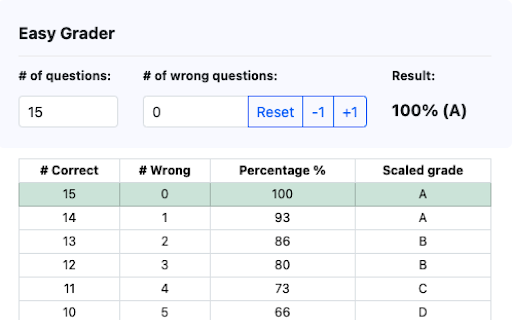
Easy Grader – A Chrome Extension calculator to help you grade your students' assignments. Introducing the Easy Grader, a quintessential Chrome extension for educators worldwide! Are you tired of crunching numbers every grading season? Easy Grader simplifies the tedious task of converting raw scores into grades. Whether you're a seasoned educator or a fresh teaching assistant, this tool offers a streamlined process to compute student scores, ensuring accuracy every time efficiently. Features: – Simple Interface: Input the total number of questions and the number of questions a student got wrong. Let the Easy Grader do the rest! – Instant Calculation: Get real-time results showing the corresponding percentage and grade. – Comprehensive Breakdown: Don’t just see the final grade! The Easy Grader provides a detailed grade breakdown, allowing educators to understand the scoring spectrum from 100% to 0%. How It Works: – Input the total number of questions in the "# of questions" field. – Input the number of questions a student answered incorrectly in the "# of wrong questions" field. – Instantly view the result, showing both the percentage and the grade. – For a detailed perspective, check out the comprehensive table below that shows the breakdown of correct vs. wrong answers, the resulting percentage, and the scaled grade. Educators, make your grading life a breeze with the Easy Grader Chrome extension. Say goodbye to complex grading sheets and embrace the future of grading!

Secret Sanitizer – Paste Safely into AI Chats
Masks API keys, passwords & tokens before they reach AI chats. 100% local — nothing leaves your machine. Developers paste code snippets, config files, and debug logs into AI assistants every day — often without realising they contain API keys, database passwords, or auth tokens. Once that data leaves your machine, you can't take it back. Secret Sanitizer intercepts the paste before it reaches the chat, replaces secrets with safe placeholders, and stores the originals in a local encrypted vault. Everything runs entirely on your machine — no servers, no network requests, no data collection. ⚙️ HOW IT WORKS Paste text into any supported AI chat — Secret Sanitizer scans and masks secrets in real time, before they're sent. → Automatic masking — secrets replaced with [LABEL] placeholders on paste → Instant notification — see exactly what was caught, with a 5-second undo window → Encrypted vault — originals stored locally with AES-GCM encryption → Pattern controls — enable or disable individual detection patterns → Custom sites — extend protection to any website or domain → Stats dashboard — track secrets blocked today and over time ↩️ SMART RESTORE When the AI replies referencing your placeholders, getting the real values back is automatic. You ask: "Fix this connection string: [DATABASE_URL_0]" AI replies: "Change [DATABASE_URL_0] to use port 5433." You copy that response — Secret Sanitizer detects the placeholders and swaps them back to the originals in your clipboard instantly. No manual lookup. No digging through the vault. The clipboard you paste elsewhere already has the real values. 🔍 70+ SECRET PATTERNS DETECTED Access tokens and API keys across major cloud, DevOps, payment, and AI platforms. JWT and bearer tokens. Database connection strings for common SQL and NoSQL engines. Private SSH and RSA keys. Passwords in .env, YAML, JSON, and config files. Credit card numbers. Indian identity documents (Aadhaar, PAN, GSTIN) and UPI IDs. New patterns added regularly. 🔒 WHY YOU CAN TRUST IT → 100% local — nothing ever leaves your machine → Zero network requests — works fully offline → No servers, no tracking, no analytics → Open source (MIT) — audit every line of code → Minimal permissions — active on AI chat domains by default; you control any additions Takes 10 seconds to install. Could save you from a very expensive mistake. Free. Open source. Built with care. 📂 Source: https://github.com/souvikghosh957/secret-sanitizer-extension 🌐 Website: https://secretsanitizer.com

One-Click Tab Round Up
In one click, merge your tabs into one window, sort them, and if they're crowded, group them. Get your numerous tabs and windows under control. As soon as you click the icon for this extension, it does its thing (no popups, options, or confirmations): 1. Merges all your windows into one 2. Sorts your tabs in alphabetical order 3. If you have many tabs open, groups them based on domain, giving the tab groups useful labels. 4. Finds duplicate tabs and groups them together. If you want, you can select these options: You can turn off window-merging You can tell One-Click to delete any duplicate tabs it finds.

Drift - Scroll While AI Thinks
Opens a scrollable feed while ChatGPT, Claude, and Gemini generate responses. Reclaim your AI wait time. Drift opens a side window while ChatGPT, Claude, or Gemini is generating a response — giving you something to scroll instead of staring at a blinking cursor. When the answer is ready, it snaps you back. No tab juggling. No "wait what was I doing again." You know the loop: you send a prompt, the AI starts thinking, and you open random tabs or fall into reels and forget why you opened the browser. Drift handles that dead time for you. While the AI is generating, it automatically offers you a side window to scroll, watch, or chill. The second the response is ready, it gets out of the way. You set it up once, tweak it to your taste, and forget it exists. It doesn't nag you. It doesn't gamify your attention. It just quietly eats the empty seconds that normally turn into 20 minutes of scrolling. How it works: — Send a message on ChatGPT, Claude, or Gemini — After a configurable delay, a floating button appears — Click it to open a customizable side window (Instagram Reels by default, or any URL) — When the AI finishes, the window minimizes and you're back Features: — Adjustable trigger delay (2–30 seconds) — Choose which AI sites activate Drift — Calibrate window size and position to your screen — Set any custom URL as your drift content — Soft focus or full focus mode — Auto-close timer — Keyboard shortcut (Alt+D) — Guided onboarding walkthrough — Export/import settings — Session stats Drift only runs on LLM sites you choose. Everything stays local. It doesn't read your prompts, your responses, or your browsing. No account, no tracking, no paywalls, no ads. It's not trying to keep you hooked — it's trying to give you your brain back. Built for people who live in AI tabs: students, developers, researchers, writers, and anyone who values flow and accepts reality. Waiting happens. Losing time doesn’t have to. If you like Drift, please help spread the word by giving me a 5 star rating, or share it with your friends! Feel free to contact me at fireheartjerry@gmail.com and I will make sure to help. More info: https://fireheartjerry.github.io/drift-extension/drift.html

Attendance Manager
Base Level Extension An attendance manager light weight extension for your chrome browser to help students keep track of their attendance percentage in classes. To use simply create a class by clicking on add new class option. After successfully attending your class you can mark present in the extension if u failed to attend the class you can mark absent in extension and it will display the effect it has on your class percentage.
