
pcblbflgdkdfdjpjifeppkljdnaekohj
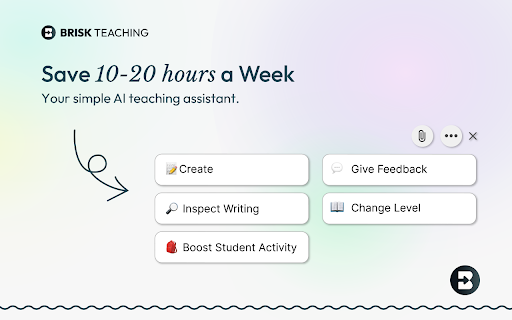
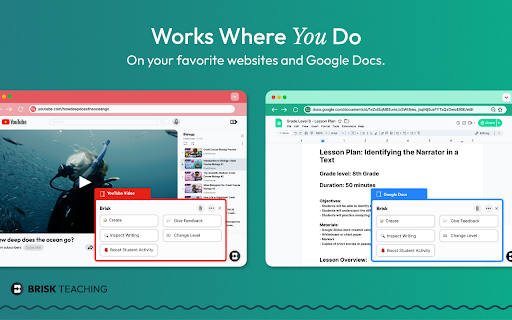

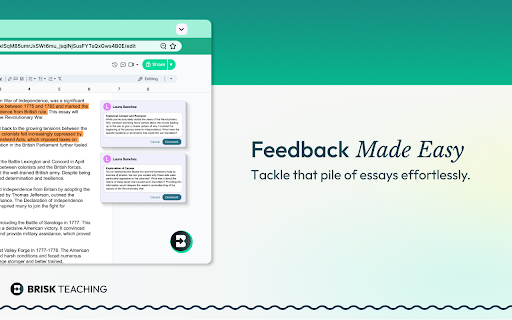

Brisk Teaching is your AI-powered teaching assistant designed to save teachers 10+ hours a week. It works seamlessly with your… Brisk Teaching is your AI-powered teaching assistant designed to save teachers 10+ hours a week. It works seamlessly with your favorite tools—Google Docs, Classroom, Slides, PDFs, and more. Install the extension and get immediate access to over 20 built-in tools including creating curriculum, rubrics, lesson plans, quizzes, sub plans, math word problems, teacher exemplars, state practice tests, and more. Use it to give targeted feedback, differentiate lessons, and tackle everyday teaching tasks — right where you already work. ➤ What Can Brisk Do for Teachers? Create Content Generate lesson plans, quizzes, Google Docs, Forms, and Slides in over 30 languages—auto-saved to your Google Drive. Give Feedback Deliver fast, clear feedback in Google Docs with four powerful methods. Level Resources Adjust reading levels on articles and docs to support every student. Inspect Writing Replay students’ edits to track progress and insights in real time. Brisk Boost Design safe, interactive AI-powered activities that align with learning objectives and deepen student engagement. ➤ Getting Started Is Easy 1. Install: Add the Brisk extension to Chrome and pin it. 2. Brisk It: Click the Brisk icon to start creating, giving feedback, and boosting engagement. 3. Relax: Let Brisk handle the heavy lifting while you focus on teaching. ➤ Why Teachers Love Brisk * Works Where You Do: Compatible with Google Docs, Forms, PDFs, Slides, and more—no exporting, just instant saves to Google Drive. * AI That Saves Time: Cut down on your workload with tools that work in just seconds. * Free Tools Galore: Access over 20+ AI-powered features for free to help you teach more effectively. * Real-Time Generation: Enter your prompt and watch in real time as Brisk AI generates the resources you need. ➤ Get Brisk Today—For Free! 1. Download the Brisk Teaching Chrome extension. 2. Pin it to your toolbar. 3. Use it wherever you work online—Google Docs, Slides, YouTube, and more. ➤ Ready to save time and boost your teaching game? Visit www.briskteaching.com and join the 1 million+ teachers who’ve made teaching Brisk! ➤ Want to see Brisk in action? Connect with us on social media @briskteaching.

Draftback
Watch the writing process unfold - play back a Google Doc as if it were a movie Draftback is a Chrome extension that lets you replay the revision history of any Google Doc you can edit. It’s mostly used by teachers to detect plagiarism and to find out when students are using ChatGPT. It has more than 500,000 users. * Draftback lets you play, pause, and rewind a Google Doc’s revision history. It can be used retroactively on existing documents. * After you install the extension, a Draftback button appears in the toolbar in Google Docs. Click to see the doc's full replay. Pause, rewind, skip ahead—you can even play back at actual speed, as if looking over the author's shoulder. * A page shows you at-a-glance insights into writing patterns and time spent. For more information, see draftback.com You can try Draftback free for 30 days, with no credit card required. Just try it right away and take your time seeing whether it's useful to you. “I have been relying on draftback for the past couple of years as a tool to monitor my student writing - to say that this app has been a game changer, not just for me, but for my colleagues AND students, is not giving it enough credit. Students have become better writers as they realize that their work is being checked for AI use, and my colleagues and I have seen huge increases in their learning and skills as a result.” “My teachers, especially my English teachers, use your Draftback Chrome extension and it has become invaluable to their teaching and their student's learning. It is a wonderful way for them to keep up with students' writing to evaluate the writing process, not just the final outcome.” “At the school where I teach, we have determined that it is the only tool we can find that allows us to determine if AI plagiarism using Grammarly or ChatGPT is taking place, by seeing whole blocks of text be replaced faster than they could be re-written. We are considering requiring all typed work to be submitted in the original Google Doc so Draftback can see the changes. Congratulations on inventing exactly the tool every teacher needs now.” Draftback was designed to be as careful as possible about user privacy. No document data is collected by or sent to any remote service by the extension. All such data is stored locally on the user’s own computer, by their Chrome browser, and is only stored there so that future replays of an already-replayed document will go faster. (Draftback is a Chrome Extension instead of a standalone app specifically so that it doesn't get access to sensitive document data.) No one, including the extension’s developer, has access to any document processed by Draftback or to its revision history. The extension uses Google Analytics; this data is anonymized and doesn't include personally identifiable information. To manage subscriptions and free trials, the extension does collect the active user’s email address and a unique id identifying their browser, but only after the user has explicitly consented to share their email. Draftback will then “phone home” when it loads to find out if the given email address / id is a subscriber or within a free trial window. (Note that the extension does not collect the email address of document authors, if these are different from the active user.) - With Draftback, your data is kept entirely private. Draftback was purposely designed so that you could play back your own docs without having to share them with a third party. This is -your- data; Draftback just lets you see it in a new way. - Draftback only needs access to docs.google.com to get the revision data for playback—but that data never leaves your own browser. It also uses this access to get your email address from the Docs page if the regular "Sign in with Google" flow fails. SUPPORT AND FEEDBACK

Slides Timer
Create timers using placeholders. ie >, >, >, >, >, > Slides Timer is a powerful extension that automatically brings your Google Slides to life with dynamic timers and clocks. Whether you're running a classroom activity, a business presentation, or a workshop, Slides Timer provides a seamless and beautiful way to keep your audience engaged and on track. Simply place your timer configuration between > and let the extension do the rest! 🚀 KEY FEATURES (FREE) Countdown & Count-up: Use - to count down or + to count up (e.g., >). 🕰️ Live Clock & Date: Display the current time or date with > or >. ♾️ Continuous Timers: Use ~ to keep your timer running across different slides. ⏭️ Slide Triggers: Automatically advance slides (-+) or go back (--) when a timer hits zero. 🔔 Audio/Video Alarms: Trigger your inserted audio (@) or video (!) files at specific times. 💎 PREMIUM FEATURES (PRO) Unlock powerful tools to customize your experience: 🎨 Custom Formatting: Full control over time/date displays using common indicators (e.g., >). 🍅 Pomodoro Cycles: Infinite work/break chaining for ultimate productivity (e.g., >). ⏱️ Analog Clock Faces: Beautifully rendered analog clocks using |analog. 📊 Dynamic Progress Bars: Visual progress bars that fill or empty as your timer runs (|bar). 💯 Scoreboards: Track points between slides with shared IDs and custom increments. 🏷️ Custom Tags: Personalize your starting and ending markers (default >). 🖌️ Custom Clock Interfaces: Get access to exclusive, advanced clock visual interfaces. ⏰ Advanced Alarm Scheduling: Take deeper control over when and how your alarms trigger. 🔄 Data Synchronization: Keep your custom settings and tags synced across your devices. ⭐ Priority Support: Dedicated and faster assistance when you need help. ⌨️ KEYBOARD CONTROLS (PRO) Enhance your presentation flow with premium quick hotkeys: Pause/Start: Press y to pause or resume the active timer. Reset: Press r to reset the timer to its starting value. 🛑 Manual Start: Use $ in your tag (e.g., >) to start the timer in a paused state. ⚙️ Custom Hotkeys: Personalize all of your keyboard shortcuts directly in the extension popup. 📖 COMMON EXAMPLES > : 5-minute countdown. ⏱️ > : 10-minute count-up. 🍅 > : A cycle of 25m work and 5m break. 📊 > : A 30-second progress bar. 🕰️ > : Current time without seconds or AM/PM. 📅 > : Countdown to a specific date! 💯 > : Scoreboard starting at 0, press [ for +1 and ] for +5. 🛠️ FORMATTING REFERENCE Customize your > and > tags with these indicators: 🕛 hh : 12-hour format (double digit) 🕒 HH : 24-hour format (double digit) mm : Minutes ⏱️ ss : Seconds 📆 dddd : Day of the week (long) 🗓️ MMMM : Month (long) 📅 yyyy : Year (4 digits) 💳 SUBSCRIPTION & MANAGEMENT Manage your PRO subscription directly through the extension popup. Click "Manage Subscription" to view invoices or update payment methods via our secure portal at https://slidestimer.web.app 🔒 PRIVACY This extension does not collect or handle personal user data beyond your Chrome Profile ID for subscription verification. 💡 Tip: Be sure to refresh your Google Slides tab after installation for the timer to activate!

Mote for Google Chrome™
Your AI-powered learning companion - Mote helps everyone to read, write & be heard across Google Workspace and the web. AI-powered tools for reading, writing, and communication—anywhere students learn online. Trusted by millions of educators and students worldwide, Mote empowers students to read, write, and communicate with confidence across any webpage, with seamless Google Workspace integration. What's new? The Mote Sidebar now features three powerful modes that adapt to every learner's needs AND has a Focus Mode to remove visual clutter from web articles, helping readers to stay focused. READING MODE Read Aloud with natural human voices Picture Dictionary & Vocabulary Builder – Click any word for instant definition, illustration, audio pronunciation, and one-click "Add to My Words" for personalized vocabulary growth. Smart Highlighting & Auto-Organization – Five color-coded highlighters (with accessible labels) automatically funnel key terms into your personal vocabulary bank and highlight collections, or export directly to Google Docs. Focus Mode – Adjustable screen mask that reduces visual clutter for better reading focus and comprehension. Instant Translation & Read-Aloud – Highlight to translate and hear natural AI voices in 50+ languages - even when text appears in images. WRITING MODE AI Voice Typing – Fast, punctuation-smart dictation that works in any text box, with context-aware predictive text that grows smarter as you write. Auto-pastes into most websites. Intelligent Text Prediction – Purpose-built for K-12 learners, Mote's AI text prediction supports phonetic spelling and adapts to writing context. CREATING MODE Voice Recording & Transcription – Record your voice, auto-transcribe with AI, and share via link or let Mote read it back in expressive voices or translate to another language. AUDIO UPLOAD Upload pre-recorded audio files and embed them directly into assignments, presentations, and educational content. Core features students and teachers love 🎤 AI Voice Tools – Natural-sounding text-to-speech in 60+ languages, voice typing, and voice recording for human-centered feedback in Google Docs, Slides, Canvas SpeedGrader, or anywhere. 🌍 Multilingual Support – Instant translation and read-aloud in 50+ languages builds confidence and independence for all learners. 🧠 Personalized Learning – Picture dictionary, vocabulary mastery tools, and adaptive text prediction that help students read, write, and comprehend at their own pace. 🔒 Admin & Teacher Controls – Toggle features, view usage analytics, and manage rosters via Classlink, Google Classroom, or CSV upload. ♿ Universal Design – Built-in support for diverse learners including dyslexic, ADHD, multilingual, and students who benefit from assistive technology - no special setup required. How to get started 1. Install the extension 2. Sign up with Google or email 3. Refresh your tab and click the Mote icon 4. Press Play on any text — or try a 5-second voice note in a Google Docs comment Perfect for: - Google Workspace for Education users - Multilingual classrooms and ELL support - Personalized and self-paced learning - Universal Design for Learning (UDL) implementation - Students who benefit from assistive technology

TeachShare Copilot
TeachShare Copilot is an extension that allows you to create educational content, grade student work, and more! The same powerful TeachShare, now across your browser. TeachShare Copilot is your free, AI-powered Chrome Extension designed for educators who want smarter tools, not just faster ones. It brings learning science and meaningful differentiation to your fingertips, helping you turn any article, YouTube video, or website into research-backed learning resources for your students in just a few clicks. 1. Click "Add to Chrome" to install the free extension. 2. Pin the TeachShare Copilot icon to your Chrome toolbar for easy access. 3. Create your free account. 4. You’re ready! TeachShare is now available wherever you plan. 1. Click the TeachShare Copilot icon while browsing any online learning material. 2. TeachShare instantly reads the online content and suggests 3 engaging and classroom-ready ideas based on proven instructional strategies. 3. Click the one you want to open in TeachShare, where you can customize, differentiate, translate, and share with your students with ease. TeachShare Copilot gives you unlimited creative power to design exactly what your students need, with total flexibility and zero limits. • MTSS-aligned intervention activities with built-in supports for every tier • PBL and SEL lessons that foster collaboration, empathy, and critical thinking • Collaborative small and whole group activities that spark discussion and deepen understanding • Customizable test prep aligned to your state standards and assessment goals • Real-world science experiments designed for exploration, discovery, and NGSS alignment • Engaging choice boards that empower student choice and ownership • Ready-to-teach, standards-aligned core and enrichment resources for all subjects and grade levels Whether you're planning your daily lesson, differentiating for small groups, or creating engaging enrichment, TeachShare Copilot helps you build strong educational resources - wherever you are! It’s powerful. It’s fully customizable. And it’s completely free. Follow, share, and grow with our amazing TeachShare educator communities. We value your input, celebrate your successes, and are always listening to your feedback. It helps us keep making TeachShare better every day.
