
nfhjdkmpebifdelclimjfaackjhiglpc

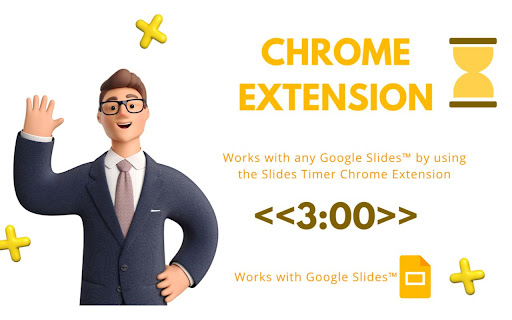
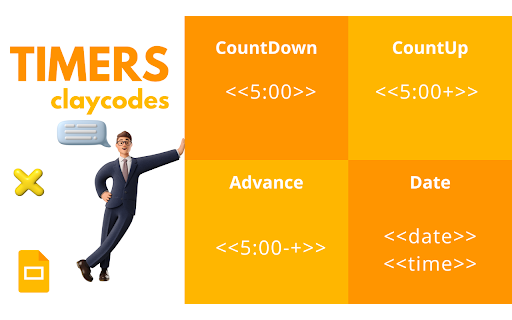
Create timers using placeholders. ie >, >, >, >, >, > Slides Timer is a powerful extension that automatically brings your Google Slides to life with dynamic timers and clocks. Whether you're running a classroom activity, a business presentation, or a workshop, Slides Timer provides a seamless and beautiful way to keep your audience engaged and on track. Simply place your timer configuration between > and let the extension do the rest! 🚀 KEY FEATURES (FREE) Countdown & Count-up: Use - to count down or + to count up (e.g., >). 🕰️ Live Clock & Date: Display the current time or date with > or >. ♾️ Continuous Timers: Use ~ to keep your timer running across different slides. ⏭️ Slide Triggers: Automatically advance slides (-+) or go back (--) when a timer hits zero. 🔔 Audio/Video Alarms: Trigger your inserted audio (@) or video (!) files at specific times. 💎 PREMIUM FEATURES (PRO) Unlock powerful tools to customize your experience: 🎨 Custom Formatting: Full control over time/date displays using common indicators (e.g., >). 🍅 Pomodoro Cycles: Infinite work/break chaining for ultimate productivity (e.g., >). ⏱️ Analog Clock Faces: Beautifully rendered analog clocks using |analog. 📊 Dynamic Progress Bars: Visual progress bars that fill or empty as your timer runs (|bar). 💯 Scoreboards: Track points between slides with shared IDs and custom increments. 🏷️ Custom Tags: Personalize your starting and ending markers (default >). 🖌️ Custom Clock Interfaces: Get access to exclusive, advanced clock visual interfaces. ⏰ Advanced Alarm Scheduling: Take deeper control over when and how your alarms trigger. 🔄 Data Synchronization: Keep your custom settings and tags synced across your devices. ⭐ Priority Support: Dedicated and faster assistance when you need help. ⌨️ KEYBOARD CONTROLS (PRO) Enhance your presentation flow with premium quick hotkeys: Pause/Start: Press y to pause or resume the active timer. Reset: Press r to reset the timer to its starting value. 🛑 Manual Start: Use $ in your tag (e.g., >) to start the timer in a paused state. ⚙️ Custom Hotkeys: Personalize all of your keyboard shortcuts directly in the extension popup. 📖 COMMON EXAMPLES > : 5-minute countdown. ⏱️ > : 10-minute count-up. 🍅 > : A cycle of 25m work and 5m break. 📊 > : A 30-second progress bar. 🕰️ > : Current time without seconds or AM/PM. 📅 > : Countdown to a specific date! 💯 > : Scoreboard starting at 0, press [ for +1 and ] for +5. 🛠️ FORMATTING REFERENCE Customize your > and > tags with these indicators: 🕛 hh : 12-hour format (double digit) 🕒 HH : 24-hour format (double digit) mm : Minutes ⏱️ ss : Seconds 📆 dddd : Day of the week (long) 🗓️ MMMM : Month (long) 📅 yyyy : Year (4 digits) 💳 SUBSCRIPTION & MANAGEMENT Manage your PRO subscription directly through the extension popup. Click "Manage Subscription" to view invoices or update payment methods via our secure portal at https://slidestimer.web.app 🔒 PRIVACY This extension does not collect or handle personal user data beyond your Chrome Profile ID for subscription verification. 💡 Tip: Be sure to refresh your Google Slides tab after installation for the timer to activate!

Alarm, Timer and Stopwatch
A powerful alarm extension that supports multiple timers and stopwatches with five to ten-minute snooze. All in one extension to manage your schedules. You can define multiple alarms, use the stopwatch with as many "lap"s as required, or simply use the timer with pause and resume support. This extension uses the built-in API to set alarms hence the extension works even if the UI is hidden or your browser gets restarted. This extension offers alarm sound snoozing which snoozes the alarm sound 3 times with a 5-minute delay. The extension displays a high-priority desktop notification when either an alarm or a timer is fired, also it plays two different sounds to get the user-attention. As of version 0.1.3, the user can snooze each notification with a 5 to 10-minute delay. As of version 0.1.4, you can export and import your preferences

Draftback
Watch the writing process unfold - play back a Google Doc as if it were a movie Draftback is a Chrome extension that lets you replay the revision history of any Google Doc you can edit. It’s mostly used by teachers to detect plagiarism and to find out when students are using ChatGPT. It has more than 500,000 users. * Draftback lets you play, pause, and rewind a Google Doc’s revision history. It can be used retroactively on existing documents. * After you install the extension, a Draftback button appears in the toolbar in Google Docs. Click to see the doc's full replay. Pause, rewind, skip ahead—you can even play back at actual speed, as if looking over the author's shoulder. * A page shows you at-a-glance insights into writing patterns and time spent. For more information, see draftback.com You can try Draftback free for 30 days, with no credit card required. Just try it right away and take your time seeing whether it's useful to you. “I have been relying on draftback for the past couple of years as a tool to monitor my student writing - to say that this app has been a game changer, not just for me, but for my colleagues AND students, is not giving it enough credit. Students have become better writers as they realize that their work is being checked for AI use, and my colleagues and I have seen huge increases in their learning and skills as a result.” “My teachers, especially my English teachers, use your Draftback Chrome extension and it has become invaluable to their teaching and their student's learning. It is a wonderful way for them to keep up with students' writing to evaluate the writing process, not just the final outcome.” “At the school where I teach, we have determined that it is the only tool we can find that allows us to determine if AI plagiarism using Grammarly or ChatGPT is taking place, by seeing whole blocks of text be replaced faster than they could be re-written. We are considering requiring all typed work to be submitted in the original Google Doc so Draftback can see the changes. Congratulations on inventing exactly the tool every teacher needs now.” Draftback was designed to be as careful as possible about user privacy. No document data is collected by or sent to any remote service by the extension. All such data is stored locally on the user’s own computer, by their Chrome browser, and is only stored there so that future replays of an already-replayed document will go faster. (Draftback is a Chrome Extension instead of a standalone app specifically so that it doesn't get access to sensitive document data.) No one, including the extension’s developer, has access to any document processed by Draftback or to its revision history. The extension uses Google Analytics; this data is anonymized and doesn't include personally identifiable information. To manage subscriptions and free trials, the extension does collect the active user’s email address and a unique id identifying their browser, but only after the user has explicitly consented to share their email. Draftback will then “phone home” when it loads to find out if the given email address / id is a subscriber or within a free trial window. (Note that the extension does not collect the email address of document authors, if these are different from the active user.) - With Draftback, your data is kept entirely private. Draftback was purposely designed so that you could play back your own docs without having to share them with a third party. This is -your- data; Draftback just lets you see it in a new way. - Draftback only needs access to docs.google.com to get the revision data for playback—but that data never leaves your own browser. It also uses this access to get your email address from the Docs page if the regular "Sign in with Google" flow fails. SUPPORT AND FEEDBACK

Slido
Engage your audience with live polling and Q&A without ever leaving Google Slides With Slido for Google slides add-on, you can: 📊 Create word clouds and other live polls directly in your presentation 🏆 Run a competitive quiz with leaderboard 🙋♀️ Collect the most burning questions with live Q&A This extension ensures that your animations, transitions, videos and GIFs all work when presenting with our Slido for Google Slides add-on.

Revision History: Writing Process Visibility for Google Docs & Slides
Built for teachers: See how students write, not just what they wrote. View the writing process in Google Docs & Slides. Revision History helps 200k+ teachers see students' writing process in Google Docs and Slides - especially useful in the AI age. Track authentic writing development and guide meaningful revisions while ensuring academic integrity. Key Features: ✍️ Complete Writing Timeline: Track editing sessions, time spent writing, and revision patterns in Google Docs & Google Slides. 🎥 Video Replay: Watch documents being written from start to finish with large paste/deletion moments highlighted 📋 Copy/Paste Detection: See what content was pasted from external sources 🏫 Google Classroom Integration: Works seamlessly with submitted assignments, so long as they were written in Docs. 🔍 Enhanced Video Navigation: Important paste/deletion events now highlighted with icons for quick access 💡 Unusual Writing Pattern Detection: Identify atypical writing patterns that may benefit from additional guidance (these patterns are NOT evidence of any specific behavior and may have perfectly reasonable explanations) 📑 Multi-document tab detection: See writing analytics that occur within an individual Google document tab. 🔑 Google SSO 👥 User contribution breakdown in Video Replay This version includes RH for Google Slides Beta release as well as Teacher Tools for Google Docs Beta (Writing Report Download & Docs Templates) Perfect for writing instruction, formative assessment, and supporting authentic student work. We’re designed for with privacy in mind: Revision History collects ZERO document or student data collection. All revision analysis occurs locally. Contact us for details. With 200k+ educators now using Revision History, we've introduced Plus subscriptions to unlock unlimited document analysis and fund ongoing support and improvements. Free tier includes analysis of 150 unique documents per month. We never imagined so many educators would use our product. We're grateful, to say the least. Works with any document created in Google Docs, including those submitted through Google Classroom. Draftback, Originality.ai, Process Feedback, and Grammarly Authorship all work in Docs only. Revision History works in Docs & Slides -- and provides Summary Stats, Unusual Writing Flags, PDF Report Downloads, and much more. Please email info@revisionhistory.com with any questions.
