
dhhclfjehmpacimcdknijodpjpmppkii


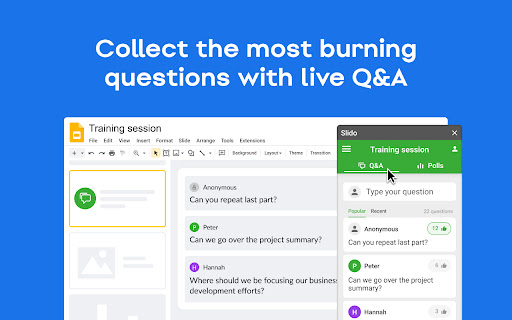
Engage your audience with live polling and Q&A without ever leaving Google Slides With Slido for Google slides add-on, you can: 📊 Create word clouds and other live polls directly in your presentation 🏆 Run a competitive quiz with leaderboard 🙋♀️ Collect the most burning questions with live Q&A This extension ensures that your animations, transitions, videos and GIFs all work when presenting with our Slido for Google Slides add-on.

Wooclap for Google Slides
This extension integrates Wooclap into Google Slides. Wooclap, an interactive questioning tool that boosts real-time engagement through 20+ dynamic question types, making classes, trainings, and presentations more participative. Easy to use and fully integrated into existing digital ecosystems, Wooclap transforms passive audiences into active learners. Today, over 3 million educators and trainers in leading institutions like HEC Paris, Duke University, Total, Pernod Ricard and the University of Edinburgh use Wooclap to shape the future of learning.

Google Meet Breakout by Robert Hudek
Only the teacher needs to install. Completely Free and your Data is Private. Google Classroom integration, Slider Control. Welcome to Google Meet Breakout Rooms Extension ***** Only the teacher needs to install this extension. ***** ***** Please do not ask your students to install it, as they will not use it **** NEW Feature: Practice using the Extension on your own computer by simulating students, perfect for teachers to rehearse before going live.https://youtu.be/QMurrSyCPmY The Google Meet Breakout Rooms Extension has 5 key features: 1) See All Students: The teacher can always see ALL of the students in ALL of the breakout rooms. 2)Free: The extension is completely free to use. I am a software engineer and created this for my personal use as a teacher and then improved it for all teachers to use. I make no money off of this extension, there are no ads, and no data is shared with me or any third parties. 3) Private: Your breakout rooms data is privately stored in your personal computer's chrome browser. Your breakout rooms data is NOT shared with anyone and it is NOT stored on a server. Even the creator of this extension has no knowledge of any of your data. 4) Hassle-free: Only the teacher needs to install this extension. Please do not ask your students to install it, as they won’t need to use it. The extension is only for the teacher, and it will not affect the students in any way. Students will continue to use Google Meet as they normally do. 5) Online Help: The online help menu is completely updated and now has screen shots of every step of the way for setup and operation. This software is created by Robert Hudek and all rights are reserved. No part of this extension may be copied without the express written consent of Robert Hudek at Hudek Tech LLc. This extension is not affiliated with Google, Inc. 1) Breakout rooms may be viewed in either tab or tiled mode 2) A slider may be used to quickly move between rooms 3) Breakout assignments may be created at any time or in advance if desired 4) Teachers may broadcast their video and audio to all the breakout rooms 5) Customize themes! 6) Can use Google Meet Nicknames (if your Google subscription supports nicknames) 7) Basic reporting 8) Mute and Remove Students buttons 9) Import, Export functions 10) Google classroom integration *** Slovak: A big thank you to Lenka Zustiaková from SOŠ GaHS, Farského 9 in Petržalka (www.farskeho.sk) for the translation into Slovak. *** Ukrainian: A big thank you to Igor Kozachuk (email: disk.igor@gmail.com) for the translation into Ukrainian *** If you want a translation of this extension to your language, please send me an email and I will be happy to work with you to get this done. My email is robert@hudektech.com. I would like to add Spanish, Portuguese, German, Japanese, and Korean but any language is fine with me. *** This extension is owned and developed by Robert Hudek. This extension is independent from Google and is not owned by or part of Google or Google Meet. This extension is designed to enhance and extend the functionality of Google Meet. *** If you find a problem please inform me at robert@hudektech.com and I will try my best to reply as soon as I can. Data Privacy: I have a detailed data privacy section on my web page, but the short version is that I do not copy, transmit or share any of your data with anyone including myself. I also do not use cookies, nor do I drop third party cookies on you. Warranty and Guarantee: There is no warranty and there is no guarantee for this extension. I have a detailed warranty (none) and guarantee (none) description on my web page but the short version is this: By using this Extension, you understand and agree that the Extension is provided "as is" and "as available". The developer Robert Hudek EXPRESSLY DISCLAIMS ALL WARRANTIES AND CONDITIONS OF ANY KIND, WHETHER EXPRESS OR IMPLIED, INCLUDING, BUT NOT LIMITED TO THE IMPLIED WARRANTIES AND CONDITIONS OF MERCHANTABILITY, FITNESS FOR A PARTICULAR PURPOSE AND NON-INFRINGEMENT.

Conferences i/o Live Content Slides
Conferences i/o is an easy-to-use live audience engagement platform that is perfect for virtual, hybrid, and in-person meetings. Millions of attendees at thousands of events, primarily across North America, have used Conferences i/o technology to make presentations more interactive. Engaged attendees are better attendees — they learn more, and they give higher ratings to sessions and events that add elements of audience participation. How does this extension work? This extension is built for existing Conferences i/o customers. It automatically decodes live content slides within Google Slides, PowerPoint Online and Prezi. These decoded slides will be replaced with interactive slide content while being displayed during a presentation. How is this extension supported? This extension is fully supported by the Conferences i/o support team. Customers can reach out at any time with questions about how the product works, and how they can get the most out of it. I'm not currently a customer. How can I try Conferences i/o? Reach out to the Conferences i/o team via our website, https://www.conferences.io Audience Q&A Enjoy a world-class Q&A experience from the inventors of crowdsourced meeting Q&A. Before your event, collect questions in one convenient place. Audience members can upvote questions, allowing Q&A time to be used efficiently. Download questions after your event and share internally or with attendees. Polling Engage your audience with a variety of poll types (multiple choice, open ended). Try our exclusive brainstorming poll, where participants can submit and then vote for ideas. Collect responses beforehand, or run live polls during your meeting. Download a well formatted report afterward. Session Evaluations Skip messy email feedback and capture an evaluation while it's fresh in mind for attendees. No need to use any other survey tool. And more! Check-ins and check-outs for continuing education sessions. Audience games for doing something a little different than a normal presentation. Single sign-on integration (if you need it). Fully customizable branding.

Mote for Google Chrome™
Your AI-powered learning companion - Mote helps everyone to read, write & be heard across Google Workspace and the web. AI-powered tools for reading, writing, and communication—anywhere students learn online. Trusted by millions of educators and students worldwide, Mote empowers students to read, write, and communicate with confidence across any webpage, with seamless Google Workspace integration. What's new? The Mote Sidebar now features three powerful modes that adapt to every learner's needs AND has a Focus Mode to remove visual clutter from web articles, helping readers to stay focused. READING MODE Read Aloud with natural human voices Picture Dictionary & Vocabulary Builder – Click any word for instant definition, illustration, audio pronunciation, and one-click "Add to My Words" for personalized vocabulary growth. Smart Highlighting & Auto-Organization – Five color-coded highlighters (with accessible labels) automatically funnel key terms into your personal vocabulary bank and highlight collections, or export directly to Google Docs. Focus Mode – Adjustable screen mask that reduces visual clutter for better reading focus and comprehension. Instant Translation & Read-Aloud – Highlight to translate and hear natural AI voices in 50+ languages - even when text appears in images. WRITING MODE AI Voice Typing – Fast, punctuation-smart dictation that works in any text box, with context-aware predictive text that grows smarter as you write. Auto-pastes into most websites. Intelligent Text Prediction – Purpose-built for K-12 learners, Mote's AI text prediction supports phonetic spelling and adapts to writing context. CREATING MODE Voice Recording & Transcription – Record your voice, auto-transcribe with AI, and share via link or let Mote read it back in expressive voices or translate to another language. AUDIO UPLOAD Upload pre-recorded audio files and embed them directly into assignments, presentations, and educational content. Core features students and teachers love 🎤 AI Voice Tools – Natural-sounding text-to-speech in 60+ languages, voice typing, and voice recording for human-centered feedback in Google Docs, Slides, Canvas SpeedGrader, or anywhere. 🌍 Multilingual Support – Instant translation and read-aloud in 50+ languages builds confidence and independence for all learners. 🧠 Personalized Learning – Picture dictionary, vocabulary mastery tools, and adaptive text prediction that help students read, write, and comprehend at their own pace. 🔒 Admin & Teacher Controls – Toggle features, view usage analytics, and manage rosters via Classlink, Google Classroom, or CSV upload. ♿ Universal Design – Built-in support for diverse learners including dyslexic, ADHD, multilingual, and students who benefit from assistive technology - no special setup required. How to get started 1. Install the extension 2. Sign up with Google or email 3. Refresh your tab and click the Mote icon 4. Press Play on any text — or try a 5-second voice note in a Google Docs comment Perfect for: - Google Workspace for Education users - Multilingual classrooms and ELL support - Personalized and self-paced learning - Universal Design for Learning (UDL) implementation - Students who benefit from assistive technology
