
jneeckmfijgiljijaomajegjoddmepaf

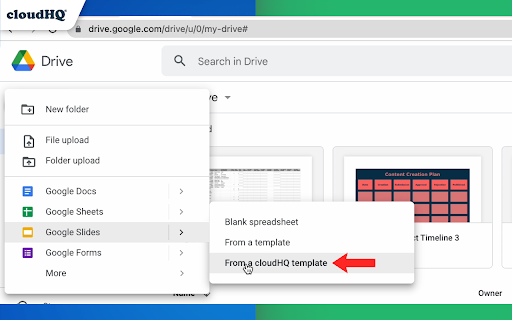
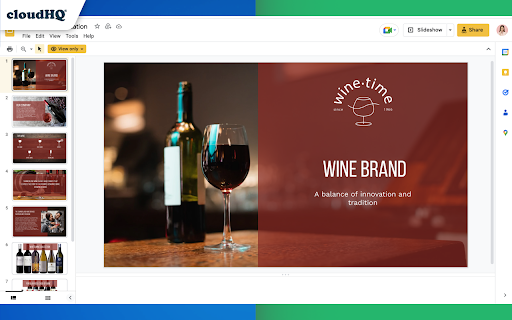

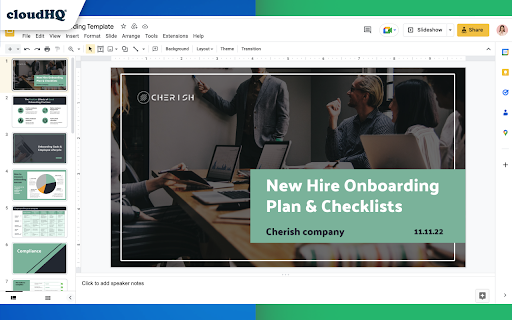
Professionally designed free templates for Google Slides™ These free templates for Google Slides™ are for commercial and non-commercial use, and are fully integrated with Google Slides™ UI. The templates are professionally designed and include: ✅ Tourism presentations ✅ Product presentations ✅ Healthcare-related presentations ✅ Food presentations ✅ Fitness presentations ✅ Event presentations ✅ Educational presentations And much more! ~~~ What you need to do to access Free Templates for Google Slides ~~~ 1) Install this extension 2) Find the templates in Google Drive by tapping on "New" --> "Google Slides" --> "Template by cloudHQ" 3) Make a copy of the template to make it your own, and edit it as you see fit! This is an extremely effective template app for anyone looking to create awesome presentation. When using a Google Slides theme template, you will save time and will quickly get over any anxiety caused by creating something from scratch. All templates have royalty-free stock images, illustrations, and photographs. They can be used in both personal and commercial projects. cloudHQ. Helping your productivity, 1 click at a time. cloudHQ website: https://www.cloudhq.net/ App website: https://www.google-slides-theme-templates.com/ Pricing: https://www.google-slides-theme-templates.com/pricing Support page: https://support.cloudhq.net/category/browser-extensions/google-slides--theme-templates/ Blog: https://blog.cloudhq.net

Email Sender Icons by cloudHQ
Identify Companies in Your Inbox. It's no secret that companies have more purchasing power than individuals, so identifying them in your inbox can be helpful when you need to triage who you reply back to first. Email Sender Icons by cloudHQ does just that. It visually associates an official company logo (favicon) to someone who sends you an email, without having to open the email itself. It's like "caller id" for your email. Now you can prioritize triaging your email response time to large companies first, instead of individuals with a free email account on platforms like Gmail™, Yahoo, Hotmail, etc. Easily Identify: - Companies in your inbox - Invoices to pay (Paypal, Venmo, etc) - Inter-office emails - Purchase Orders The icon (aka favicon) is determined by the sender's email domain address, and appears on the same line as your email preview. For example, if you receive an email from elon@tesla.com, this Gmail™ extension will add the Tesla logo next to your message preview so that you can immediately identify that Elon is probably very important and you should return his message before others in your inbox. A note on privacy and security: All logo (favicon) processing is done locally within your browser, and no Gmail™ data is ever uploaded or shared anywhere. cloudHQ. Helping your productivity, 1 click at a time. cloudHQ Website: https://www.cloudhq.net/ App Website: https://www.email-sender-icons.com Pricing: FREE Support page: https://support.cloudhq.net Blog: https://support.cloudhq.net/category/browser-extensions/email-sender-icons/

ChatGPT Sidebar by cloudHQ
ChatGPT sidebar as your AI assistant on any page Welcome to the ChatGPT Sidebar by cloudHQ, an AI assistant that emerges from the side of any webpage you browse. As you navigate different webpages, your email inbox, or any online document, ChatGPT Sidebar can be accessed with just a click of a button. The information you get with this handy sidebar provides you with straightforward knowledge about whatever it is that you're browsing. Whether you're deciphering a dense article, exploring new topics, or just casually browsing, our ChatGPT Sidebar is designed to enrich your understanding, streamline information, and answer any queries you might have—immediately. How to use ChatGPT Sidebar? 1. Go to any website 2. Select the text 3. Click on ChatGPT Sidebar icon on the right side of your screen, select the prompt and click on "Send to ChatGPT". 1. Use ChatGPT prompts across websites for tasks like: ✔️ Summarize ✔️ Rewrite ✔️ Check Grammar ✔️ Translate ✔️ Clarify code ✔️ Summarize the web page ✔️ Your own prompts 2. Access our ready-to-use prompt library, where you can further customize any prompts for your own needs. 3. Full support for both ChatGPT-4 and ChatGPT-3.5 4. Full support for Open AI API Refine your web experience with ChatGPT, and become smarter in 1 click! 🌟 cloudHQ website: https://www.cloudhq.net/ App website: https://www.gpt-sidebar.com Pricing: https://www.gpt-sidebar.com/pricing Support page: https://support.cloudhq.net/category/browser-extensions/chatgpt-sidebar/ FAQ page: https://support.cloudhq.net/chatgpt-sidebar-faq-frequently-asked-questions/ Blog: https://blog.cloudhq.net

Templates for Google Docs™ by cloudHQ
Professionally designed free Google Docs Templates: Invoice templates, Resume templates, Business Plans, and more. These free Google Docs™ templates are for commercial and non-commercial use, and are fully integrated with Google Docs™. You'll find professionally-designed: ✅ Business Proposals ✅ Resume templates ✅ Cover letter templates ✅ Invoice templates ✅ Google Slides templates ✅ Lesson Plans ✅ Newsletters ✅ Flyers ✅ SO MUCH MORE! All you need to do is: 1) Install this extension. 2) Find the templates in Google Drive™ by tapping on "New" --> Google Docs -->Template by cloudHQ 3) Make a copy of the template, and tweak it as you see fit! This is an extremely effective template app for anyone looking to create business plans, invoices, resumes, cover letters, newsletters and flyers. When using a Google Docs Template, you save time and can quickly get over the anxiety of creating something from scratch. Use proven design concepts, and save time, all while creating a winning document that conveys everything you want it to. All templates have royalty-free stock images, illustrations, and photographs. They can be used in both personal and commercial projects. cloudHQ. Helping your productivity, 1 click at a time. cloudHQ website: https://www.cloudhq.net/ App website: https://www.google-docs-templates.com/ Pricing: https://www.google-docs-templates.com//pricing Support page: https://support.cloudhq.net/category/browser-extensions/google-docs-templates/ Blog: https://blog.cloudhq.net Google Drive and Google Docs are trademarks of Google LLC. Use of these trademarks is subject to Google Permissions.

ChatGPT for Google by cloudHQ
This extension gives you ChatGPT query responses alongside Google search engine results. This extension is easy to use and enhances your Google search experience. Features: ✅ OpenAI Responses alongside your Google search results ✅ A summary of search results ✅ Supplement responses with data after 2021 via search results ✅ OpenAI API and multiple version support ✅ Toggle on/off as desired ✅ Copy to clipboard ~~~How to use it~~~ 1. Get an OpenAI account here if you don't already have one: https://chat.openai.com/chat and create an account 2. Install this extension 3. Open Chrome and search for anything in Google Search 4. AI-generated responses alongside conventional search engine results will be displayed on the right side of your window 5. When in ChatGPT, simply type in your prompt, and the results will be ChatGPT's response, and will then provide you with a Google Search summary on the subject (very helpful for up to date information) ~~~FAQ~~~ 1. What is ChatGPT? ChatGPT is a computer program created by OpenAI that can generate human-like text. It's like a super-advanced version of autocorrect: it predicts and generates what it thinks should come next in a conversation or a piece of writing. This is useful for many things, such as writing emails, creating content, answering questions, and even tutoring in different subjects. It's important to note that it doesn't know any personal data unless you tell it during the conversation, and it doesn't know specifics about the documents it learned from. 2. What does this extension do? This browser extension is developed by cloudHQ LLC. The extension enhances search engine results with the power of artificial intelligence from OpenAI. The extension operates by displaying AI-generated responses alongside conventional Google search engine results, offering users an enhanced search result experience. 3. Is this extension free to use? Yes, the extension is free to use. 4. Is this extension integrated with other cloudHQ products? Yes. This extension is fully integrated with other cloudHQ products such as Save Emails to PDF by cloudHQ, Export Emails to Sheets by cloudHQ, and more. 5. Do I need an OpenAI (chat.openai.com) account? Yes, you need to have an OpenAI account to use this extension. Go to https://chat.openai.com/chat and create an account. If you choose to use an API, you need to have a developer account. You can create it here: https://platform.openai.com/ We hope you enjoy your new search result experience and find it helpful for your overall knowledge about anything you wish to know about. cloudHQ. Helping your productivity, 1 click at a time. cloudHQ website: https://www.cloudhq.net/ App website: https://www.chatgpt-for-google-search.com/ Pricing: https://www.chatgpt-for-google-search.com/pricing Support page: https://support.cloudhq.net/category/browser-extensions/chatgpt-for-google/ FAQ page: https://support.cloudhq.net/ Blog: https://blog.cloudhq.net
