
keodkbefllpdgoodnnamaipiacnkpmog
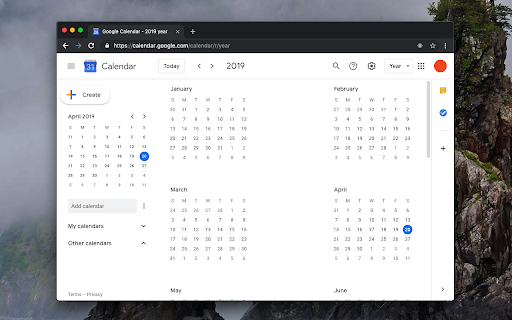
Displays your Calendar's weekly, or monthly schedules and agenda on new tabs This extension replaces the default new tab page with a customized Google Calendar page. You can view various calendar views, such as day, week, month, year, or agenda. Moreover, you have the flexibility to set a custom URL for the new page, which can even point to a different calendar web application. The extension directs the new tab to the specified URL, and that's it. Key Features: 1. Substitute the new tab with an external service of your choice. 2. Open the external service with a single click next to your current tab (using the action button). 3. Access common calendar views (day, week, month, year, or agenda) via a right-click context menu. 4. Access an account selector, allowing you to choose the logged-in account for displaying the calendar. 5. You can configure different pages for new tab and toolbar button click Legal Disclaimer: This extension is an open-source project that exclusively opens the official Google Calendar web application in a new tab. It is not affiliated with Google or the Google Calendar team in any way. Furthermore, this extension cannot access or modify your calendar or any other data.

Tags for Google Calendar™
A little visual addon that adds special markup to tags and question marks in event names. This add-on causes two markup changes in of Google Calendar. Event names containing a colon (:) will have the part before the colon being displayed as a colored tag that helps discerning different kinds of events without the need for creating dozens of calendars. For example: "Tag: Event name" becomes "[Tag] Event name". Event names ending with a question mark will be displayed in italic and transparent, as a kind of optional or yet to be confirmed event.

Google Calendar Event Checker
Mark events as completed or cancelled in Google Calendar with emojis or strikethroughs. Mark Google Calendar events as completed with checkmarks, emojis, or strikethrough and turn your calendar into a task tracker. It’s the perfect tool for professionals, students, and anyone who wants to mark events as done or canceled and boost productivity. 🆓 Free Version Features 🆓 Available immediately after installation - no sign-in or subscription required: ▸ Customizable completion marks: choose between emojis (✅ or ❌), unicode checkmark (✓), or strikethrough effect (title crossed off). ▸ Automatic timestamps: save completion date/time in event description for easy reference. ▸ Edit-page marking: mark events as done from the calendar event edit page. ▸ Minimal and Privacy-Oriented: the extension is designed to be minimalistic and don’t track any user data. ⭐ Premium Version Features ⭐ Unlock advanced productivity and simplicity features: ▸ Quick-mark from event dialog: complete events with one click from the event popup. ▸ Daily events dashboard: view all today's events in the extension popup with completion status. ▸ Mark from any tab: complete calendar events without opening Google Calendar. ▸ Custom checkmark slots: add up to 5 emojis or unicode symbols as completion markers. ▸ Still Minimal and Privacy-Oriented: we don't see or store any of your events and never share your data. How to use free version: ▸ Install the extension, no sign in needed ▸ Open any Google Calendar event for editing ▸ Click the completion mark button (✅) ▸ Save the event ▸ Go to the extension's options to configure the completion marks and a strike-through effect. How to use premium version: ▸ Pin extension and sign in with your Google account ▸ Start free trial (no credit card needed) ▸ Mark events as completed from an event dialog ▸ Mark events as completed from "Today events" view ▸ Configure custom checkmarks and a strike-through effect in ⚙️ User Settings page (available after sign in). ⚠️ Troubleshooting ⚠️ If something isn't working properly, here's what you can try: ▸ Make sure you can edit event title from an event edit page - some events are not editable at all - for example: working locations, contacts’ birthdays calendar, shared calendars if you don’t have proper permissions. ▸ Sign out and sign back to the extension (for premium users). ▸ Reinstall the extension. ▸ Report an issue to support@calcheckr.com, include screenshots if possible as it might help to resolve your case more quickly, make sure to mention what browser you’re using. ❓Frequently Asked Questions❓ Q: How do I mark Google Calendar events as completed? A: Install the extension, open any event, and use the completion button or choose your preferred visual mark (checkmark, emoji, or strikethrough). Q: Will other people see my completion marks? A: Yes! Since changes save directly to Google Calendar, anyone with calendar access sees the completion marks. Great for team collaboration. Q: Does this work with Google Workspace? A: Absolutely! Works with personal Google accounts and Google Workspace (formerly G Suite) accounts. Q: Does it work with recurring events? A: Yes! Mark individual instances or the entire series. Q: Can I use the free version forever? A: Yes! The free plan includes core features. Upgrade to Premium only if you want one-click marking, daily views, and custom checkmarks. Q: Is my calendar data secure? A: Absolutely! We use only Google infrastructure. Authentication tokens are encrypted, and we never see, store, or share your calendar events data. Q: How do I cancel Premium? A: Cancel anytime from the Stripe customer portal. Premium features remain active until your billing period ends, then you automatically return to the free plan. 📧 Contacts 📧 For any questions, comments and ideas please reach out to support@calcheckr.com 2.2.0 - 12/10/2025: - premium: strikethrough effect in popup view - premium: date picker for quick navigation 2.1.2 - 12/06/2025: - internal fixes: make completion detection to be based on the default + custom checkmarks only 2.1.1 - 12/03/2025: - internal fixes - options page UI refactoring 2.0.2 - 11/24/2025: - internal fixes - add support id in extension options 2.0.1 - 11/18/2025: - internal fixes - show onboarding page once - start introducing premium version 1.6.2 - 12/13/2022: - Fix issue with not showing button (input selector got updated) 1.6.0 - 10/09/2022: - Add error and usage reporting option 1.3.0 - 10/07/2021: - the strikethrough effect is now configurable in options 1.2.0 - 10/05/2021: - issue with search was fixed by saving origin event's title in the description area (configurable in options) - add date and time label when it was completed to the description textarea (configurable in options) 1.1.0 - 10/04/2020: - add check emoji in the beginning (configurable in options) - fix issue for event titles with emojis

Manganum: Sidebar with Gmail and Google Calendar
One-click access to your tools, even Gmail and Google Calendar. Boost your productivity with Manganum — an all-in-one sidebar for Chrome that integrates Gmail, Google Calendar, Drive, Keep, and more. Access mail, calendar, notes, tasks, and AI tools like ChatGPT with one click on any tab. Key Features: — Unified Sidebar: Access Gmail, Google Calendar, Drive, Keep, and more in one click, directly from the sidebar. — Inbox App: Quick access to your Gmail inbox, allowing you to check emails without fully opening Gmail. — Calendar App: View your Google Calendar schedule and receive reminders for upcoming events. Join video calls with a single click. — AI Integration: Get instant access to ChatGPT and Google Bard for AI-powered assistance on any tab. — Drive Integration: Access your Google Drive files without opening additional tabs. — Translator: Translate text across more than 100 languages directly in your browser. — Tasks & Notes: Manage your tasks with Google Tasks or Todoist, and jot down ideas in Google Keep or Manganum Notes. — Customizable New Tab: Personalize your new tab page with motivational quotes, stunning backgrounds, and practical widgets. — Sync SMS: Receive SMS from your Android phone directly in the sidebar. — Games & Tools: Take a break with classic arcade games like Pacman and 2048, or use calculators and other tools. Customization: — Dark Mode: Enjoy a darker interface in Inbox, Translator, and Tasks. — Pin Mode: Keep the sidebar always visible as you switch between tabs. — Auto-Open: Set your favorite sidebar app to open automatically with each new tab. Manganum simplifies your digital life by bringing all essential tools into one place. Whether you’re managing emails, scheduling meetings, or using AI, Manganum keeps everything accessible with just one click. Maximize your efficiency and stay organized with Manganum. Install now and revolutionize your browsing experience with Gmail, Google Calendar, and other essential tools. Click ""Add to Chrome"" to get started! Created with ❤️.

Google Calendar Weekend Highlighter
Custom Colour for Weekends in Google Calendar >>>>>>>>>>>>>>>>>>> LET'S GO DARK! >>>>>>>>>>>>>>>>> Important NOTE!!! >>>>>>>>>>>>>>>>>>>>> DONATE!
