
kdoddkjhpcokbhchhlkbbjnfmlpcacmi
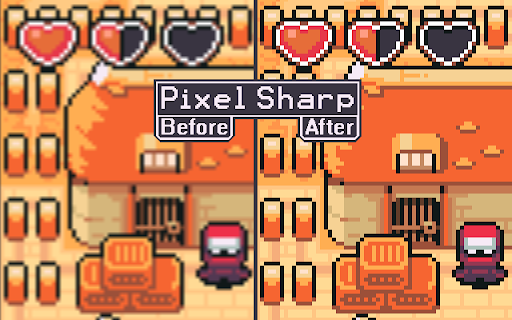
Sets the image scaling of the page to Nearest Neighbor for sharp pixels PixelSharp changes the scaling of images on the current page to be pixel-perfect when activated. Scaled up pixel art in the browser often ends up very blurry due to the default "linear" scaling method. This scaling works well for general browsing, as most images on the web are high resolution, but is detrimental to pixel art and low resolution images. Activating PixelSharp changes the page scaling to "nearest neighbour", the intended scaling method for pixel art. How to use: The extension was designed to be pinned so that you can simply click the icon to activate it. You can also activate PixelSharp by first pressing the "Extensions" button next to the URL bar and then clicking on PixelSharp in the list of installed extensions. You will need to enable "Allow access to file URLs" for the extension to work on images loaded from your computer. Technical details: The extension only activates when clicked. Clicking the extension icon will trigger a single update to the current page which modifies the display styles to use nearest neighbour scaling. After the page has been updated the extension stops. Reloading the page will clear the page modification, essentially reverting the images on the page back to the original browser scaling behaviour. Image attribution: The "before and after" image was created from real screen captures of the same image at 500% browser zoom scale, before and after using the PixelSharp extension. The pixel art used to demonstrate this ("Ninja Adventure - Asset Pack" by pixel-boy and AAA) was licensed under the Creative Commons Zero (CC0) license ("public domain").

Video Image Control ( new gamma )
The extension regulate sharpness, contrast, brightness, saturation and other settings for video and images on the all websites. The settings can be applied to video, pictures, flash players, as well as to any items you select. Opens the video in a separate window (picture in picture mode) Used Picture-in-Picture Web API Extension works in YANDEX BROWSER It supports GOOGLE MAPS, and YANDEX MAPS, 2D and 3D games, and many other other applications built on HTML5. Just press the FLASH button ;) ALLOWS YOU TO SHARE VIEWED PAGES IN SOCIAL NETWORKS!!! ADJUST VIDEO SETTINGS ✫ Sharpness ✫ Brightness ✫ Contrast ✫ Color Balance ✫ Saturate ✫ Gamma ✫ Grayscale ✫ Sepia ✫ Crazy mirror ✫ Decrease or increase the video speed (from 0.1x up to 4x) ✫ The ability to rotate or flip video, pictures, flash players, and any other content ✫ Connected smart sharpening allows more flexible editing of video and other graphics You can control the extension from both the extension panel and the player (the button is located in the upper left corner) The extension supports players based on both HTML5 and Flash. You improve video in this video editor. Enhance video will make clean and bright video color the picture. Correct video image in real time. Video correction settings are saved, all the parameters of the video effect stored. Edit quality sharpen video can in the range from 0 to 3 Speed control works in the range from 0.1x to 4x in increments of 0.1 You can control the speed by holding down the CTRL + ALT keys and pressing the ↑ ↓ arrows on the keyboard

Page Gallery
Displays a gallery of the images on the current page with filtering and sorting. Looking through a confusing image gallery or trying to find the largest version of an image on a page? Open the Page Gallery and see every image in a handy overview with filtering and sorting!

MyCache
MyCache automatically stores saved copies of the pages you visit. MyCache is a Chrome extension for saving copies of the pages you visit automatically or on request for offline viewing. It also provides a user interface for viewing all pages stored in the filesystem. By using MyCache you agree to the terms of use and privacy policy (https://github.com/msindwan/msindwan.github.io/wiki/MyCache-Terms-of-Use-and-Privacy-Policy) MyCache does not send your data to the vendor or any third-party vendors. All files are saved on your desktop. If saving all files by default, please make sure to keep sensitive files saved by MyCache safe and secure.

Video Filters
Easy access to html5 video filters and shaders Extension enables you to change brightness and more of any video on the web. Includes a button for playing the videos in Picture in Picture mode. Available filters are; Brightness, Contrast, Saturation, Invert, Sepia, Opacity, Grayscale, Hue, Blur and playbackrate. Experimental effect; Sharpness, Vignette, Temperature, Chromatic Aberration and Edge Detection. Tested on; Netflix, Disney+, YouTube and more. Experimental effects unfortunately can not work with DRM protected content.
