
mdoelcifdkcimkdbfkjjnedabmjlkokc

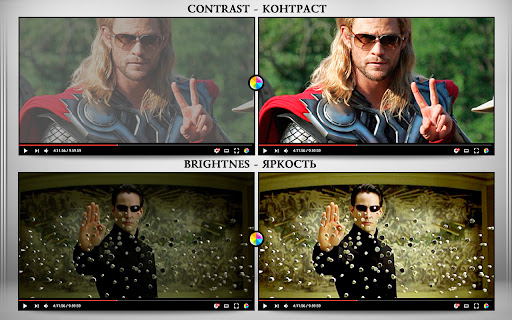
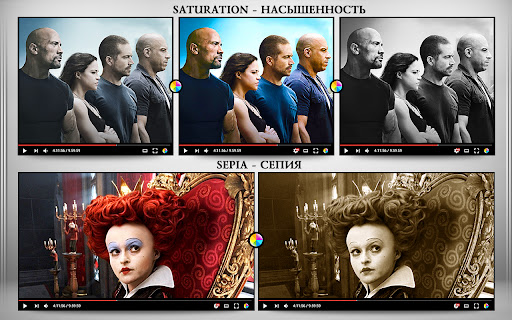

The extension regulate sharpness, contrast, brightness, saturation and other settings for video and images on the all websites. The settings can be applied to video, pictures, flash players, as well as to any items you select. Opens the video in a separate window (picture in picture mode) Used Picture-in-Picture Web API Extension works in YANDEX BROWSER It supports GOOGLE MAPS, and YANDEX MAPS, 2D and 3D games, and many other other applications built on HTML5. Just press the FLASH button ;) ALLOWS YOU TO SHARE VIEWED PAGES IN SOCIAL NETWORKS!!! ADJUST VIDEO SETTINGS ✫ Sharpness ✫ Brightness ✫ Contrast ✫ Color Balance ✫ Saturate ✫ Gamma ✫ Grayscale ✫ Sepia ✫ Crazy mirror ✫ Decrease or increase the video speed (from 0.1x up to 4x) ✫ The ability to rotate or flip video, pictures, flash players, and any other content ✫ Connected smart sharpening allows more flexible editing of video and other graphics You can control the extension from both the extension panel and the player (the button is located in the upper left corner) The extension supports players based on both HTML5 and Flash. You improve video in this video editor. Enhance video will make clean and bright video color the picture. Correct video image in real time. Video correction settings are saved, all the parameters of the video effect stored. Edit quality sharpen video can in the range from 0 to 3 Speed control works in the range from 0.1x to 4x in increments of 0.1 You can control the speed by holding down the CTRL + ALT keys and pressing the ↑ ↓ arrows on the keyboard

Video Brightness Adjuster
Adjusts the brightness of the video to make dark scenes more visible. You can adjust the brightness when scenes in movies and the like are dark and difficult to see. It's possible to adjust three types: brightness, contrast, and saturation.

Video Enhancer for YouTube™
Increase playback rate up to 16x, boost the audio, adjust both the brightness and contrast and add various filters to your video. Enhance your video with various useful and helpful options and filters. Features: • Adjust the playback rate of the video from 0.1x to 16x • Boost the audio • Loop the video • Loop over specific sections of the video • Adjust the brightness • Adjust the contrast • Add and adjust up to 7 more filters • Toggle Picture-in-Picture(PiP) mode • Customize the theme and font size of the extension You can report issues and request features here: https://github.com/isgkm/VEfYT Version 2.0.0: • Refactored the majority of the codebase fixing some bugs and improving performance • Redesigned the UI • Added the ability to edit filter values directly in the text fields to allow more precise inputs • Added the option to loop the video • Added the option to loop the specific sections of a video • Added the font size option to the settings page Version 1.2.0: • Added the option to toggle Picture-in-Picture(PiP) mode Version 1.1.0: • Now you can adjust the filter values more precisely with the mouse wheel • Added the option to not reset filters on video change • Added the option to customize the colors of the extension

Video Quality Enhancer Extension: ClipMage AI
AI Powered Video Quality Enhancement for all videos in chrome. Video Quality Enhancer Extension: ClipMage AI ClipMage AI is an AI Powered video quality enhancer for all your videos in chrome. No more blurry, unfocused videos. ClipMage lets you upscale and enhance videos up to High Definition quality right in your browser. It also features other tools like a ChatGPT sidebar to chat with AI models to 10x your productivity, as well as AI Image and Video Generation. An All-in-one AI tool for your browser.

NexVid - Real-time Video Upscaler & Enhancer
Upscale and enhance videos 🎬 NexVid is a lightweight browser extension for real-time video upscaling and creative enhancement. It uses GPU-accelerated Anime4K processing, advanced filters, and a large library of WebGL shaders to improve anime, cartoons, movies, music videos, and other web video directly in your browser. Choose from 15+ Anime4K upscaling quality profiles, tune the target FPS for your hardware, set a resolution threshold to avoid processing already high-resolution sources, and build your own enhancement stack without uploading media anywhere. - Real-time upscaling with profiles ranging from fastest to maximum quality. - Performance controls including target FPS tuning and automatic resolution threshold handling - works great even on less powerful computers thanks to adjustable filters and profiles. - 30+ WebGL shaders across retro, glow, glitch, chromatic, artistic, anime-focused, and experimental super-resolution categories. - Advanced filters and image controls including brightness, saturation, contrast, grayscale, sepia, hue rotation, blur, gamma, emboss, morphology, unsharp mask, and high-pass sharpening. - Adjustable shader parameters plus preset saving and loading for complete effect chains. - Built-in local video player to apply upscaling, filters, and shaders to local video files. - Interface available in English, French, Spanish, Russian, and Simplified Chinese. - Privacy-friendly processing performed locally in the browser. 🔒 Ideal for users who want sharper lines, cleaner details, and more stylized playback without leaving the browser. Our extension provides occasional, non-invasive ads within the extension interface, including in the popup and/or other internal extension pages to keep the service free for our users.
