
kbldlmjcoelkdnjaiegddeinclgnmbmo

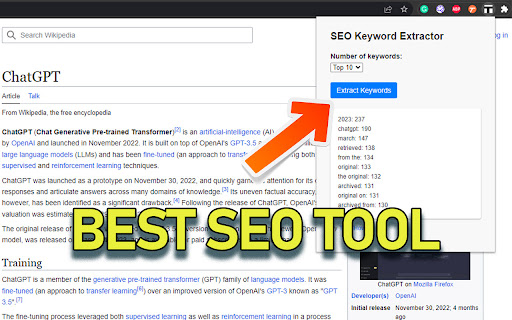
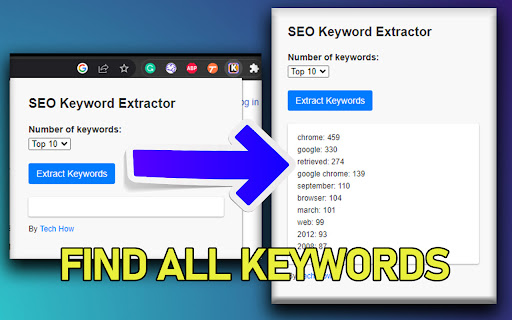
Extract top keywords and long-tail phrases from any webpage. Boost your content strategy with the SEO Keyword Extractor, a powerful and user-friendly browser extension designed to help you uncover the most relevant keywords from any webpage. Whether you're a content creator, SEO professional, or digital marketer, this extension will streamline your research process and help you craft engaging, high-performing content. By installing SEO Keyword Extractor, you'll gain access to the following benefits: - Instant keyword extraction: Analyze any webpage with a single click to uncover the top keywords and long-tail phrases. Gain valuable insights into the content strategies of top-performing pages in your niche. - Customizable keyword lists: Choose the number of keywords you'd like to extract, ranging from the top 5 to the top 15, ensuring you receive the most relevant information for your needs. - Smart filtering: Our advanced algorithm filters out common stop words, providing you with a clean, focused list of keywords and phrases, allowing you to optimize your content for better search engine rankings. - Easy-to-use interface: The sleek, modern design ensures a seamless user experience, with an intuitive layout that makes extracting keywords from any webpage a breeze. - Time-saving insights: Say goodbye to tedious manual keyword research. SEO Keyword Extractor streamlines your workflow, allowing you to focus on creating high-quality content that resonates with your target audience.

Website Ranking and SEO Checker by Semalt
Semalt SEO Extension is a free SEO tool to track websites’ Google rankings and spot issues that keep you from attracting traffic. Click just once to find out how your website ranks and what keywords it’s ranking for. View ranking changes over time. Identify and analyze your competitors. Discover the website’s best-performing pages as those that have the most Google Top positions. All you need to put your SEO effort into where it needs to be. Besides giving you in-depth data on Google SERPs, Semalt SEO Extension can be used to check your website for SEO issues that cause your traffic and conversions to dwindle. Please Note: Semalt collects ranking data on 53 million websites for 100 million keywords in over 1000 location-specific Google search results. This data is updated every day and fed into Extension for you to analyze for free and without restrictions. You don’t even need to have a Semalt account or the API key to use the extension. ➊ Ranking data and features ➣ Number of keywords in TOP See how many keywords your competitor’s or your own website ranks for in Google TOP 1-100 results. Check whether there are more or fewer keywords than the website ranked for days or months ago. ➣ Keywords Distribution by TOP Crunch some more keyword-related numbers while analyzing the changes in TOP-1, TOP-3, TOP-10, TOP-50, and TOP-100 over time. ➣ Rankings by Keywords View a list of the most popular keywords the website ranks for. Compare their SERP positions for any dates and start detecting trends. ➣ TOP-100 Competitors by Keywords Get to know your competition with the TOP-100 Competitors list. It can be generated for any keyword your website ranks for once you click on this keyword in the Rankings by Keywords chart. Bonus: you can then scan a competitor’s website from the list on semalt.net. ➣ Number of pages in TOP Check how many of your website’s pages rank in TOP 1-100 Google search results. Use the chart to track changes over time. ➣ Page distribution by TOP rankings Analyze how your website’s pages are distributed throughout TOP-1, TOP-3, TOP-10, TOP-50, and TOP-100 search results by position and compare it to where they were earlier. ➣ Pages in TOP Get to know which of your website’s pages generate the most Google traffic. Each page comes with the number of keywords it’s ranking for. You can scrutinize the spots it takes up for these keywords in search results in a few clicks. You can then download a complete report or just a list of keywords the page’s ranking for. ➣ Keywords for selected pages Track how the number of keywords a selected page is ranking for has changed over time. ➣ Competitors in Google TOP Identify competitors for the website you’re analyzing. The list of competitors is based on the shared keywords that your website and your competitors’ websites rank for on Google. ➣ Shared keyword changes Check how the competition and the number of keywords you share with each of your biggest competitors have changed over time. Get a comprehensive SEO Audit report for your website. Pinpoint technical errors and other issues that stand in your website’s way to ranking higher in the SERPs and attracting more visitors. Check your website for as many as 47 performance indicators and find out where it stands in terms of today’s SEO. Each performance indicator comes with a detailed description and expert tips on making your website Google-friendlier and improving the user experience. Webpage Analyzer looks into your website’s performance from the following perspectives: - On-page SEO - Indexing - Structured Data - Mobile Adaptability - Performance and Page Speed - Domain - Server & Security - Social Media Presence - Analytics and Counters ➣ Reports You can download a complete or customized report in PDF/CSV/TXT format for any data type you can find in the extension. ➣ User-friendly configurations Configure extension to analyze SEO data more conveniently by selecting: - location for Google search results - date - advanced filtering and sorting options ➋ Who can benefit from extension? ➣ SEO specialists Whether you do SEO for your own website or work at an SEO agency, your daily routine certainly includes Google ranking monitoring. With Semalt Extension, you can save time and money by tracking the rankings of any website quickly and effortlessly. ➣ Marketing specialists The Semalt SERP tracking SEO tool can help you monitor website visibility trends on Google. This can give you a goldmine of insightful data for conducting market analysis or tracking SEO KPIs. ➣ Website owners As a website owner, you want your rankings to be high and your traffic to be massive. Semalt Extension is a good starting point to achieve your goals. It provides precise analytics that you need to see the big picture and make a go of SEO. ➌ How to install extension? It takes 5 (literally) seconds to install extension in just 2 clicks: Click #1 — Hit the Add to Chrome button Click #2 — Add the extension And now it’s there. ➍ How to get started with extension? Go to a website you’d like to scan and left-click the Semalt Extension icon in your Chrome Extensions menu. You’ll get analytics data for this website in a heartbeat. ➎ About Semalt Semalt has been providing SEO analytics data and SEO services since 2013. We’ve helped over 600,000 businesses grow so far and are ready to help yours. Learn more about Semalt at semalt.com/about. ➏ Privacy Policy Your privacy means everything to us. Semalt Extension does NOT collect data on how you use Chrome, search, or navigate websites. It only uses the URL of the web page you enable it on, as well as additional elements associated with this page. Learn more about Semalt’s Privacy Policy at semalt.com/privacy-policy. ➐ Support If you have any questions, comments, or suggestions, contact us at extension@semalt.com or go to our Support page - semalt.com/support.

Keyword Planner
Keyword Planner expands the number of search suggestions shown in the Google™, YouTube™, Amazon™, eBay™ and Etsy™ search bars. Keyword Planner uses the Google™, YouTube™, Amazon™, eBay™ and Etsy™ Suggest APIs to show you useful keywords related to your search query right under the search box. It also integrates with third party APIs to show you search volume data for these keywords. 1. Install the chrome extension 2. Go to any of the supported websites - Google™ YouTube™, Amazon™, eBay™ or Etsy™ and perform a search 3. Inside the text box, on the right hand side you will see 4 new buttons - all, questions, comparisons & prepositions 4. Click the button you want, and you will see multiple lists of keywords show up right underneath the search bar. Change log for the keyword planner chrome extension v0.0.26 (27 Oct 2025) - Fixed issue with YouTube - Fixed issue with Etsy - Added tooltips to buttons to explain what they do v0.0.25 (13th Apr 2024) - Fixed issue with filename in v0.0.24. Youtube.js was incorrectly written as YouTube.js in the manifest file. This would cause issues in non-windows versions. v0.0.24 (30th Mar 2024) - Added 3 more buttons with new functionality. Questions gives you keywords that are in the form of questions, Comparisons gives you keywords that are comparing the search query with other options, and prepositions give you keywords that use prepositions with the search query v0.0.23 (18th Feb 2024) - Rewrote the entire codebase to remove Svelte dependancy - Fixed issue with all websites where the keywords widgets would not show up v0.0.22 (14th August 2022) - Fixed issue with duplicate keywords - Changed extension summary to include other supported websites v0.0.19 (10th August 2022) - Support for YouTube™, Amazon™, eBay™ and Etsy™ v0.0.14 (25th July 2022) - Support for Google dark theme - Bug fixing

Detailed SEO Extension
Get SEO insights at the click of a button to any website you're currently on. Built by full-time SEO's for daily analysis. Get SEO-related insights at the click of a button to any website you're currently on. Pull back their title tag, meta description, meta robots tag and much more. Save hours of time looking through the source code of this page with our SEO analysis extension.

Google Instant Keywords Extractor
Extract search suggestions from Google Search with a Single click 🔥 Look no further! The Google Instant Keywords Extractor is your complete solution to streamline your keyword research and search process effortlessly. 𝐇𝐨𝐰 𝐈𝐭 𝐖𝐨𝐫𝐤𝐬: ✅ Visit 𝐆𝐨𝐨𝐠𝐥𝐞.𝐜𝐨𝐦 and enter your search query — as you type, Google instantly generates a list of keyword suggestions based on popular searches. ✅ The extension automatically detects these suggestions in real time. No popup needed — you can interact directly on the search page. ✅ Copy a single keyword by clicking its dedicated copy icon. ✅ Select multiple keywords using checkboxes, and copy only the ones you need. ✅ Want them all? Hit 𝐂𝐨𝐩𝐲 𝐀𝐥𝐥 for a single-click bulk copy of every suggestion. 🗝 𝐊𝐞𝐲 𝐅𝐞𝐚𝐭𝐮𝐫𝐞𝐬: 🖱️ One-Click Copy – Instantly copy any keyword suggestion individually. 📋 Bulk Copy Options – Copy all suggestions or just the ones you’ve selected. ☑️ Smart Selection – Use checkboxes to choose multiple keywords at once. 🎯 Persistent Selection – Keeps your chosen keywords selected, even as suggestions update. 🚀 Real-time Updates – Suggestions refresh dynamically as you type — no page reload needed. 🎨 Clean & Modern UI – Sleek Material Design with smooth animations. 📱 Fully Responsive – Works perfectly on all screen sizes. ♿ Accessible – Keyboard navigation and screen reader-friendly. Say goodbye to manual copying and hello to a faster, smarter, and more user-friendly keyword research experience. Try it now and make your workflow effortless!
