
npapojppkmfhefbokolngnomlgkkpcnc
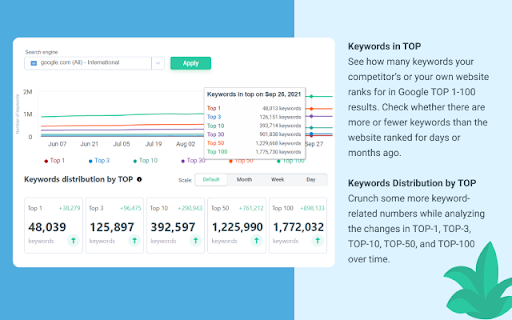
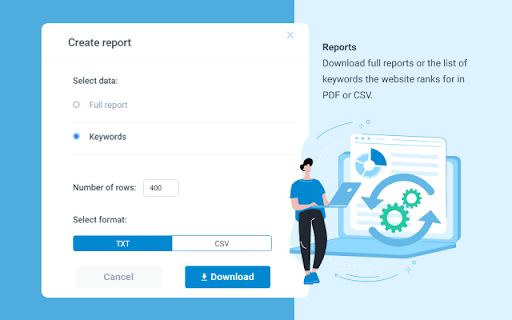

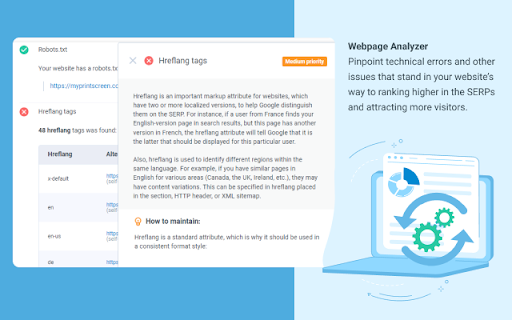

Semalt SEO Extension is a free SEO tool to track websites’ Google rankings and spot issues that keep you from attracting traffic. Click just once to find out how your website ranks and what keywords it’s ranking for. View ranking changes over time. Identify and analyze your competitors. Discover the website’s best-performing pages as those that have the most Google Top positions. All you need to put your SEO effort into where it needs to be. Besides giving you in-depth data on Google SERPs, Semalt SEO Extension can be used to check your website for SEO issues that cause your traffic and conversions to dwindle. Please Note: Semalt collects ranking data on 53 million websites for 100 million keywords in over 1000 location-specific Google search results. This data is updated every day and fed into Extension for you to analyze for free and without restrictions. You don’t even need to have a Semalt account or the API key to use the extension. ➊ Ranking data and features ➣ Number of keywords in TOP See how many keywords your competitor’s or your own website ranks for in Google TOP 1-100 results. Check whether there are more or fewer keywords than the website ranked for days or months ago. ➣ Keywords Distribution by TOP Crunch some more keyword-related numbers while analyzing the changes in TOP-1, TOP-3, TOP-10, TOP-50, and TOP-100 over time. ➣ Rankings by Keywords View a list of the most popular keywords the website ranks for. Compare their SERP positions for any dates and start detecting trends. ➣ TOP-100 Competitors by Keywords Get to know your competition with the TOP-100 Competitors list. It can be generated for any keyword your website ranks for once you click on this keyword in the Rankings by Keywords chart. Bonus: you can then scan a competitor’s website from the list on semalt.net. ➣ Number of pages in TOP Check how many of your website’s pages rank in TOP 1-100 Google search results. Use the chart to track changes over time. ➣ Page distribution by TOP rankings Analyze how your website’s pages are distributed throughout TOP-1, TOP-3, TOP-10, TOP-50, and TOP-100 search results by position and compare it to where they were earlier. ➣ Pages in TOP Get to know which of your website’s pages generate the most Google traffic. Each page comes with the number of keywords it’s ranking for. You can scrutinize the spots it takes up for these keywords in search results in a few clicks. You can then download a complete report or just a list of keywords the page’s ranking for. ➣ Keywords for selected pages Track how the number of keywords a selected page is ranking for has changed over time. ➣ Competitors in Google TOP Identify competitors for the website you’re analyzing. The list of competitors is based on the shared keywords that your website and your competitors’ websites rank for on Google. ➣ Shared keyword changes Check how the competition and the number of keywords you share with each of your biggest competitors have changed over time. Get a comprehensive SEO Audit report for your website. Pinpoint technical errors and other issues that stand in your website’s way to ranking higher in the SERPs and attracting more visitors. Check your website for as many as 47 performance indicators and find out where it stands in terms of today’s SEO. Each performance indicator comes with a detailed description and expert tips on making your website Google-friendlier and improving the user experience. Webpage Analyzer looks into your website’s performance from the following perspectives: - On-page SEO - Indexing - Structured Data - Mobile Adaptability - Performance and Page Speed - Domain - Server & Security - Social Media Presence - Analytics and Counters ➣ Reports You can download a complete or customized report in PDF/CSV/TXT format for any data type you can find in the extension. ➣ User-friendly configurations Configure extension to analyze SEO data more conveniently by selecting: - location for Google search results - date - advanced filtering and sorting options ➋ Who can benefit from extension? ➣ SEO specialists Whether you do SEO for your own website or work at an SEO agency, your daily routine certainly includes Google ranking monitoring. With Semalt Extension, you can save time and money by tracking the rankings of any website quickly and effortlessly. ➣ Marketing specialists The Semalt SERP tracking SEO tool can help you monitor website visibility trends on Google. This can give you a goldmine of insightful data for conducting market analysis or tracking SEO KPIs. ➣ Website owners As a website owner, you want your rankings to be high and your traffic to be massive. Semalt Extension is a good starting point to achieve your goals. It provides precise analytics that you need to see the big picture and make a go of SEO. ➌ How to install extension? It takes 5 (literally) seconds to install extension in just 2 clicks: Click #1 — Hit the Add to Chrome button Click #2 — Add the extension And now it’s there. ➍ How to get started with extension? Go to a website you’d like to scan and left-click the Semalt Extension icon in your Chrome Extensions menu. You’ll get analytics data for this website in a heartbeat. ➎ About Semalt Semalt has been providing SEO analytics data and SEO services since 2013. We’ve helped over 600,000 businesses grow so far and are ready to help yours. Learn more about Semalt at semalt.com/about. ➏ Privacy Policy Your privacy means everything to us. Semalt Extension does NOT collect data on how you use Chrome, search, or navigate websites. It only uses the URL of the web page you enable it on, as well as additional elements associated with this page. Learn more about Semalt’s Privacy Policy at semalt.com/privacy-policy. ➐ Support If you have any questions, comments, or suggestions, contact us at extension@semalt.com or go to our Support page - semalt.com/support.

Ahrefs SEO Toolbar
Save hours with a complete toolkit in one SEO extension. Insights for on-page, keyword research, and link analysis on any webpage. Ahrefs toolbar is free and gives you detailed SEO insights without leaving your browser. 🌍 Global SEO research (No VPN needed) Switch regions, Google domains, languages, and get new keyword ideas directly in search results. 📃 On-page SEO data in 1 click Check titles, meta descriptions, headers, and technical SEO factors like canonical tags and indexation directives in one click. 🔗 Link analysis made easy Highlight links on the page, trace redirects, filter outgoing links, spot broken links, and export all the data to CSV. 🛠 Detailed SEO research tools Save URLs from open tabs or a SERP, switch user agents to see pages like Googlebot, read HTTP headers, and get performance data for page speed insights. ✨ Paid Ahrefs users unlock Ahrefs metrics: See domain and page-level metrics like keyword counts, traffic estimates, referring domains, and more - directly on every site or result. 📌 Note: Ahrefs subscription is required for access to Ahrefs metrics. The core tools of this SEO extension remain completely free.

Serpstat Website SEO Checker
Instantly check your website's SEO, analyze competitors and get advantage of powerful search analytics in one place. Serpstat Website SEO Checker allows you to find the key metrics of any site or page in just a few clicks. It provides you with an extensive list of SEO metrics, analysis, and tips. To examine a domain/page, you don't need to open a new tab. Click on the icon and you'll get an SEO audit of domain or page: visibility, traffic, number of keywords, top competitors in the region, etc. Three sections are now available: * On-page SEO parameters - Free Lifetime * Page analysis - Freemium * Domain analysis - Freemium Some features work without API requests to Serpstat servers so they are available without signing up, right after installation of the extension. Some reports require to sign up and get a token for API access. Serpstat Website SEO Checker makes analyzing competitors data easier than ever. The extension helps you to provide quickly a keyword research and trust me, it's much better than Keyword Planner tool. The major features: #1 On-page search engine optimization: Page Source Google Cache PageSpeed Insights Site start date Meta tags HTML tags Words Count / Symbols Count Favicon checker and many others. #2 Page analysis: Top 10 keywords in Google ranking URL that ranks for this request Ranking position for this keyword Position change and search volume Keyword CPC URL Competitors Keywords the site ranks in Missing keywords #3 Domain analysis Domain visibility Domain traffic Number of keywords Improved and declined keywords New and lost keywords PPC keywords Number of results in Google, Bing Yandex Quality Index Number of images in Google Image Search Alexa Rank. Visibility change graph In fact, we've brought together the most useful SEO features, so you no longer need a bunch of tools like Ahrefs, Semrush, Majestic and others. Keep an eye on this - it's just the beginning, you'll see many exciting updates soon. Important: To get full access to all functionality, you'll need to sign up on Serpstat.com For information regarding data collection please visit: https://serpstat.com/users/privacy-policy/

Free SEO Audit & Website Checker by Semalt
Get a comprehensive SEO Audit report for your website. Pinpoint technical errors and other issues that stand in your website’s way to ranking higher in the SERPs and attracting more visitors. Free SEO Audit & Website Checker is a special-purpose Google Chrome SEO extension. It allows you to analyze any website for as many as 47 performance indicators and find out where it stands in terms of today’s SEO. Each performance indicator comes with a detailed description and expert tips on making your website Google-friendlier and improving the user experience. SEO Audit & Website Checker looks into your website’s performance from all sides, including: - On-page SEO - Indexing - Structured Data - Mobile Adaptability - Performance and Page Speed - Domain - Server & Security - Social Media Presence - Analytics and Counters Features and benefits of SEO Audit & Website Checker by Semalt: - Lightning-fast website checks. By clicking on the extension icon, you instantly start an audit of the website opened in one of your tabs. - Audits trusted by hundreds of thousands of users. So far, over 2 million websites have been analyzed by https://semalt.com/ users with this SEO Audit tool. PDF reports. Once your website is audited, you can customize and download an SEO Audit report in PDF. - Free to use. Adding this extension to your browser is free, and you don’t need to sign up, enter an API key, or get through tons of intrusive ads. How to install this extension? It takes 5 (literally) seconds to install SEO Audit & Website Checker: - Click #1 — Hit the Add to Chrome button - Click #2 — Add the extension - Click #3 — Pin it to your Chrome toolbar by clicking the Pushpin icon to always have it at your fingertips How to get started with SEO Audit & Website Checker? Go to a website you’d like to check and left-click the Free SEO Audit & Website Checker icon in your Chrome Extensions menu. You’ll get analysis data for this website in a heartbeat. About Semalt Semalt has been providing SEO analytics data and SEO services since 2013. We’ve helped over 600,000 businesses grow so far and are ready to help yours. Learn more about Semalt at semalt.com/about. Privacy Policy Your privacy means everything to us. SEO Audit & Website Checker does NOT collect data on how you use Chrome, search, or navigate websites. It only uses the URL of the web page you enable it on, as well as additional elements associated with this page. Learn more about Semalt’s Privacy Policy at semalt.com/privacy-policy. Support If you have any questions, comments, or suggestions, contact us at extension@semalt.com or our Support page – semalt.com/support.

FatRank - SEO Rank Checker
Check your website's ranking position in Google search results across different countries * Please Note: This extension will use your Google local search settings and will include local listings as a rank position. To stop this make sure your location in Google search settings is set to your country i.e 'United States'. * Fat Rank is a FREE lightweight in browser keyword rank checker tool. Simply visit a website, click the Fat Rank icon, type in your keyword and it will tell you where that website ranks in Google and which page URL ranks. It is very practical and usable for both competitor research, prospecting and even simple quick ranking reports for your clients. Visit a website, click on the extension icon and type a keyword or key phrase and the extension will return the current Google ranking position for that domain and also provide you with the url of the page the keyword ranks for. It will search down to a ranking depth of 100. If the domain doesn't rank for a keyword within the top 100 positions, it will simply display 'Not found'. You can make multiple keyword / key phrase checks and these will all store within your session history tab where you can export via a CSV as report for your client. Beautifully simple, usable and practical tool designed for SEO's by SEO's. * Fat Rank is counting local results how do I stop this and check country wide? This extension will use your Google local search settings and will include local listings as a rank position. To stop this make sure your location in Google search settings is set to your country i.e 'United States'. * What does 'Not Found in Top 100 Results' mean? This means the website you are viewing does not rank within the top 100 results for the keyword you entered. We only check up to the 100th result for speed. * What does 'Try Again Later, Google is Blocking Searches' mean? Fat Rank uses your browser behind scenes to check a keyword ranking position. If you do too many keyword checks within a short period of time Google temporarily block search results. We recomend to leave the extension for a while and try again later.
