
eneohehdbadflaenpfheabnaikhdkkfa

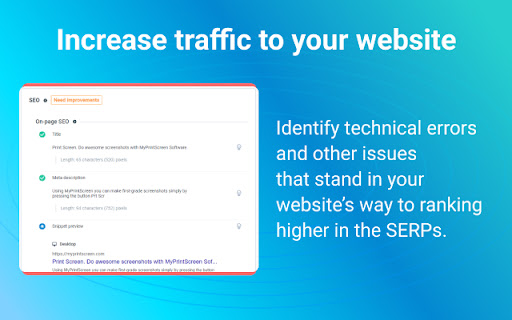

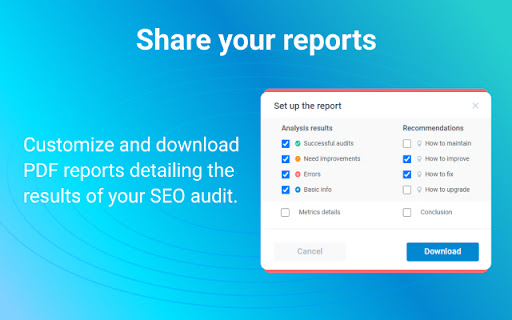
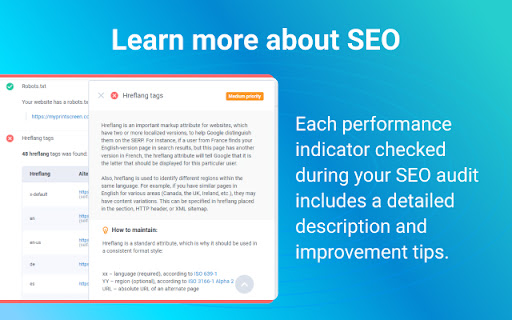
Get a comprehensive SEO Audit report for your website. Pinpoint technical errors and other issues that stand in your website’s way to ranking higher in the SERPs and attracting more visitors. Free SEO Audit & Website Checker is a special-purpose Google Chrome SEO extension. It allows you to analyze any website for as many as 47 performance indicators and find out where it stands in terms of today’s SEO. Each performance indicator comes with a detailed description and expert tips on making your website Google-friendlier and improving the user experience. SEO Audit & Website Checker looks into your website’s performance from all sides, including: - On-page SEO - Indexing - Structured Data - Mobile Adaptability - Performance and Page Speed - Domain - Server & Security - Social Media Presence - Analytics and Counters Features and benefits of SEO Audit & Website Checker by Semalt: - Lightning-fast website checks. By clicking on the extension icon, you instantly start an audit of the website opened in one of your tabs. - Audits trusted by hundreds of thousands of users. So far, over 2 million websites have been analyzed by https://semalt.com/ users with this SEO Audit tool. PDF reports. Once your website is audited, you can customize and download an SEO Audit report in PDF. - Free to use. Adding this extension to your browser is free, and you don’t need to sign up, enter an API key, or get through tons of intrusive ads. How to install this extension? It takes 5 (literally) seconds to install SEO Audit & Website Checker: - Click #1 — Hit the Add to Chrome button - Click #2 — Add the extension - Click #3 — Pin it to your Chrome toolbar by clicking the Pushpin icon to always have it at your fingertips How to get started with SEO Audit & Website Checker? Go to a website you’d like to check and left-click the Free SEO Audit & Website Checker icon in your Chrome Extensions menu. You’ll get analysis data for this website in a heartbeat. About Semalt Semalt has been providing SEO analytics data and SEO services since 2013. We’ve helped over 600,000 businesses grow so far and are ready to help yours. Learn more about Semalt at semalt.com/about. Privacy Policy Your privacy means everything to us. SEO Audit & Website Checker does NOT collect data on how you use Chrome, search, or navigate websites. It only uses the URL of the web page you enable it on, as well as additional elements associated with this page. Learn more about Semalt’s Privacy Policy at semalt.com/privacy-policy. Support If you have any questions, comments, or suggestions, contact us at extension@semalt.com or our Support page – semalt.com/support.

ROSSK SEO Extension: Free SEO Checker, Link Analyzer, SEO Toolbar & Audit.
Gain SEO insights on any site you're visiting with just a click. Made by SEO Expert with 15+ years of experience. The simplest way to run an SEO website audit of your current browser window. Click on the extension icon and watch as it pulls on-page insights, including analysis of metadata, indexing, canonical tags, hreflang tags, web vitals, H tags, robots.txt, sitemap.xml, and server status. Additionally, use advanced features like the page rendering analyzer, disabling AI overviews, disabling JavaScript, user agent switcher, schema markup analyzer, Open Graph, and link analyzer with our 5-star, top-rated seo extension. No bloat, no ads, no unnecessary permissions—just a simple way to get an SEO report for any web page in a few clicks. Key Features of ROSSK SEO EXTENSION 💻 1️⃣ On-Page SEO Report ✅Quickly assess crucial on-page SEO elements such as meta tags, word count, heading structure, hreflang tags, X-robots, robots.txt, sitemap and canonical URLs. 2️⃣ Page Rendering Checker ✅This feature will allow you to compare client-side rendering (CSR) versus server-side rendering (SSR) for SEO, you can overlay the two versions of a webpage to visualize where differences occur. 3️⃣ User-Agent Switcher ✅User-Agent Switcher is a tool or browser extension that allows you to change the user agent string that your browser sends to websites. 4️⃣ Disable AI Overviews ✅This feature will allow you to test how search engines & users experience a webpage with or without JavaScript, ensuring that critical content & links are accessible & indexable even when JavaScript is turned off. 5️⃣ Disable JS ✅This feature disables AI-generated overviews from Google search results. Not all users value AI-powered summaries and insights that may clutter search results, this tool delivers a legacy, clean, simplified interface that prioritizes traditional search results. 6️⃣ Open Graph Markup ✅Checks social tags like Open Graph Tags and Twitter Cards, along with image optimizations. 7️⃣ Structured Data Checker ✅ Displays JSON-LD structured data in a concise view, eliminating the need to dig through page code. 8️⃣ Link Checker and Highlighter ✅Identifies and categorizes all outgoing links on a page. ✅ Highlights links based on different attributes such as external, internal, do follow and nofollow and exporting feature. ✅Detects broken links and redirects, providing actionable insights for link optimization. 9️⃣HTTP Header Reader ✅Our SEO toolbar allows users to inspect HTTP response headers for any visited URL. ✅Essential for diagnosing redirect issues and optimizing page load times. 1️⃣ 0️⃣ Additional Information about this extension ✅ User Data Handling: The SEO toolbar respects user privacy by not storing or disclosing browsing details beyond what is necessary to provide the specified functionalities. ✅ Terms and Privacy: ROSSK SEO EXTENSION general terms and conditions and maintains a strict privacy policy to safeguard user data. Extension Policy https://rossk.com/extension-policy

Website Ranking and SEO Checker by Semalt
Semalt SEO Extension is a free SEO tool to track websites’ Google rankings and spot issues that keep you from attracting traffic. Click just once to find out how your website ranks and what keywords it’s ranking for. View ranking changes over time. Identify and analyze your competitors. Discover the website’s best-performing pages as those that have the most Google Top positions. All you need to put your SEO effort into where it needs to be. Besides giving you in-depth data on Google SERPs, Semalt SEO Extension can be used to check your website for SEO issues that cause your traffic and conversions to dwindle. Please Note: Semalt collects ranking data on 53 million websites for 100 million keywords in over 1000 location-specific Google search results. This data is updated every day and fed into Extension for you to analyze for free and without restrictions. You don’t even need to have a Semalt account or the API key to use the extension. ➊ Ranking data and features ➣ Number of keywords in TOP See how many keywords your competitor’s or your own website ranks for in Google TOP 1-100 results. Check whether there are more or fewer keywords than the website ranked for days or months ago. ➣ Keywords Distribution by TOP Crunch some more keyword-related numbers while analyzing the changes in TOP-1, TOP-3, TOP-10, TOP-50, and TOP-100 over time. ➣ Rankings by Keywords View a list of the most popular keywords the website ranks for. Compare their SERP positions for any dates and start detecting trends. ➣ TOP-100 Competitors by Keywords Get to know your competition with the TOP-100 Competitors list. It can be generated for any keyword your website ranks for once you click on this keyword in the Rankings by Keywords chart. Bonus: you can then scan a competitor’s website from the list on semalt.net. ➣ Number of pages in TOP Check how many of your website’s pages rank in TOP 1-100 Google search results. Use the chart to track changes over time. ➣ Page distribution by TOP rankings Analyze how your website’s pages are distributed throughout TOP-1, TOP-3, TOP-10, TOP-50, and TOP-100 search results by position and compare it to where they were earlier. ➣ Pages in TOP Get to know which of your website’s pages generate the most Google traffic. Each page comes with the number of keywords it’s ranking for. You can scrutinize the spots it takes up for these keywords in search results in a few clicks. You can then download a complete report or just a list of keywords the page’s ranking for. ➣ Keywords for selected pages Track how the number of keywords a selected page is ranking for has changed over time. ➣ Competitors in Google TOP Identify competitors for the website you’re analyzing. The list of competitors is based on the shared keywords that your website and your competitors’ websites rank for on Google. ➣ Shared keyword changes Check how the competition and the number of keywords you share with each of your biggest competitors have changed over time. Get a comprehensive SEO Audit report for your website. Pinpoint technical errors and other issues that stand in your website’s way to ranking higher in the SERPs and attracting more visitors. Check your website for as many as 47 performance indicators and find out where it stands in terms of today’s SEO. Each performance indicator comes with a detailed description and expert tips on making your website Google-friendlier and improving the user experience. Webpage Analyzer looks into your website’s performance from the following perspectives: - On-page SEO - Indexing - Structured Data - Mobile Adaptability - Performance and Page Speed - Domain - Server & Security - Social Media Presence - Analytics and Counters ➣ Reports You can download a complete or customized report in PDF/CSV/TXT format for any data type you can find in the extension. ➣ User-friendly configurations Configure extension to analyze SEO data more conveniently by selecting: - location for Google search results - date - advanced filtering and sorting options ➋ Who can benefit from extension? ➣ SEO specialists Whether you do SEO for your own website or work at an SEO agency, your daily routine certainly includes Google ranking monitoring. With Semalt Extension, you can save time and money by tracking the rankings of any website quickly and effortlessly. ➣ Marketing specialists The Semalt SERP tracking SEO tool can help you monitor website visibility trends on Google. This can give you a goldmine of insightful data for conducting market analysis or tracking SEO KPIs. ➣ Website owners As a website owner, you want your rankings to be high and your traffic to be massive. Semalt Extension is a good starting point to achieve your goals. It provides precise analytics that you need to see the big picture and make a go of SEO. ➌ How to install extension? It takes 5 (literally) seconds to install extension in just 2 clicks: Click #1 — Hit the Add to Chrome button Click #2 — Add the extension And now it’s there. ➍ How to get started with extension? Go to a website you’d like to scan and left-click the Semalt Extension icon in your Chrome Extensions menu. You’ll get analytics data for this website in a heartbeat. ➎ About Semalt Semalt has been providing SEO analytics data and SEO services since 2013. We’ve helped over 600,000 businesses grow so far and are ready to help yours. Learn more about Semalt at semalt.com/about. ➏ Privacy Policy Your privacy means everything to us. Semalt Extension does NOT collect data on how you use Chrome, search, or navigate websites. It only uses the URL of the web page you enable it on, as well as additional elements associated with this page. Learn more about Semalt’s Privacy Policy at semalt.com/privacy-policy. ➐ Support If you have any questions, comments, or suggestions, contact us at extension@semalt.com or go to our Support page - semalt.com/support.

SEO Buddy - On-Page SEO Analyser
A complete On-Page SEO tool to help you analyse your webpage and optimize it for better ranking SEO Buddy is a complete On-Page SEO tool to help you analyse your webpage and guide you to optimise it for better ranking. ✅ Analyse On-Page SEO: This extension analyse the existing On-Page SEO following good practices and get a performance score ✅ Reliable Benchmark: Most essential On-Page SEO conventions are used to calculate the score of your current On-Page SEO score. ✅ Checklist for Improvement: It suggests checklist containing best practices to improve the SEO ranking. ✅ Detail overview of each factors: All the best On-Page SEO practices are presented in a detail manner like External/Internal/ Broken Links, Images missing alt, useful integrations etc. ✅ Technologies Detection: It has technology detection feature like Built-With and Wappalyzer to detect which technologies are being used on the webpage. ✅ Super fast and efficient: On-Page SEO analysis are done very efficiently within seconds ensuring reliable results. ✅ Clean and User friendly UI/UX: Ensuring a great experience is important to us. In every aspects we tried to guide the user through as less cluttered informations as possible. Besides all the above mentioned features, we are actively working bringing newer features. If you have questions, concerns or feature request, please send an email to rahulbaruri1@gmail.com. We will to reply you as early as possible.

Google™ SERP Simulator by Semalt
Instantly track website rankings for any keywords in any Google™ location and language – with no fees to pay. SERP Simulator by Semalt is a free SEO tool that allows you to mimic a Google™ SERP (Search Engine Result Page) for any search query. What makes this extension a go-to for your work is that it lets the Google search engine user simulate geo-specific search results for their IP address. Using SERP Simulator by Semalt for other locations will result in highly misrepresented results that may differ from the real ones. This extension is based on the official Google™ API designed to mimic search results for over 31,000 geolocations. ➊ Features and benefits Simulate any search query and track website rankings on Google™ SERPs for over 31,000 geolocations in 155 languages. Run Favorites Search queries to check website rankings on Google™ SERPs quickly and hassle-free. Download and share the reports with your colleagues and clients. Use SERP Simulator by Semalt for free – without sign-ups and restrictions. ➋ Who can benefit from the extension? As a website owner, SEO, or marketing specialist, you can’t plan your day without checking website rankings on Google™ Search Engine Result Pages. This gives you a heads-up on whether the website is growing the right way. With SERP Simulator by Semalt, you can save time and money by tracking the rankings of any website quickly and effortlessly. ➌ How to install the extension? It takes 5 (literally) seconds to install this extension in just several clicks: - Click #1 — Hit the Add to Chrome button - Click #2 — Add the extension - Click #3 — Click the Extensions button next to your profile pic - Click #4 — Pin SERP Simulator by Semalt to your toolbar by hitting the pushpin icon And now it’s there. ➍ How to get started with the extension? - Click on SERP Simulator by Semalt displayed in your toolbar. - You will see a new Chrome tab with the extension running. - Fine-tune SERP simulation settings and run the search. ➎ About Semalt Semalt has been providing SEO analytics data and SEO services since 2013. We’ve helped over 600,000 businesses grow so far and are ready to help yours. Learn more about Semalt at semalt.com/about. ➏ Privacy Policy Your privacy means everything to us. Semalt Extension does NOT collect data on how you use Chrome, search, or navigate websites. It only uses the URL of the web page you enable it on, as well as additional elements associated with this page. Learn more about Semalt’s Privacy Policy at semalt.com/privacy-policy. ➐ Support If you have any questions, comments, or suggestions, contact us at extension@semalt.com or go to our Support page - semalt.com/support.
