
ohffmmbmebhcljgcdijjlepjaoladfag
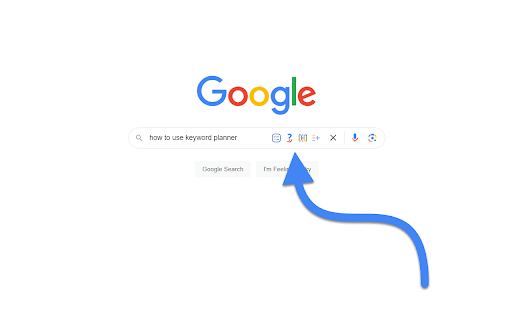

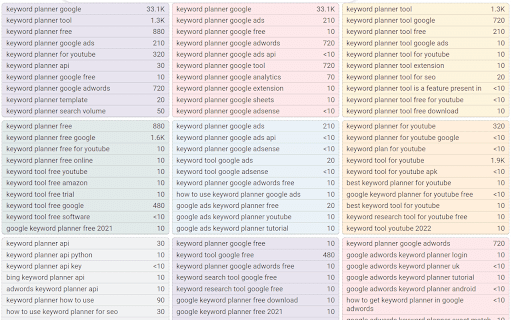
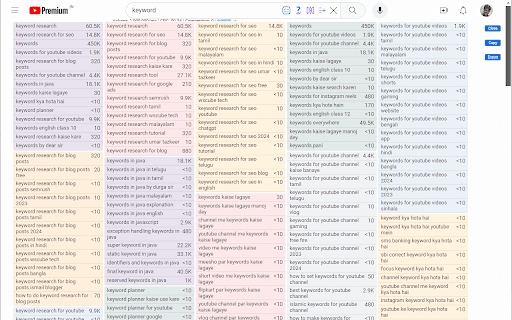

Keyword Planner expands the number of search suggestions shown in the Google™, YouTube™, Amazon™, eBay™ and Etsy™ search bars. Keyword Planner uses the Google™, YouTube™, Amazon™, eBay™ and Etsy™ Suggest APIs to show you useful keywords related to your search query right under the search box. It also integrates with third party APIs to show you search volume data for these keywords. 1. Install the chrome extension 2. Go to any of the supported websites - Google™ YouTube™, Amazon™, eBay™ or Etsy™ and perform a search 3. Inside the text box, on the right hand side you will see 4 new buttons - all, questions, comparisons & prepositions 4. Click the button you want, and you will see multiple lists of keywords show up right underneath the search bar. Change log for the keyword planner chrome extension v0.0.26 (27 Oct 2025) - Fixed issue with YouTube - Fixed issue with Etsy - Added tooltips to buttons to explain what they do v0.0.25 (13th Apr 2024) - Fixed issue with filename in v0.0.24. Youtube.js was incorrectly written as YouTube.js in the manifest file. This would cause issues in non-windows versions. v0.0.24 (30th Mar 2024) - Added 3 more buttons with new functionality. Questions gives you keywords that are in the form of questions, Comparisons gives you keywords that are comparing the search query with other options, and prepositions give you keywords that use prepositions with the search query v0.0.23 (18th Feb 2024) - Rewrote the entire codebase to remove Svelte dependancy - Fixed issue with all websites where the keywords widgets would not show up v0.0.22 (14th August 2022) - Fixed issue with duplicate keywords - Changed extension summary to include other supported websites v0.0.19 (10th August 2022) - Support for YouTube™, Amazon™, eBay™ and Etsy™ v0.0.14 (25th July 2022) - Support for Google dark theme - Bug fixing

Keyword Surfer
Keyword Surfer allows you to generate keyword ideas and see search volumes directly in Google search results. Keyword Surfer generates fresh keyword ideas and search volumes, right from your Google search results. Each time you search in Google, you'll uncover valuable insights on search volume, CPC, keyword suggestions, related terms, visibility metrics, and on-page data. Download the extension and add it to any Chromium-based search engine. Once added, make sure to grant the extension any required access and you’re good to go. Then, start by Googling a term—Keyword Surfer will appear on the side panel of your Google results page, however, you may be required to scroll down the page to see it. With Keyword Surfer, you can also store keywords for quick access, without having to google them separately every time. Plus, you can conveniently export collections as a .csv file whenever you need to. Streamline your whole content creation research process without ever leaving Google results page. NEW! Keyword Surfer can now be used in ChatGPT to humanize the written content. It also shows you how likely your content is to be detected as human-like. Check more in our [Keyword Surfer in ChatGPT article](https://docs.surferseo.com/en/articles/9956100-keyword-surfer-in-chatgpt). Looking for our Google Docs extension for effortless writing with SEO optimization in mind? [You can find it here!](https://chromewebstore.google.com/detail/surfer-for-google-docs/faapilcgnafanfcdhlkjijhoimmlhmjn) ______________________________ Data for the extension are provided by Surfer: surferseo.com. Surfer transforms SEO into a clear, predictable path for business growth by offering smart solutions that boost organic traffic. We pave the way for simpler, smarter SEO for agencies, teams, and marketers. Our toolkit empowers these groups to automate content management tasks and increase traffic without breaking the bank. Crafted by a dedicated team of engineers, marketers, and SEO specialists, our platform is designed to simplify the SEO content creation process, making it efficient and user-friendly. Thanks to our reliance on reverse-engineering algorithms, users have come to trust our advice. Our Content Score sets the industry standard, removing uncertainty from on-page SEO. Count on our tool for relevant, data-supported recommendations. We make SEO straightforward.

PPCexpo Keyword Planner
Find the Perfect Keyword. Surprise Yourself. Your keyword exploration should be painless — never tedious nor time-consuming. Stop struggling with multi-tabs and metric overload. Unlock superior keywords that produce high-value traffic in less time with the PPCexpo Keyword Planner. Uncover the most relevant and valuable keyword opportunities hidden in your data with sophisticated AI and natural language processing engine. Discover a cluster of customer-focused keyword ideas, complete with search volume and CPC data, that will inspire and ignite your imagination. By selecting more effective keywords, you’ll connect to high-intent customers and gain a competitive edge. Generate more conversions and reduce wasted spend with higher quality keywords. You’ll smile at the extra marketing budget! That’s the money-saving impact of keyword optimization! Eliminate the back-and-forth so your train of thought never derails. You can dedicate 100% of your attention to the keyword opportunities and insights that promise to grow your strategies. No more distracting noise from irrelevant keywords and metrics. PPCexpo Keyword Planner only displays the most pertinent keywords. You won’t feel paralyzed by overwhelming and unnecessary metrics in your analysis. Your keyword exploration is instantly transformed into an easy, fast, effective and stress-free process. Empower your content, SEO and PPC strategies with PPCexpo Keyword Planner today. If you have any questions, comments or suggestions, contact us at contactus@ppcexpo.com

SEOquake
SEOquake is a free plugin that provides you with key SEO metrics, along with other useful tools such as SEO Audit and many others SEOquake allows you to: ★ Review all major metrics in a heartbeat ★ Get a thorough analysis of SERPs and export the results in CSV format ★ Estimate keyword difficulty instantly ★ Set parameters for a search query ★ Run a complete SEO audit of a webpage, including a check for mobile compatibility ★ Check your social statistics for Facebook ★ Use a wide range of default parameters or create a custom set ★ Get a full report for internal/external links ★ Determine a keyword’s density and configure a stop-word list ★ Compare URLs/domains SEOquake consists of several tools you can use depending on which specific SEO endeavors you’re pursuing. The SEO bar is an additional toolbar located at the top of the browser window, and it presents core metrics – a number of which can be customized. The SERP overlay is a bar that appears below each SERP result. Once enabled, it gives you detailed metrics associated with each listing along with another sidebar section that allows you to sort and export your results. Also, you can get detailed reports for a specific page you are analyzing. SEOquake has other useful tools, including, the SEO Audit tool, the Keyword Density report, Internal/External Link analysis and even social metrics. SEOquake is really easy to install and work with. The SEOquake plugin is compatible with several browser extensions and is constantly updated. So far, SEOquake has been downloaded more than three million times and counting. If you have any questions, comments or suggestions, contact us at mail@seoquaketeam.com.

Ahrefs SEO Toolbar
Save hours with a complete toolkit in one SEO extension. Insights for on-page, keyword research, and link analysis on any webpage. Ahrefs toolbar is free and gives you detailed SEO insights without leaving your browser. 🌍 Global SEO research (No VPN needed) Switch regions, Google domains, languages, and get new keyword ideas directly in search results. 📃 On-page SEO data in 1 click Check titles, meta descriptions, headers, and technical SEO factors like canonical tags and indexation directives in one click. 🔗 Link analysis made easy Highlight links on the page, trace redirects, filter outgoing links, spot broken links, and export all the data to CSV. 🛠 Detailed SEO research tools Save URLs from open tabs or a SERP, switch user agents to see pages like Googlebot, read HTTP headers, and get performance data for page speed insights. ✨ Paid Ahrefs users unlock Ahrefs metrics: See domain and page-level metrics like keyword counts, traffic estimates, referring domains, and more - directly on every site or result. 📌 Note: Ahrefs subscription is required for access to Ahrefs metrics. The core tools of this SEO extension remain completely free.
