
akdgnmcogleenhbclghghlkkdndkjdjc
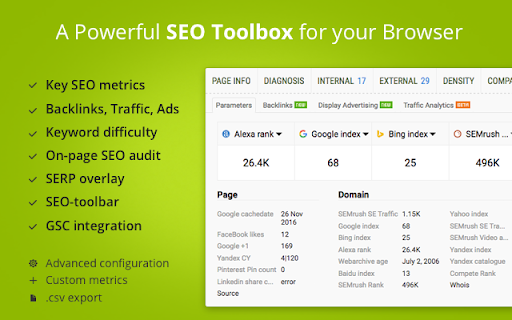
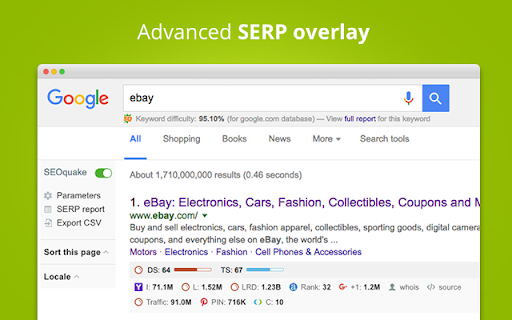


SEOquake is a free plugin that provides you with key SEO metrics, along with other useful tools such as SEO Audit and many others SEOquake allows you to: ★ Review all major metrics in a heartbeat ★ Get a thorough analysis of SERPs and export the results in CSV format ★ Estimate keyword difficulty instantly ★ Set parameters for a search query ★ Run a complete SEO audit of a webpage, including a check for mobile compatibility ★ Check your social statistics for Facebook ★ Use a wide range of default parameters or create a custom set ★ Get a full report for internal/external links ★ Determine a keyword’s density and configure a stop-word list ★ Compare URLs/domains SEOquake consists of several tools you can use depending on which specific SEO endeavors you’re pursuing. The SEO bar is an additional toolbar located at the top of the browser window, and it presents core metrics – a number of which can be customized. The SERP overlay is a bar that appears below each SERP result. Once enabled, it gives you detailed metrics associated with each listing along with another sidebar section that allows you to sort and export your results. Also, you can get detailed reports for a specific page you are analyzing. SEOquake has other useful tools, including, the SEO Audit tool, the Keyword Density report, Internal/External Link analysis and even social metrics. SEOquake is really easy to install and work with. The SEOquake plugin is compatible with several browser extensions and is constantly updated. So far, SEOquake has been downloaded more than three million times and counting. If you have any questions, comments or suggestions, contact us at mail@seoquaketeam.com.

SEO Extension [Metrics, Backlinks, On-Page]
Speed up your SEO routine with SEO extension by Mangools. See the important metrics & website insights on a click. CHECK THE DOMAIN AUTHORITY AND POPULARITY The most popular SEO metrics by Moz, Majestic and popularity charts give you a great overview of any website. Metrics included: - Domain Authority - Page Authority - Citation Flow - Trust Flow - Alexa Rank - Referring IPs - Facebook shares - Followers on social profiles See what the currently visited website already ranks for without visiting any keyword tool: - See the list of keywords with positions in search results - Get the exact search volume for each keyword - See the estimated visits of the currently visited website - Check PPC metrics - Evaluate the keywords with Keyword Difficulty by Mangools rated as (one of) the most accurate metrics on the market Get the list of your competitor's backlinks directly in your browser. The “Backlinks” tab includes the backlinks with the most critical metrics: - The Link Strength developed by Mangools - Source URL - Citation Flow - Trust Flow - HREF - Anchor text - DoFollow/NoFollow tags Click on the "Expand" button to proceed to LinkMiner if you want to further backlink analysis. ON-PAGE SEO ANALYSIS What's the appearance of the website in Google SERP? Are there any on-page errors? Find out with: - Google SERP snippet preview tool - Meta tags, Headings and Structured data checker - Keyword usage analysis - Outbound links analysis (broken link checker) - Page Speed checker - Social previews Identify what long tail keywords are used on the website, what's their density and where are they used. - 1/2/3 word terms - tags usage - title tag and the meta description usage - keyword count - keyword density. If you want to analyze the keywords, just click on the magnifier to see the keyword difficulty and other metrics in KWFinder. You can also copy and import all the keywords. This is super-useful to find any broken links on the website. They are a great opportunity for broken link building or if you look at your own website, you'll be able to fix any errors thanks to the following information: Track the organic positions of your website or competitors: - Start tracking the keywords the currently visited website already ranks for (we'll show you their top organic keywords) - The Dominance Index and Estimated Visits inform you about the overall organic traffic share - Spot the biggest ranking changes with the Top Rankers and Top Outrankers We've included quick context menu integrations so you can access all the popular features of the Mangools SEO tools package at any time. Advanced features that are available directly in SERP to boost the SEO analysis are great huh? And that's exactly what's included in the search results: - SERP positions - Shortcuts to Mangools SEO tools for further analysis You can use this extension with the 10-day FREE trial account. No strings attached, no credit card required. If you are already subscribed to Mangools SEO tools, you'll see the data from the tools in the extension ;)

Sinbyte Seo
Tiện ích Sinbyte Seo cung cấp cho người dùng giải pháp check index trên google 1 cách hiệu quả và tiết kiệm chi phí. Công cụ kiểm tra link đã lập chỉ mục hay chưa. Giúp Seo tiết kiệm được nhiều thời gian.

SCheckPro
Công cụ hỗ trợ và phát triển SEO. Chỉ sử dụng trên spineditor. Hỗ trợ người dùng thao tác nhanh trong việc tìm kiếm và sao chép dữ liệu cần thiết.

FatRank - SEO Rank Checker
Check your website's ranking position in Google search results across different countries * Please Note: This extension will use your Google local search settings and will include local listings as a rank position. To stop this make sure your location in Google search settings is set to your country i.e 'United States'. * Fat Rank is a FREE lightweight in browser keyword rank checker tool. Simply visit a website, click the Fat Rank icon, type in your keyword and it will tell you where that website ranks in Google and which page URL ranks. It is very practical and usable for both competitor research, prospecting and even simple quick ranking reports for your clients. Visit a website, click on the extension icon and type a keyword or key phrase and the extension will return the current Google ranking position for that domain and also provide you with the url of the page the keyword ranks for. It will search down to a ranking depth of 100. If the domain doesn't rank for a keyword within the top 100 positions, it will simply display 'Not found'. You can make multiple keyword / key phrase checks and these will all store within your session history tab where you can export via a CSV as report for your client. Beautifully simple, usable and practical tool designed for SEO's by SEO's. * Fat Rank is counting local results how do I stop this and check country wide? This extension will use your Google local search settings and will include local listings as a rank position. To stop this make sure your location in Google search settings is set to your country i.e 'United States'. * What does 'Not Found in Top 100 Results' mean? This means the website you are viewing does not rank within the top 100 results for the keyword you entered. We only check up to the 100th result for speed. * What does 'Try Again Later, Google is Blocking Searches' mean? Fat Rank uses your browser behind scenes to check a keyword ranking position. If you do too many keyword checks within a short period of time Google temporarily block search results. We recomend to leave the extension for a while and try again later.
