
jpoefccfjpcdglbnjfhomifadledaodm
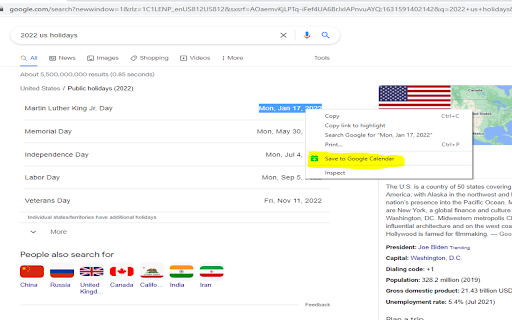

Effortlessly schedule events with our smart Google Calendar integration. Select a date or natural language phrases like 'next 3 days,' 'tomorrow,' or similar directly from any webpage and save them instantly to your Google Calendar. No more manual entry or switching tabs—stay organized with ease!

Calendar 2026
Calendar 2026 is a browser extension that gives you quick access to google calendar With this extension, you will be able to: 🚀 Open the calendar with just one click on the extension icon, without leaving your current tab. 🌟 Enjoy a minimalist design that doesn't distract you from your tasks. 📆 See the current day at a glance, so you can check your schedule and plans. 🌎 Use the calendar in the language and format that is convenient for you, depending on your browser settings. Calendar 2026 is an extension for anyone who wants to have their personal calendar at hand. This extension is suitable for those who: 💻 Spend a lot of time in the browser, working, studying, entertaining, or exploring the internet. 🗓 Follow a schedule and want to be organized and productive. 🕊 Love minimalism and simplicity in everything. 🗂 Want to remember what day of the week it is or what the date is. Calendar 2026 is not just a calendar, but your personal assistant that will always remind you of what and when needs to be done. In the future, we plan to add even more features and capabilities to this extension, such as: 📝 Todo list, so you can add your tasks and reminders to the calendar and mark them as completed. 📲 Integration with Google Calendar and Apple Calendar, so you can sync your calendar with other apps and services you use. 🎂 Ability to add birthdays and reminders for them, so you never forget important events and holidays. 🌙 Night mode that automatically changes the calendar colors based on the time of day to reduce eye strain. 🌐 Calendar synchronization with other devices and services, so you always have access to your schedule no matter where you are. 📊 Statistics and analytics that show how you allocate your time, which tasks you complete or skip more often, and what goals you achieve. 🎁 Bonuses and rewards that motivate you to accomplish your plans and lift your mood. For example, you can earn points, medals, badges, or discounts for completing a certain number of tasks or goals. In addition, in the future, we want to make the calendar even more interesting and useful by adding integrations with various apps and services, such as: 📧 Gmail, so you can receive notifications about new emails, events, and tasks right in the calendar. 📚 Wikipedia, so you can learn interesting facts and events related to the selected date. 🎮 Steam, so you can see which games you and your friends played on a specific day. 🌤 Weather services, so you can see the weather forecast for the selected date and location. 🎫 Booking services, so you can plan your trips, hotels, tickets, and other services. 📰 News websites, so you can stay up to date with current events and topics that interest you. 🎨 Design services, so you can get inspiration and ideas for your creative projects. Calendar 2026 is not just a calendar, but a whole world of possibilities waiting for you. Install this extension today!

Google Calendar Weekend Highlighter
Custom Colour for Weekends in Google Calendar >>>>>>>>>>>>>>>>>>> LET'S GO DARK! >>>>>>>>>>>>>>>>> Important NOTE!!! >>>>>>>>>>>>>>>>>>>>> DONATE!

Send to Google Tasks
Send the page you are reading to Google Tasks Send to Google Tasks is a chrome extension that performs one simple thing: it send the page or link from your chrome browser to Google Tasks. Attribution for the icons and graphics: - Icons are made by Pixel perfect (https://www.flaticon.com/authors/pixel-perfect) from Flaticon (https://www.flaticon.com).

GQueues for Google Calendar
If you live in Google Calendar, you understand the importance of a timely reminder to get to work, and blocking out meeting-free time so you have space to actually get that work done. With the GQueues Google Calendar extension, you can view full details for GQueues tasks syncing to Google Calendar, and mark those tasks complete right from the Calendar interface. No switching back and forth between the two apps to keep track of what you’ve accomplished. If you’ve already activated Calendar syncing for your GQueues account, the next step is to install this extension to push that integration (and your productivity) to the next level. The GQueues for Google Calendar Chrome Extension requires a GQueues account to work. GQueues is a task management app specifically designed for teams on Google Workspace. With GQueues you get: • Deep integration with Google Workspace including Chrome, Gmail, Calendar, and Drive • Immediate, 2-way task syncing with Google Calendar • Unlimited, project-based calendars to share with your team • Simple, intuitive interface • Core task management including subtasks and repeating tasks • Robust search and task filters • Easy collaboration with shared folders and assignments for delegating work • Mobile apps for Android and iOS
