
jnohfmocaegmddendphnlkmbeodhpcma
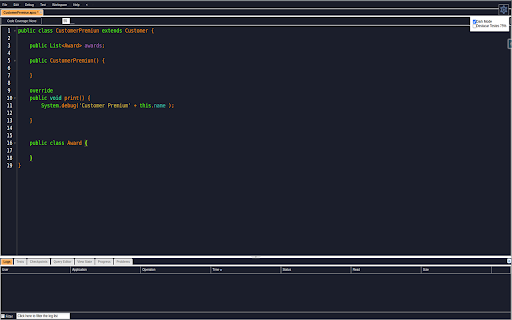


Adicione o modo escuro ao Salesforce Developer Console - melhore sua experiência de desenvolvimento com elegância. Descrição: Esta extensão adiciona um modo escuro ao console do desenvolvedor do Salesforce, proporcionando uma experiência visual mais agradável durante o desenvolvimento. Recursos: Modo escuro atraente para o console do desenvolvedor do Salesforce. Destaque de sintaxe personalizado para facilitar a leitura e a compreensão do código. Suporte para fonte do Visual Studio Code para uma experiência de programação mais familiar. Além disso, o código também oferece a opção de detalhar uma tabela de logs o que pode ajudar a exibir o conteúdo completo das células e evitar o recorte de dados e uma melhor analise dos logs. Instale a extensão Salesforce Dark Mode no Google Chrome. Abra o console do desenvolvedor do Salesforce. O console será exibido no modo escuro, com uma paleta de cores atraente para facilitar a leitura do código. Aproveite uma experiência de desenvolvimento mais agradável e produtiva.

Salesforce DevTools
Salesforce DevTools is a powerful Salesforce developer chrome extension for doing the below things : ・Quickly generate Apex code / SOQL, exporting query results to Excel file. ・Quickly access to new record page, list page and object setting page of any object. ・Quickly search object fields and check its usage. ・Display fields API name on Salesforce object detail page. ・Exporting Objects Definition to Excel file. ・Exporting Objects Fields Definition to Excel file. ・Exporting Objects Page Layout Definition to Excel file. ・Exporting Objects List View Definition to Excel file. ・Exporting Flow Definition to Excel file. ・Salesforce data modal (ERDs) generator. ・All Check / Select on profile edit page and field permissions edit page. ・Mass edit, mass delete, mass clone custom fields (Only Classic). ++++++++++++++++++++++++++++ Release notes ++++++++++++++++++++++++++++ 2026/01/1 ・Added features of "Export Flow Definition". -------------------------------------- 2023/04/10 ・Added features of mass edit, mass delete, mass clone custom fields on Lightning. -------------------------------------- 2022/01/30 ・Added feature of searching object fields and show its usage. -------------------------------------- 2021/04/05 ・Added feature of exporting Object definition (FULL) and fixed bugs. -------------------------------------- 2020/09/07 ・Added feature of exporting List View definition and fixed bugs. -------------------------------------- 2020/06/07 ・Fixed Lighting active bug and Japanese language document exporting bug. -------------------------------------- 2020/04/12 ・Improved feature of Query Editor. -------------------------------------- 2020/01/06 ・Added feature of exporting object page layout. -------------------------------------- 2019/08/18 ・Added feature of Multi Check on field permission edit page. -------------------------------------- 2019/05/13 ・Added features of mass edit, mass delete, mass clone custom fields -------------------------------------- 2019/03/24 ・Fixed issues. -------------------------------------- 2018/12/17 ・Reactivated feature of Debug Log Viewer. ・Added feature of searching Debug Log. ・Fixed issues. -------------------------------------- 2018/11/12 ・Improved UX of feature exporting object API reference to Excel file. ・Added Query Editor feature to all Objects. ・Added feature of exporting query result to Excel file -------------------------------------- 2018/09/25 ・Added support for cloudforce orgs. -------------------------------------- 2018/09/03 Major Release ・ Added support for Lightning! ・ Improved UX of feature Object Reference Doc generating. ・ Improved UX of feature All Check. -------------------------------------- 2018/04/17 ・Improved ERDs UX, fixed bugs. -------------------------------------- 2017/10/11 ・Improved Debug Log Viewer UX. -------------------------------------- 2017/05/29 ・Added feature of query editor and csv data exporting. -------------------------------------- 2017/04/23 ・Added feature of ERDs generator. -------------------------------------- 2017/02/06 ・Fix bugs. -------------------------------------- 2017/01/30 ・Added features of SOQL generator and Apex debug log viewer. -------------------------------------- 2016/12/20 ・Fixed export excel bugs. -------------------------------------- 2016/12/06 ・Improved UI, fixed bugs. -------------------------------------- 2016/11/25 ・Added features that allows you to enable it on custom domain. -------------------------------------- 2016/08/21 Major Release ・Added features of exporting objects definition to excel file. -------------------------------------- 2016/05/18 ・ Added support for Visualforce Page. -------------------------------------- 2016/04/04 ・ Added the features of object searching and object quick access. -------------------------------------- 2016/03/31 ・ Added support for generating Apex Code include blank fields -------------------------------------- 2016/03/28 ・ Added support for RecordType ・ Added hint for Quick Access Menu Turned Off

Lightning Studio
Build Salesforce LWC development easy and fastest. 💻 𝑯𝒐𝒘 𝒕𝒐 𝑼𝒔𝒆 𝑳𝒊𝒈𝒉𝒕𝒏𝒊𝒏𝒈 𝑺𝒕𝒖𝒅𝒊𝒐: ● Log in to Salesforce and click the Lightning Studio icon located in the browser’s top-right corner (Standard Chrome extension toolbar). ● Wait for the icon to turn blue, indicating it’s ready to use. ● For first-time installations, refresh the page before accessing the extension. 🔎𝑭𝒆𝒂𝒕𝒖𝒓𝒆𝒔:───────────────────────────────────────────────────── ✔ 𝐑𝐚𝐩𝐢𝐝 𝐃𝐞𝐯𝐞𝐥𝐨𝐩𝐦𝐞𝐧𝐭: Build and manage Lightning Web Components (LWC), Aura Components, Apex Classes, Lightning Message Service (LMS), and Lightning Types from a single interface. ✔ 𝐅𝐢𝐥𝐞 𝐌𝐚𝐧𝐚𝐠𝐞𝐦𝐞𝐧𝐭: Create and maintain individual files for LWC, Aura, and Lightning Type components with ease. ✔ 𝐃𝐞𝐩𝐥𝐨𝐲𝐦𝐞𝐧𝐭 ⁽ᵇᵉᵗᵃ⁾: Deploy Salesforce metadata using package ZIP files for controlled and reliable deployments. ✔ 𝐁𝐚𝐜𝐤𝐮𝐩: Download selected components, folders, or full metadata backups as ZIP files. deployments. ✔ 𝐂𝐨𝐝𝐞 𝐅𝐢𝐧𝐝𝐞𝐫: Search across LWC, Apex, and Aura code from one place. ✔ 𝐆𝐫𝐚𝐩𝐡𝐐𝐋 𝐄𝐱𝐩𝐥𝐨𝐫𝐞𝐫: Execute and test GraphQL queries directly within Salesforce. ✔ 𝐑𝐄𝐒𝐓 𝐀𝐏𝐈 𝐄𝐱𝐩𝐥𝐨𝐫𝐞𝐫 ⁽ᵇᵉᵗᵃ⁾: Test and run Salesforce REST APIs through an intuitive interface. ✔ 𝐀𝐧𝐨𝐧𝐲𝐦𝐨𝐮𝐬 𝐀𝐩𝐞𝐱 ⁽ᵇᵉᵗᵃ⁾: Run Apex code anonymously and review execution results with detailed debug logs. ✔ 𝐒𝐎𝐐𝐋 𝐭𝐨 𝐆𝐫𝐚𝐩𝐡𝐐𝐋: Seamlessly convert SOQL queries into GraphQL format. ִ✔ 𝐂𝐨𝐝𝐞 𝐂𝐨𝐦𝐩𝐚𝐫𝐢𝐬𝐨𝐧: Quickly identify code changes using an integrated diff checker. ✔ 𝐉𝐒𝐎𝐍 𝐭𝐨 𝐀𝐩𝐞𝐱 ⁽ᵇᵉᵗᵃ⁾: Convert JSON payloads into Apex wrapper classes for faster API integration and development. ✔ 𝐁𝐞𝐚𝐮𝐭𝐢𝐟𝐢𝐞𝐫 ⁽ᵇᵉᵗᵃ⁾: Format and beautify JSON and XML for improved readability and debugging. 📝 𝑬𝒅𝒊𝒕𝒐𝒓 𝑬𝒙𝒑𝒆𝒓𝒊𝒆𝒏𝒄𝒆: ────────────────────────────────────────────── ● 𝐐𝐮𝐢𝐜𝐤 𝐃𝐞𝐩𝐥𝐨𝐲𝐦𝐞𝐧𝐭: Save and deploy changes instantly with 𝗖𝗧𝗥𝗟+𝗦 (Window) or ⌘+𝗦 (Mac). ● 𝐋𝐖𝐂 𝐒𝐧𝐢𝐩𝐩𝐞𝐭𝐬: Access a full library of 𝘀𝗵𝗼𝗿𝘁𝗰𝘂𝘁 𝗸𝗲𝘆𝘀 for faster LWC development. ● 𝐓𝐡𝐞𝐦𝐞 𝐌𝐨𝐝𝐞𝐬: Switch between 𝗗𝗮𝗿𝗸 𝗠𝗼𝗱𝗲 and 𝗟𝗶𝗴𝗵𝘁 𝗠𝗼𝗱𝗲 for a personalized coding experience. ───────────────────────────────────────────────────────────── 🌐𝐃𝐨𝐜𝐮𝐦𝐞𝐧𝐭𝐚𝐭𝐢𝐨𝐧: https://nisar-99.github.io/lightning-studio ───────────────────────────────────────────────────────────── 🛡️𝐒𝐞𝐜𝐮𝐫𝐢𝐭𝐲 ★ 𝘓𝘰𝘤𝘢𝘭 𝘋𝘢𝘵𝘢 𝘖𝘯𝘭𝘺: 𝘈𝘭𝘭 𝘥𝘢𝘵𝘢 𝘴𝘵𝘢𝘺𝘴 𝘰𝘯 𝘺𝘰𝘶𝘳 𝘥𝘦𝘷𝘪𝘤𝘦; 𝘯𝘰𝘵𝘩𝘪𝘯𝘨 𝘪𝘴 𝘴𝘦𝘯𝘵 𝘵𝘰 𝘦𝘹𝘵𝘦𝘳𝘯𝘢𝘭 𝘴𝘦𝘳𝘷𝘦𝘳𝘴. ★ 𝘕𝘰 𝘛𝘩𝘪𝘳𝘥-𝘗𝘢𝘳𝘵𝘺 𝘚𝘩𝘢𝘳𝘪𝘯𝘨: 𝘞𝘦 𝘥𝘰𝘯’𝘵 𝘴𝘩𝘢𝘳𝘦 𝘥𝘢𝘵𝘢 𝘸𝘪𝘵𝘩 𝘢𝘯𝘺 𝘵𝘩𝘪𝘳𝘥-𝘱𝘢𝘳𝘵𝘺 𝘴𝘦𝘳𝘷𝘪𝘤𝘦𝘴. ★ 𝘕𝘰 𝘓𝘦𝘨𝘢𝘭 𝘋𝘪𝘴𝘤𝘭𝘰𝘴𝘶𝘳𝘦𝘴: 𝘕𝘰 𝘱𝘦𝘳𝘴𝘰𝘯𝘢𝘭 𝘥𝘢𝘵𝘢 𝘪𝘴 𝘴𝘩𝘢𝘳𝘦𝘥 𝘧𝘰𝘳 𝘭𝘦𝘨𝘢𝘭 𝘰𝘳 𝘰𝘵𝘩𝘦𝘳 𝘱𝘶𝘳𝘱𝘰𝘴𝘦𝘴. ★ 𝘕𝘰 𝘋𝘢𝘵𝘢 𝘊𝘰𝘭𝘭𝘦𝘤𝘵𝘪𝘰𝘯: 𝘞𝘦 𝘥𝘰𝘯’𝘵 𝘤𝘰𝘭𝘭𝘦𝘤𝘵, 𝘴𝘦𝘭𝘭, 𝘰𝘳 𝘶𝘴𝘦 𝘱𝘦𝘳𝘴𝘰𝘯𝘢𝘭 𝘪𝘯𝘧𝘰𝘳𝘮𝘢𝘵𝘪𝘰𝘯. ★ 𝘗𝘳𝘪𝘷𝘢𝘤𝘺 𝘣𝘺 𝘋𝘦𝘴𝘪𝘨𝘯: 𝘌𝘹𝘵𝘦𝘯𝘴𝘪𝘰𝘯 𝘧𝘶𝘯𝘤𝘵𝘪𝘰𝘯𝘴 𝘴𝘦𝘤𝘶𝘳𝘦𝘭𝘺 𝘸𝘪𝘵𝘩 𝘮𝘪𝘯𝘪𝘮𝘢𝘭 𝘥𝘢𝘵𝘢 𝘶𝘴𝘦. ───────────────────────────────────────────────────────────── 💡𝐖𝐞 𝐕𝐚𝐥𝐮𝐞 𝐘𝐨𝐮𝐫 𝐅𝐞𝐞𝐝𝐛𝐚𝐜𝐤 Your suggestions help us improve! Feel free to share any feedback or ideas to make the app even better.

ORGanizer for Salesforce
ORGanizer - The best Salesforce Extension ever The ORGanizer Chrome Extension (BETA) lets you forget about your Salesforce.com® username and passwords and help you to recognize Salesforce.com® tabs on your browser. With Salesforce ORGanizer you can: - Store your frequently used accounts (basic encryption for password, details on the guide): username / password / login url / landing page - Login an account on a new tab, window and window on incognito mode or get the full login URL for other browsers - Change an ORG tab and title to instantly recognize which tab belongs to which ORG - Use the built in Quick Link tool to quickly access your most used standard Salesforce links - Create your personal ORG's quick link library to handle special links - Use the Quick Links tool to make a global search or open a custom relative link (e.g. from a copied Salesforce ID) or login to another ORG - Use the Quick Console right inside your Salesforce tab to have quick access to describe manager, queries, execute anonymous and other handy tools More and more features to come in the next releases! N.B. Ads are displayed in the free version on the popup and quick console. To remove ads purchase a license.

Salesforce Inspector Advanced
Productivity tools for Salesforce administrators and developers to inspect data and metadata directly from the Salesforce UI. Salesforce Inspector Advanced - The Ultimate Developer Toolkit for Salesforce Transform your Salesforce development workflow with this comprehensive browser extension designed for developers, admins, and architects. Salesforce Inspector Advanced provides powerful tools to inspect, analyze, and optimize your Salesforce org. 🔍 INSPECT & ANALYZE • Object & Field Inspector: Deep dive into object metadata, field usage analysis, and relationship mapping • Flow Analyzer: Comprehensive flow analysis detecting performance issues, security vulnerabilities, and best practice violations with actionable recommendations • Org Analyzer: Identify unused resources, code quality issues, security vulnerabilities, and migration opportunities across your entire org 💾 DATA MANAGEMENT • Advanced SOQL/SOSL Editor: Intelligent code editor with autocomplete, syntax highlighting, and inline suggestions for fields, objects, and relationships • Data Export: Query and export data with advanced filtering, sorting, column management, and support for GraphQL • Data Import: Bulk import with Bulk API support, hard delete capabilities, and smart field mapping • Inline Editing: Edit records directly in the data export view with bulk update capabilities ⚡ APEX DEVELOPMENT • Apex Runner: Execute anonymous Apex, batch jobs, and queueable classes with real-time log monitoring • Log Viewer: Advanced log analysis with flame charts, profiler, resource tracking (SOQL, DML, callouts), and unit test execution with code coverage • Code Editor: Full-featured editor with syntax highlighting, auto-indentation, and intelligent suggestions for Apex classes and methods 🔧 METADATA & DEPLOYMENT • Metadata Browser: Explore and download metadata with automatic package.xml generation • Metadata Import: Streamlined metadata deployment with relationship handling 🌐 API & INTEGRATION • API Explorer: Test Salesforce APIs with templates, history, and response formatting for REST, Bulk API, Chatter, Reports, and more • Platform Event Manager: Subscribe, monitor, and publish platform events, push topics, and change data capture events 🤖 AI-POWERED FEATURES • AI Flow Analysis: Leverage ChatGPT, Claude, Mistral, or Agentforce to analyze flows and generate SOQL queries • Intelligent Suggestions: Context-aware autocomplete for fields, picklist values, and relationships 🎨 USER EXPERIENCE • Customizable Interface: Custom favicon colors, editable shortcuts, and personalized settings • Quick Access Popup: Fast access to common tasks, user management, and org navigation • Modern UI: Clean, responsive interface with keyboard shortcuts and intuitive navigation 🔒 SECURITY • OAuth 2.0 with PKCE: Secure authentication with support for external connected apps • Security Analysis: Detect SOQL injection vulnerabilities, XSS risks, and access management issues Perfect for developers who need to: • Analyze and optimize Salesforce Flows • Query and manipulate data efficiently • Debug Apex code with advanced log analysis • Manage metadata and deployments • Test APIs and integrations • Identify org health issues and optimization opportunities Whether you're building new features, debugging issues, or maintaining your org, Salesforce Inspector Advanced provides the tools you need to work faster and smarter. https://github.com/dufoli/Salesforce-Inspector-Advanced This extension is based on the original Salesforce inspector extension made by Søren Krabbe and Salesforce inspector reloaded by Thomas Prouvot.
