
lojdmgdchjcfnmkmodggbaafecagllnh
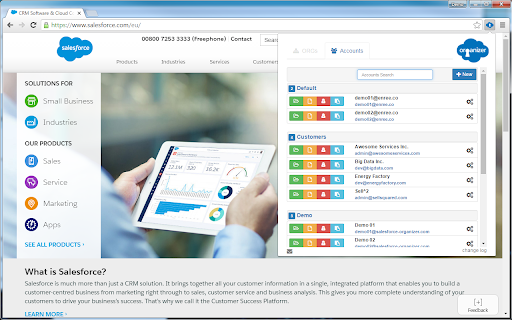


ORGanizer - The best Salesforce Extension ever The ORGanizer Chrome Extension (BETA) lets you forget about your Salesforce.com® username and passwords and help you to recognize Salesforce.com® tabs on your browser. With Salesforce ORGanizer you can: - Store your frequently used accounts (basic encryption for password, details on the guide): username / password / login url / landing page - Login an account on a new tab, window and window on incognito mode or get the full login URL for other browsers - Change an ORG tab and title to instantly recognize which tab belongs to which ORG - Use the built in Quick Link tool to quickly access your most used standard Salesforce links - Create your personal ORG's quick link library to handle special links - Use the Quick Links tool to make a global search or open a custom relative link (e.g. from a copied Salesforce ID) or login to another ORG - Use the Quick Console right inside your Salesforce tab to have quick access to describe manager, queries, execute anonymous and other handy tools More and more features to come in the next releases! N.B. Ads are displayed in the free version on the popup and quick console. To remove ads purchase a license.

Salesforce DevTools
Salesforce DevTools is a powerful Salesforce developer chrome extension for doing the below things : ・Quickly generate Apex code / SOQL, exporting query results to Excel file. ・Quickly access to new record page, list page and object setting page of any object. ・Quickly search object fields and check its usage. ・Display fields API name on Salesforce object detail page. ・Exporting Objects Definition to Excel file. ・Exporting Objects Fields Definition to Excel file. ・Exporting Objects Page Layout Definition to Excel file. ・Exporting Objects List View Definition to Excel file. ・Exporting Flow Definition to Excel file. ・Salesforce data modal (ERDs) generator. ・All Check / Select on profile edit page and field permissions edit page. ・Mass edit, mass delete, mass clone custom fields (Only Classic). ++++++++++++++++++++++++++++ Release notes ++++++++++++++++++++++++++++ 2026/01/1 ・Added features of "Export Flow Definition". -------------------------------------- 2023/04/10 ・Added features of mass edit, mass delete, mass clone custom fields on Lightning. -------------------------------------- 2022/01/30 ・Added feature of searching object fields and show its usage. -------------------------------------- 2021/04/05 ・Added feature of exporting Object definition (FULL) and fixed bugs. -------------------------------------- 2020/09/07 ・Added feature of exporting List View definition and fixed bugs. -------------------------------------- 2020/06/07 ・Fixed Lighting active bug and Japanese language document exporting bug. -------------------------------------- 2020/04/12 ・Improved feature of Query Editor. -------------------------------------- 2020/01/06 ・Added feature of exporting object page layout. -------------------------------------- 2019/08/18 ・Added feature of Multi Check on field permission edit page. -------------------------------------- 2019/05/13 ・Added features of mass edit, mass delete, mass clone custom fields -------------------------------------- 2019/03/24 ・Fixed issues. -------------------------------------- 2018/12/17 ・Reactivated feature of Debug Log Viewer. ・Added feature of searching Debug Log. ・Fixed issues. -------------------------------------- 2018/11/12 ・Improved UX of feature exporting object API reference to Excel file. ・Added Query Editor feature to all Objects. ・Added feature of exporting query result to Excel file -------------------------------------- 2018/09/25 ・Added support for cloudforce orgs. -------------------------------------- 2018/09/03 Major Release ・ Added support for Lightning! ・ Improved UX of feature Object Reference Doc generating. ・ Improved UX of feature All Check. -------------------------------------- 2018/04/17 ・Improved ERDs UX, fixed bugs. -------------------------------------- 2017/10/11 ・Improved Debug Log Viewer UX. -------------------------------------- 2017/05/29 ・Added feature of query editor and csv data exporting. -------------------------------------- 2017/04/23 ・Added feature of ERDs generator. -------------------------------------- 2017/02/06 ・Fix bugs. -------------------------------------- 2017/01/30 ・Added features of SOQL generator and Apex debug log viewer. -------------------------------------- 2016/12/20 ・Fixed export excel bugs. -------------------------------------- 2016/12/06 ・Improved UI, fixed bugs. -------------------------------------- 2016/11/25 ・Added features that allows you to enable it on custom domain. -------------------------------------- 2016/08/21 Major Release ・Added features of exporting objects definition to excel file. -------------------------------------- 2016/05/18 ・ Added support for Visualforce Page. -------------------------------------- 2016/04/04 ・ Added the features of object searching and object quick access. -------------------------------------- 2016/03/31 ・ Added support for generating Apex Code include blank fields -------------------------------------- 2016/03/28 ・ Added support for RecordType ・ Added hint for Quick Access Menu Turned Off

Salesforce Advanced Search & Record Details
Salesforce Advanced Search plugin works in both Classic and Lightning: i) Search any keyword, text or field api name used anywhere in below Salesforce Components, in the result section plugin shows the total number of files where keyword has been used in different components. Plugin also provides to choose which all components to search in for the keyword via checkbox selection: 1) Apex Classes 2) Apex Triggers 3) Visualforce Pages 4) Visualforce Components 5) Email Templates ii) Show Field API Names with Labels of an object in details page, you can toggle between Show and Hide Field API Names without refreshing the page iii) View All Fields and Values provides a way to view all the fields (Label and API Name) and values for a given record of an object, even those that are not in the Page Layout. The show cached checkbox gives the ability to view cached values without querying the SF database. iv) Delete Record allows the admin to delete a record. It's also available for Firefox: https://addons.mozilla.org/en-US/firefox/addon/salesforce-advanced-search/

Maven Tools for Salesforce
Uniquely architectured for Salesforce technical consultants, Maven Tools transforms how Salesforce implementations are being delivered. It offers features like an intelligent query editor, REST console, event hub and many more, giving you the power to deliver changes more quickly and effectively. 📨 Support ▸ Go to our service desk to get technical support, or to report bugs and suggest improvements : https://mavenmule.atlassian.net/servicedesk/customer/portal/6

Salesforce Log Inspector
This app helps you inspect, analyze, and optimize your Salesforce debug log. ──────────: 𝑭𝒆𝒂𝒕𝒖𝒓𝒆𝒔 :────────── 🗂️ 𝐋𝐨𝐠 𝐄𝐱𝐩𝐥𝐨𝐫𝐞𝐫 - Quickly browse log rows with search and highlighted code for easy identification of key details. 🌿𝐑𝐚𝐰 𝐓𝐫𝐞𝐞 - View displays your Apex logs in a structured tree format. Instead of scrolling through long, unformatted text, you can explore the log hierarchy with expandable and collapsible nodes. 🐞 𝐀𝐩𝐞𝐱 𝐃𝐞𝐛𝐮𝐠 - View only 𝚂𝚢𝚜𝚝𝚎𝚖.𝚍𝚎𝚋𝚞𝚐() outputs for simplified troubleshooting, excluding other log details. 📅 𝐄𝐱𝐞𝐜𝐮𝐭𝐢𝐨𝐧 𝐓𝐢𝐦𝐞𝐥𝐢𝐧𝐞 - Visualize code execution over time with a flame chart and detailed event tooltips. 🔗 𝐄𝐱𝐞𝐜𝐮𝐭𝐢𝐨𝐧 𝐓𝐫𝐞𝐞 - Explore the method call path with key metrics like DML, SOQL counts, and execution times. 🔎 𝐄𝐱𝐞𝐜𝐮𝐭𝐢𝐨𝐧 𝐀𝐧𝐚𝐥𝐲𝐬𝐢𝐬 - Identify time-consuming methods to pinpoint performance bottlenecks for optimization. 🛢️ 𝐒𝐎𝐐𝐋 𝐀𝐧𝐚𝐥𝐲𝐬𝐢𝐬 - Find the most executed and time-consuming SOQL queries and those with the most extensive result sets. 🧮 𝐃𝐌𝐋 𝐀𝐧𝐚𝐥𝐲𝐬𝐢𝐬 - Identify the most frequent and slowest DML operations to optimize data processing. 🤖 𝐅𝐥𝐨𝐰 𝐀𝐧𝐚𝐥𝐲𝐬𝐢𝐬 -Quickly identify which Flows ran and how often in this execution. ──────────────────────────────────────────────────── 🌐𝐃𝐨𝐜𝐮𝐦𝐞𝐧𝐭𝐚𝐭𝐢𝐨𝐧: https://nisar-99.github.io/salesforce-log-inspector ──────────────────────────────────────────────────── 🛡️𝐒𝐞𝐜𝐮𝐫𝐢𝐭𝐲 ★ 𝘓𝘰𝘤𝘢𝘭 𝘋𝘢𝘵𝘢 𝘖𝘯𝘭𝘺: 𝘈𝘭𝘭 𝘥𝘢𝘵𝘢 𝘴𝘵𝘢𝘺𝘴 𝘰𝘯 𝘺𝘰𝘶𝘳 𝘥𝘦𝘷𝘪𝘤𝘦; 𝘯𝘰𝘵𝘩𝘪𝘯𝘨 𝘪𝘴 𝘴𝘦𝘯𝘵 𝘵𝘰 𝘦𝘹𝘵𝘦𝘳𝘯𝘢𝘭 𝘴𝘦𝘳𝘷𝘦𝘳𝘴. ★ 𝘕𝘰 𝘛𝘩𝘪𝘳𝘥-𝘗𝘢𝘳𝘵𝘺 𝘚𝘩𝘢𝘳𝘪𝘯𝘨: 𝘞𝘦 𝘥𝘰𝘯’𝘵 𝘴𝘩𝘢𝘳𝘦 𝘥𝘢𝘵𝘢 𝘸𝘪𝘵𝘩 𝘢𝘯𝘺 𝘵𝘩𝘪𝘳𝘥-𝘱𝘢𝘳𝘵𝘺 𝘴𝘦𝘳𝘷𝘪𝘤𝘦𝘴. ★ 𝘕𝘰 𝘓𝘦𝘨𝘢𝘭 𝘋𝘪𝘴𝘤𝘭𝘰𝘴𝘶𝘳𝘦𝘴: 𝘕𝘰 𝘱𝘦𝘳𝘴𝘰𝘯𝘢𝘭 𝘥𝘢𝘵𝘢 𝘪𝘴 𝘴𝘩𝘢𝘳𝘦𝘥 𝘧𝘰𝘳 𝘭𝘦𝘨𝘢𝘭 𝘰𝘳 𝘰𝘵𝘩𝘦𝘳 𝘱𝘶𝘳𝘱𝘰𝘴𝘦𝘴. ★ 𝘕𝘰 𝘋𝘢𝘵𝘢 𝘊𝘰𝘭𝘭𝘦𝘤𝘵𝘪𝘰𝘯: 𝘞𝘦 𝘥𝘰𝘯’𝘵 𝘤𝘰𝘭𝘭𝘦𝘤𝘵, 𝘴𝘦𝘭𝘭, 𝘰𝘳 𝘶𝘴𝘦 𝘱𝘦𝘳𝘴𝘰𝘯𝘢𝘭 𝘪𝘯𝘧𝘰𝘳𝘮𝘢𝘵𝘪𝘰𝘯. ★ 𝘗𝘳𝘪𝘷𝘢𝘤𝘺 𝘣𝘺 𝘋𝘦𝘴𝘪𝘨𝘯: 𝘌𝘹𝘵𝘦𝘯𝘴𝘪𝘰𝘯 𝘧𝘶𝘯𝘤𝘵𝘪𝘰𝘯𝘴 𝘴𝘦𝘤𝘶𝘳𝘦𝘭𝘺 𝘸𝘪𝘵𝘩 𝘮𝘪𝘯𝘪𝘮𝘢𝘭 𝘥𝘢𝘵𝘢 𝘶𝘴𝘦. ──────────────────────────────────────────────────── ❤️𝐂𝐫𝐞𝐝𝐢𝐭: I would like to acknowledge and thank 𝗦𝗮𝗹𝗲𝘀𝗳𝗼𝗿𝗰𝗲 (𝖣𝖾𝗏𝖾𝗅𝗈𝗉𝖾𝗋 𝖢𝗈𝗇𝗌𝗈𝗅𝖾) and 𝗖𝗲𝗿𝘁𝗶𝗻𝗶𝗮 (𝖵𝖲 𝖢𝗈𝖽𝖾 𝖤𝗑𝗍𝖾𝗇𝗌𝗂𝗈𝗇) for the inspiration and creative influence that helped shape this work. ──────────────────────────────────────────────────── 💡𝐖𝐞 𝐕𝐚𝐥𝐮𝐞 𝐘𝐨𝐮𝐫 𝐅𝐞𝐞𝐝𝐛𝐚𝐜𝐤 Your suggestions help us improve! Feel free to share any feedback or ideas to make the app even better. ────────────────────────────────────────────────────
