
jgpghknlbaljigdhcjimjnkkjniiipmm
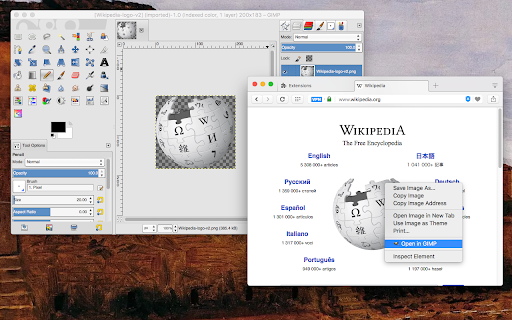
Adds context menu items to send image links and image files directly to the GIMP photo editor This extension streamlines sending images to GIMP, eliminating the need for manual saving. If the image has a valid URL, it is transmitted directly to GIMP. In the case of an image in DATA URL format, it is temporarily stored in your system's temporary directory, after which GIMP is invoked to open this image (you can modify this behavior via the options page). Important notes: 1. To use this extension, you must have the GIMP photo editor installed, which can be obtained from https://www.gimp.org/downloads/. 2. If the extension cannot automatically locate GIMP, you can specify its location on the options page. 3. For this extension to function and open images in the GIMP photo editor, a native connector must be installed. Instructions for installing the native client will be provided when attempting to open an image link with this extension. 4. This extension operates as an open-source project, and you are welcome to visit and contribute code. Features: 1. The ability to download images and transmit local file paths to GIMP. 2. Directly send image links to GIMP (though not recommended). -- Legal Disclaimer: This extension offers a convenient means of facilitating access to GIMP but is not affiliated with or a part of the GIMP photo editor. It is an independent, open-source project.

Image Editor for Google Chrome™
Install for edit your images quickly. Need a quick and simple method to edit your images online? Our software Image Editor for Google Chrome™ supports the most popular image formats such as JPG/ JPEG / PNG / GIF Our image editor provides plenty of features such as Adding rounded corners to your photos Change the brightness of your photos Change the contrast Add Filters to the photo Blur the photo if you want a more historical feel To begin using our software Image Editor for Google Chrome™, simply install and open the image you wish to edit. Its that simple! Disclaimer: Please note this extension is NOT made by Google and is made by an independent development team. All copyrights belong to their respective owners. Google doesn’t endorse or sponsor this Chrome extension. Image Editor for Google Chrome™ is not owned by, is not licensed by and is not a subsidiary of Google Inc.

Image editor PaintMagick for photos
PaintMagick to create and edit photos and images online using a web browser PaintMagick is an image editor for photos and draws with advanced drawing features, effects and filters. It allows to create and edit images directly in the web browser. You can create images, paste from clipboard (ctrl+v) or upload from computer (using menu or drag & drop). Everything stays in your web browser. - Files: open images, directories, URL, drag and drop, save, print. - Edit: undo, cut, copy, paste, selection, paste from clipboard. - Image: information, EXIF, trim, zoom, resize (Hermite resample, default resize), rotate, flip, color corrections, etc - Layers: multiple layers system, differences, merge, flatten, Transparency support. - Effects: Black and White, Blur (box, Gaussian, stack, zoom), Bulge/Pinch, ... - Tools like pencil or brush. - Help: keyboard shortcuts, translations.

Video editor OpenShot online
Create and edit videos with OpenShot online The OpenShot video editor is a Chrome extension that allows to create and edit videos online. It is an integration with an OpenShot instance, which is a free and open-source video editor . It supports commonly used video codecs that are supported by FFmpeg like WebM (VP9), AVCHD (libx264), HEVC (libx265) and audio codecs like mp3 (libmp3lame) and aac (libfaac). The program can render MPEG4, ogv, Blu-ray and DVD video, and Full HD videos for uploading to the internet video websites. It is a video editor integrated with our file manager to manage only video file types with this desktop app. OpenShot main features are - Support for many video, audio, and image formats (based on FFmpeg). - Unlimited tracks / layers. - Clip resizing, scaling, trimming, snapping, rotation, and cutting. - Video transitions with real-time previews. - Compositing, image overlays, watermarks. - Title templates, title creation, sub-titles. - Scrolling motion picture credits. - Solid color clips (including alpha compositing). - Support for Rotoscoping / Image sequences. - Advanced Timeline (including Drag & drop, scrolling, panning, zooming, and snapping). - Video encoding (based on FFmpeg). - Digital zooming of video clips. - Time-mapping and Speed changes on clips (slow/fast, forward/backward, etc...) - Custom transition lumas and masks. - Audio mixing and editing. - Digital video effects, including brightness, gamma, hue, greyscale, chroma key. (bluescreen / greenscreen) , and many more. In order to handle the video compositions this extension includes the following functionality over the files used by this extension: - Personal files and directories in the Cloud. - Operations with files and folders: copy, move, upload, create folder/file, etc - Search for files. This is not a video player, it is a video editor, so do not expect great quality when playing video or audio. Download locally the video composed by OpenShot to play it with the right quality. This OpenShot Video Editor extension uses the platform http://www.offidocs.com. It is available for free online users but it also allows the integration with premium users and on-premises OffiDocs deployments where the OffiDocs OpenShot video editor is installed. IMPORTANT: This extension scans the URLs browsed in order to detect video files. The video files detected appear in a file list located in the extension popup that are retrieved from our servers. The scanning is performed from our servers so your URL are reported to our system. No personal data is collected. This scan can be disabled with a checkbox that appears in the extension popup. If you disable this scanning, this functionality is not available so then the extension functionality is very limited.

BeFunky Extension
Instantly edit web page images and screenshots with BeFunky Photo Editor With the BeFunky Chrome Extension you can grab images off the web and open them in BeFunky with a single click. It's super easy to use, from any webpage just click the BeFunky icon in your browser toolbar. Then a window will open with thumbnails of every image on the page, select the one you want to edit and it'll immediately open in BeFunky. TURN YOUR PHOTOS INTO PAINTINGS, CARTOONS, SKETCHES, AND MORE Our Artsy effects are the most unique feature of our Photo Editor. With one tap, your photos will take on stunning, artistic characteristics. From realistic textures to natural-looking brush strokes and saturated color palettes, our artsy effects will instantly turn your photo into a work of art! REMOVE BACKGROUNDS FROM PHOTOS IN ONE TAP Our A.I.-powered Background Remover intelligently detects the subject of your image and precisely removes the surrounding background. Perfect for changing backgrounds on product photography, portraits, and more! ENHANCE IMAGE APPEARANCE WITH A.I. There's a lot of trial and error and fine-tuning involved in enhancing a photo. Our A.I. Image Enhancer takes the guesswork out of photo editing. With a single tap, it'll make colors more vibrant and add a touch of contrast to enhance details, giving your photos what they need to really pop. POWERFUL A.I. MADE FOR EDITING FACES Our A.I. Portrait Enhancer gives you professional portrait retouching results, all in a single tap. Quickly enhance exposure, soften the appearance of fine lines and blemishes on all skin tones, whiten teeth and brighten eyes without eliminating freckles and beauty marks! GIVE YOUR PHOTOS A UNIQUE LOOK There's truly no limit to what you can create! Everything from Vintage and Chromatic effects to filters that make your photo resemble a Van Gogh painting is right at your fingertips. Are you looking to add a texture, bokeh, or a design overlay? You'll find all that and more in BeFunky.
