
mffeadjabcnpcjlpbdbhoglnfbmbfkoo

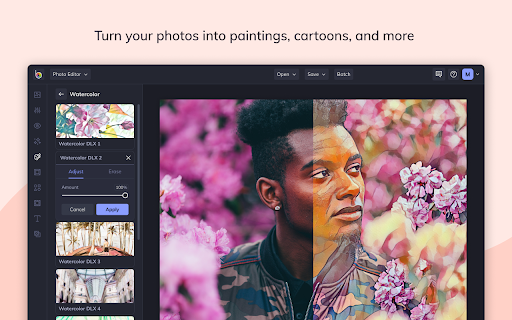
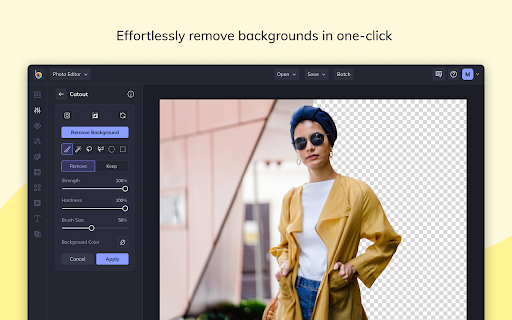


Instantly edit web page images and screenshots with BeFunky Photo Editor With the BeFunky Chrome Extension you can grab images off the web and open them in BeFunky with a single click. It's super easy to use, from any webpage just click the BeFunky icon in your browser toolbar. Then a window will open with thumbnails of every image on the page, select the one you want to edit and it'll immediately open in BeFunky. TURN YOUR PHOTOS INTO PAINTINGS, CARTOONS, SKETCHES, AND MORE Our Artsy effects are the most unique feature of our Photo Editor. With one tap, your photos will take on stunning, artistic characteristics. From realistic textures to natural-looking brush strokes and saturated color palettes, our artsy effects will instantly turn your photo into a work of art! REMOVE BACKGROUNDS FROM PHOTOS IN ONE TAP Our A.I.-powered Background Remover intelligently detects the subject of your image and precisely removes the surrounding background. Perfect for changing backgrounds on product photography, portraits, and more! ENHANCE IMAGE APPEARANCE WITH A.I. There's a lot of trial and error and fine-tuning involved in enhancing a photo. Our A.I. Image Enhancer takes the guesswork out of photo editing. With a single tap, it'll make colors more vibrant and add a touch of contrast to enhance details, giving your photos what they need to really pop. POWERFUL A.I. MADE FOR EDITING FACES Our A.I. Portrait Enhancer gives you professional portrait retouching results, all in a single tap. Quickly enhance exposure, soften the appearance of fine lines and blemishes on all skin tones, whiten teeth and brighten eyes without eliminating freckles and beauty marks! GIVE YOUR PHOTOS A UNIQUE LOOK There's truly no limit to what you can create! Everything from Vintage and Chromatic effects to filters that make your photo resemble a Van Gogh painting is right at your fingertips. Are you looking to add a texture, bokeh, or a design overlay? You'll find all that and more in BeFunky.

Photo Editor
Photo Editor is a powerful application to edit any image or photo which are available on the internet. Just right click on the… Photo Editor is a powerful application to edit any image or photo which are available on the internet. Just right click on the photo and then select Open with Photo Editor. As simple as that. ✅ Edit any photos or images in the website with just right click on it. ✅ Tons of powerful builtin features and comes free of costs ✅ Lot of prebuilt image filters and effects ✅ Text editing and annotation ✅ Custom Icons and shapes ✅ Cropping images ✅ Editing Local files as well ✅ Wonderful User Interface ✅ Just click and go, no hassle of using desktop software or 3rd party web based applications

Stencil
The Stencil Chrome extension lets you highlight text anywhere on the web and turn it into an image instantly. See an image you want to add some text to? Just right-click any image and select "Open Image with Stencil". Then you can start creating and customizing your image! - Over 5,000,000+ new royalty-free background photos (with search) - Over 3,100,000+ royalty-free icons (with search) - 1,350+ all new templates (with search) - 4,700+ fonts - Instantly add captions to images on Facebook, Twitter, Pinterest & Instagram and any images on the web! - Custom watermarks - Works on any website! Start creating and sharing your images with Stencil!

Gimp online - image editor and paint tool
Create and edit images and photos with Gimp Online Gimp Image Editor is a tool for tasks like photo and image retouching, image composition and image authoring. It is an integration with the Linux Desktop app GIMP (GNU Image Manipulation), a freely distributed program that provides many capabilities. It can be used as a simple paint program, image editor, an expert quality photo retouching program, an image renderer, or an image format converter. It is an image editor integrated with our file manager to manage only image file types with this desktop app. GIMP is ideal for advanced photo retouching techniques. It gets rids you of unneeded details using the clone tool, or touch up minor details easily with the new healing tool. Moreover, numerous digital photo imperfections can be easily compensated for using GIMP. Fix perspective distortion caused by lens tilt simply choosing the corrective mode in the transform tools. - Suite of painting tools including Brush, Pencil, Airbrush, Clone, etc. - Image editor. - Sub-pixel sampling for all paint tools for high quality anti-aliasing. - Extremely powerful gradient editor and blend tool. - Supports custom brushes and patterns. - Full alpha channel support. - Layers and channels. - Multiple Undo/Redo. - Editable text layers. - Transformation tools including rotate, scale, shear and flip. The file format support ranges from the common likes of JPEG (JFIF), GIF, PNG, TIFF to special use formats such as the multi-resolution and multi-color-depth Windows icon files. Gimp Image Editor uses the GIMP license: GPL. Hence it can be installed and distributed for free. This extension uses the platform http://www.offidocs.com from which this software is served. It is available for free online users but it also allows the integration with premium users and on-premises OffiDocs deployments where the OffiDocs GIMP is installed. IMPORTANT: This extension scans the webpages browsed in order to detect image files. The image files detected appear in a file list located in the extension popup that are retrieved from our servers. The scanning is performed from our servers for a maximum efficiency so your webpages are reported to our system. No personal data is collected. This scan can be disabled with a checkbox that appears in the extension popup. If you disable this scanning, this functionality is not available so then the extension functionality is very limited.

Image Editor
You can modify image text, image text, image watermark, rotation, filter, crop, flip, color. And get the DataURL of the picture. Right-click the picture to edit online! Edit pictures online, you can modify text, image text, image watermark, rotation, filter, crop, flip, color. And get the DataURL of the picture. Features Load image to canvas Undo/Redo (With shortcut) Crop Flip Rotation Free drawing Line drawing Shape Icon Text Mask Filter Image Filter
