
omebobahbkampglebglkoagddjnjbhle


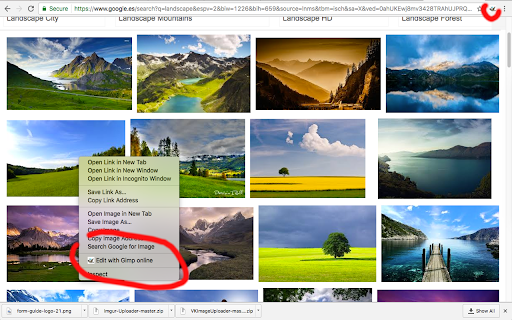

Create and edit images and photos with Gimp Online Gimp Image Editor is a tool for tasks like photo and image retouching, image composition and image authoring. It is an integration with the Linux Desktop app GIMP (GNU Image Manipulation), a freely distributed program that provides many capabilities. It can be used as a simple paint program, image editor, an expert quality photo retouching program, an image renderer, or an image format converter. It is an image editor integrated with our file manager to manage only image file types with this desktop app. GIMP is ideal for advanced photo retouching techniques. It gets rids you of unneeded details using the clone tool, or touch up minor details easily with the new healing tool. Moreover, numerous digital photo imperfections can be easily compensated for using GIMP. Fix perspective distortion caused by lens tilt simply choosing the corrective mode in the transform tools. - Suite of painting tools including Brush, Pencil, Airbrush, Clone, etc. - Image editor. - Sub-pixel sampling for all paint tools for high quality anti-aliasing. - Extremely powerful gradient editor and blend tool. - Supports custom brushes and patterns. - Full alpha channel support. - Layers and channels. - Multiple Undo/Redo. - Editable text layers. - Transformation tools including rotate, scale, shear and flip. The file format support ranges from the common likes of JPEG (JFIF), GIF, PNG, TIFF to special use formats such as the multi-resolution and multi-color-depth Windows icon files. Gimp Image Editor uses the GIMP license: GPL. Hence it can be installed and distributed for free. This extension uses the platform http://www.offidocs.com from which this software is served. It is available for free online users but it also allows the integration with premium users and on-premises OffiDocs deployments where the OffiDocs GIMP is installed. IMPORTANT: This extension scans the webpages browsed in order to detect image files. The image files detected appear in a file list located in the extension popup that are retrieved from our servers. The scanning is performed from our servers for a maximum efficiency so your webpages are reported to our system. No personal data is collected. This scan can be disabled with a checkbox that appears in the extension popup. If you disable this scanning, this functionality is not available so then the extension functionality is very limited.

Screenshot Tool - Screen Capture & Editor
Innovative screenshot tool lets users screen capture and edit screenshot. Full page screen capture. Take stunning screenshots of entire websites and capture page elements. Offline. No registration. Screenshot tool - captures entire websites and user areas. Ready-made screenshots can be quickly edited (crop, paint over, add arrows, captions or text). Screen Capture tool for making a full page or partial capture with further editing, download, or text adding. Make a full webpage screen capture or just any part of it with an opportunity to edit, save and download screen capture to your PC. The app is launched from a browser that totally saves your time. Simply click the extension icon to choose from options whole page capture or a selected part. You will not see any additional windows with websites here. Why waste time if you just want a screenshot? Want to share your screen for cases like reporting technical issues, making product demos or how-to tutorials? Here are reasons to choose Screenshot and Screen Capture: ✔️ Screenshot of the full page, not just the visible area or selected area; ✔️ Screenshot on One-Click; ✔️ Storage and processing without a server; ✔️ Save PNG files or Copy it to the clipboard with One-Click; ✔️ No login or registration required; ✔️ There are no restrictions on the size or size of the file; ✔️ Edit and discard changes your screenshot; ✔️ Add graphic and text elements such as pointer, arrow, square and other shapes; Click on the extension icon (in the upper right corner of the browser) then choose one of the options capture and watch the Screenshot Tool capture each part of the page and then transfer the finished screenshot to a new tab, where you can edit the image and upload it as a file to your PC. Notes Remember to reload the page after you install extension before trying to take a screenshot of it (Chrome should initialize the extension for each page). The extension Screenshot tool is completely free and easy to manage for users. If our extension is useful to you, please give us 5 stars!

Image Editor & Tools - iLoveIMG
Easily edit, convert or download web page images and screenshots with iLoveIMG iLoveIMG makes image editing quick and effortless. Whether you're preparing visuals for work, web, or everyday use, everything you need is in one place. With the iLoveIMG Chrome Extension, you can resize, compress, convert, crop, and edit images directly from your browser. Trusted worldwide for speed and ease of use, iLoveIMG delivers powerful image tools in a clean, intuitive experience. OPTIMIZE IMAGES • Compress Image: Reduce image file size without losing quality. Perfect for faster uploads, sharing, and saving storage space. •Resize Image: Resize images to exact dimensions or percentages. Ideal for social media, websites, or email attachments. CONVERT IMAGE FORMATS •JPG Converter: Convert images to JPG format for smaller file sizes and better compatibility across platforms. •PNG Converter: Convert images to PNG for higher quality and transparency support when needed. •WebP Converter: Convert images to WebP for modern web optimization with smaller sizes and high quality. EDIT IMAGES •Crop Image: Crop images to focus on key areas or fit specific formats like social media posts or thumbnails. •Rotate Image: Rotate images to the correct orientation in seconds. Fix sideways or upside-down photos easily. •Add Watermark: Add text or logos to images. Protect your content or reinforce your brand identity. ADVANCED TOOLS •Meme Generator: Create memes quickly by adding text to images. Customize captions and share instantly. •Image Upscaler: Increase image resolution while preserving quality. Improve clarity for prints or digital use. •Remove Background: Automatically remove backgrounds from images. Create clean visuals for products or presentations. Why Choose iLoveIMG? ● All-in-one image toolkit in your browser ● Fast, simple, and easy to use ● High-quality results with minimal effort ● Clean, intuitive interface ● Trusted by millions worldwide Install the iLoveIMG Chrome Extension and simplify the way you work with images—resize, compress, convert, and edit in just a few clicks.

Web Paint - Page Marker & Editor
Web Paint - Page Marker & Editor enables you to make annotations and modifications on websites. This extension allows you to draw, add text, insert lines, and highlight content directly on web pages and PDFs. The tool is compatible with both mouse and touchscreen inputs, giving you the ability to create and save your edits to your device. Whether you're a student, a professional, or simply an avid web user, this extension is a valuable addition. It offers a range of advanced annotation tools, such as a pencil, highlighter, color picker, arrow, polygon, text, and emojis. Are you accustomed to highlighting important text in books or do you want to draw directly on websites in real-time from your browser? Perhaps you need to share your screen for tasks like reporting technical issues, creating product demonstrations, or crafting how-to tutorials. Here's why you should consider using our extension: - It includes all the features found in MS Paint. - You can adjust the thickness, transparency, and choose preset colors. - Capture a screenshot of the entire page. Paint Online is a lightweight and free Chrome extension designed for educational purposes, introducing anyone to the world of drawing right within their browser. Additionally, it offers the opportunity to practice the alphabet, numbers, and artwork while learning. The extension allows for full-page screen captures, saving the screenshots as PDFs or images. These instant captures are stored locally and don't generate online traffic. The screenshot tool functions offline and is incredibly user-friendly. You can easily choose between full-screen or partial area captures with a single click. Furthermore, you have the flexibility to customize the screenshots by adding text, drawing lines, arrows, and shapes. The extension provides the following features: 1.Convenient hotkeys for each tool 2. Save drawings along with screenshots 3. Save images to your PC or print them 4. Crop and save specific image areas We value your feedback! Our team is dedicated to offering you the best Chrome experience possible. If you find our extension helpful, please consider giving it a 5-star rating.

Paint Online - Drawing Tool
Sketch fun drawings directly on web pages using the paint tool. Capture your art with a quick screenshot. Classic MS Paint in the browser, with extra features. The paint on tab tool has a simple and easy-to-use design. It is not confusing, and easily recognizable icons are used in the app, which makes it easy for everyone to use. Paint Tool is a fun extension on Google Chrome which lets you annotate any page you want and share it with your friends. Paint enables you to draw on any webpage with various tools to express your thoughts, make a point or edit. The plus points of Paint extension are: - Draw on any webpage in your browser. - Make shapes with the magic marker. - Write with the text tool. - Take screenshot to share your creativity. Using this Paint Online, you can share your feelings about a webpage and then share it with your friends.
