
mnopmeepcnldaopgndiielmfoblaennk
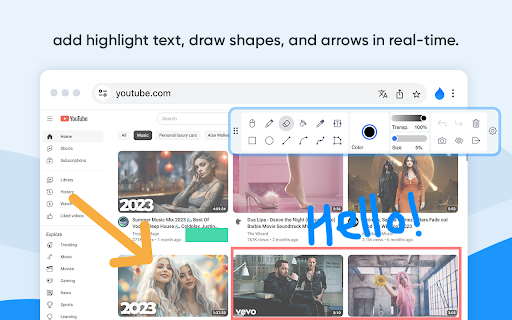


Web Paint - Page Marker & Editor enables you to make annotations and modifications on websites. This extension allows you to draw, add text, insert lines, and highlight content directly on web pages and PDFs. The tool is compatible with both mouse and touchscreen inputs, giving you the ability to create and save your edits to your device. Whether you're a student, a professional, or simply an avid web user, this extension is a valuable addition. It offers a range of advanced annotation tools, such as a pencil, highlighter, color picker, arrow, polygon, text, and emojis. Are you accustomed to highlighting important text in books or do you want to draw directly on websites in real-time from your browser? Perhaps you need to share your screen for tasks like reporting technical issues, creating product demonstrations, or crafting how-to tutorials. Here's why you should consider using our extension: - It includes all the features found in MS Paint. - You can adjust the thickness, transparency, and choose preset colors. - Capture a screenshot of the entire page. Paint Online is a lightweight and free Chrome extension designed for educational purposes, introducing anyone to the world of drawing right within their browser. Additionally, it offers the opportunity to practice the alphabet, numbers, and artwork while learning. The extension allows for full-page screen captures, saving the screenshots as PDFs or images. These instant captures are stored locally and don't generate online traffic. The screenshot tool functions offline and is incredibly user-friendly. You can easily choose between full-screen or partial area captures with a single click. Furthermore, you have the flexibility to customize the screenshots by adding text, drawing lines, arrows, and shapes. The extension provides the following features: 1.Convenient hotkeys for each tool 2. Save drawings along with screenshots 3. Save images to your PC or print them 4. Crop and save specific image areas We value your feedback! Our team is dedicated to offering you the best Chrome experience possible. If you find our extension helpful, please consider giving it a 5-star rating.

Marker
Finds the most relevant phrases in any text and highlights them so you can understand it at a glance. Marker makes it very easy to find the relevant information in a long text, by reading it for you and highlighting the important parts. 📖 If you are in front of a long article, use Marker to highlight the relevant phrases automatically. Just click on the marker icon and watch it work for you! 🤖 Marker uses Artificial Intelligence to find the most important sentences and highlights them. It works with most websites. 💻 Marker works inside your device. It doesn't need to send your data to an external server. 👀 Marker is powered by an open-source implementation of the TextRank algorithm. You can find more about it here: https://github.com/NachoBrito/ts-textrank

WebBrush - Web Paint Tool for Chrome
Draw on Any Website - Advanced Web Paint Tool with Free Screenshot Annotation & Markup 🚀 WebBrush Web Paint Tool: Your Canvas, Your Way! 🎨 Enhance your web browsing experience with WebBrush Web Paint Tool, the ultimate browser extension that puts the power of creative expression at your fingertips. ▸ DRAW ON ANY PAGE: Instantly turn any webpage into your artistic Web Paint canvas. ▸ Drawing Tools: Explore a diverse array of brushes, pens, and pencils for unparalleled creative expression. 🖌️🎨 ▸ Color Palette: Personalize your drawings with a customizable palette, making each creation uniquely yours. 🌈 ▸ Undo/Redo: Seamlessly control your artistic journey with easy correction and experimentation. ↩️🔄 ▸ Text Annotations: Add context and personal flair by placing text directly on the web page, enriching your annotations. 📝 ▸ Save & Copy: Effortlessly preserve and share your masterpieces with intuitive save or copy options. 💾📋 Unlock a new dimension of interaction with Web Paint tool. Download WebBrush Web Paint Tool now and let your creativity flow seamlessly on the web! 🚀✨

Smart Web Paint for Chrome
Draw on any web page with Smart Web Paint for Chrome! Smart Web Paint for Chrome - drawing tool that works on web pages. Features: Draw on web pages In-line paint tools e.g. pencil, text, line, arrows. Change sizes and colors Save as a PNG file Copy to the clipboard Please note: The tool doesn't work on system pages such as browser settings (chrome://), new tab, Chrome Webstore

Paint Tool for Chrome
Paint tool to draw anything and anywhere in real-time, paint online. Take a screenshot of your drawing use screenshot tool. Paint Tool - draw on any website, add text, add lines, and highlight! With Web Paint, you can use your mouse or touchscreen to draw on the web or on PDF and save it to your computer. Paint, draw, and mark on any webpage or website. Whether you're a student, a professional, or just someone who loves browsing the web is a must-have extension. You'll have access to an array of advanced annotation tools, including a pencil, highlighter, color picker, arrow, polygon, text, emoji, and more. Easy to set up extension: 1. Install the Web Paint extension, and reload the page to let the extension work. 2. Click on the extension whenever you need to draw or highlight something. 3. Drawings are automatically saved. 4. Take Screenshot. 5. Reload the page to exit the draw mode from the browser. Accustomed to reading books and highlighting important texts or just wanted to draw on any website in real time in the comfort of your browser or want to share your screen for cases like reporting technical issues, making product demos or how-to tutorials? Here are reasons to choose our extension: 1. Has all the features of MS Paint. 2. Adjustable thickness, transparency, and preset color. 3. Take a screenshot of the page. Paint Online is lite weight and a free extension for Chrome that can be used for educational purposes and introduce anyone to drawing right from your browser. In addition, it can practice the alphabet, numbers, and paintings while educating. The creation of a screen capture is easy as it ever could be. Choose from the full-screen or partial area and take it in a click. Then you can fully customize screenshot like add text, drawing lines, arrows, and shapes. You can share your images on Pinterest board. It also contains the functions you need: - Hot-keys to each tool - Save drawing with a screenshot option - Save image to your PC or Print - Crop the necessary area of an image and save it Important Notice After installation/update, please reload the active tabs in your browser for the extensio to work. Rate us! We work hard to provide you with the best experience for Chrome. If you like our extension, please provide us with a 5 star rating!
