
jflddflnnaggppnecfphaljgahfajihk
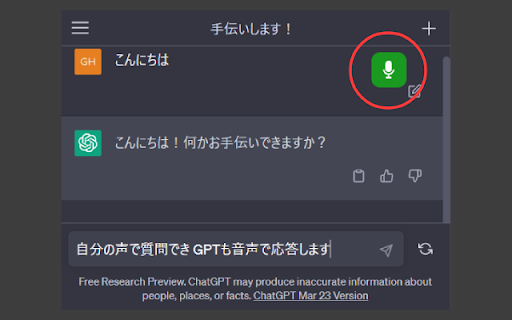
You can voice conversation with ChatGPT. This add-on(unofficial) is only valid for pages at https://chat.openai.com/ Let's have a voice conversation with ChatGPT. 1. Install this add-on. 2. Open the page at https://chat.openai.com/ (For the first time, you need to create an OpenAI account) 3. A microphone icon is displayed on the top right of the page. 4. Click the microphone icon to turn it on. 5. You will be asked whether to allow the use of the microphone only for the first time, so [Allow]. 6. You can talk. 7. Click the microphone icon again to turn it off. Click the add-on icon to change audio settings. * Mic must be enabled. * Since the response sentence is read gradually, the reading may be unnatural. * Misreading is a specification. * Rarely speaking may fail. * This addon is unofficial.

Talk with GPT Extensions
Extension to talk with GPT Talk-with-GPT is a Chrome extension that lets you have a conversation with the latest language model AI from OpenAI. With Talk-with-GPT, you can engage in a natural and engaging chat with GPT-3, using your voice or text input. The extension uses Chrome's text-to-speech and text recognition features to facilitate a conversation experience with the AI. To use Talk-with-GPT, simply register an OpenAI API key, and you're ready to go. The extension comes with a simple and intuitive user interface. Whether you're looking to have a casual conversation, practice your language skills, or just experiment with the latest in AI technology, Talk-with-GPT is the perfect tool for you. 1. Get API-KEY from open ai. 2. Open extension popup. 3. Register the key. 4. Select language if needed. 5. Click "Start conversation" button. 6. On the modal, click "click to speak" button and start the conversation. Talk-with-GPT는 OpenAI의 최신 언어 모델 AI와 대화할 수 있는 크롬 확장 프로그램입니다. Talk-with-GPT를 사용하면 음성 또는 텍스트 입력을 사용하여 GPT-3와 자연스러운 대화를 나눌 수 있습니다. 이 확장 프로그램은 크롬의 텍스트 음성 변환 및 텍스트 인식 기능을 사용하여 AI와 대화를 쉽게 할 수 있도록 도와줍니다. Talk-with-GPT를 사용하려면 OpenAI API 키를 등록하기만 하면 됩니다. 이 확장 프로그램은 간단하고 직관적인 사용자 인터페이스를 제공합니다. 캐주얼 대화, 언어 실력 향상, 최신 AI 기술 실험 등 다양한 용도로 Talk-with-GPT가 완벽한 도구입니다.

ChatGPT Tool Voice
Desarrollado por Juan Camilo Pabon La extensión proporciona herramientas de lectura de texto e introducción de texto mediante voz lo cual facilita la interacción con la herramienta de ChatGPT. Tambien proporciona utilidades para poder copiar un texto y leerlo en altavoz.

SpeakGPT
ChatGPT Voice for GPT3.5 and Non-Plus Subscriber Are you tired of typing out your questions and responses to ChatGPT? Well, get ready to have a live conversation with ChatGPT using the amazing SpeakGPT Chrome extension! This revolutionary tool allows you to effortlessly communicate with ChatGPT through voice recognition and text-to-speech technology. Now with Tiktok voice! All you have to do is click the microphone button, speak to ChatGPT, and listen to the response as if you're having a real conversation. It's that simple! And with the ability to customize voices, recognition language codes, and more, SpeakGPT is tailored to your unique preferences. This extension works like a charm on your mobile phone too! Just install it on your Kiwi Browser and voila! Now you can chat effortlessly with ChatGPT on the go! 🚀 Instructions: 1. Install SpeakGPT Chrome Extension (add to chrome) 2. Open SpeakGPT options page chrome-extension://ijnkocnekkckckignphbbhgjeodoejid/options.html or kiwi-extension://ijnkocnekkckckignphbbhgjeodoejid/options.html 3. Set voice, recognition language, token. 4. Save button 5. Validate Token button 6. Go to the talk interface chrome-extension://ijnkocnekkckckignphbbhgjeodoejid/talk.html or kiwi-extension://ijnkocnekkckckignphbbhgjeodoejid/talk.html 7. Hit microphone button and start talking to ChatGPT

ASKGPT
Experience ChatGPT's voice-enabled interface by speaking into your microphone and listening to its responses. This cutting-edge feature utilizes advanced speech recognition and text-to-speech technologies for a seamless interactions. Only Supported with OpenAI's GPT-3 tool Features: 1. Lets you use your microphone to ask questions. Uses speech recognition and text-to-speech technologies 2. Reads response from chatgpt for you 3. You can configure a number voices from the configuration list. Automatically saves the configuration locally and lets you use without reconfiguring every time you use chatgpt 4. You can download code snippets easily.
