
galockpmkiembebpfcnnalaomfglknkf
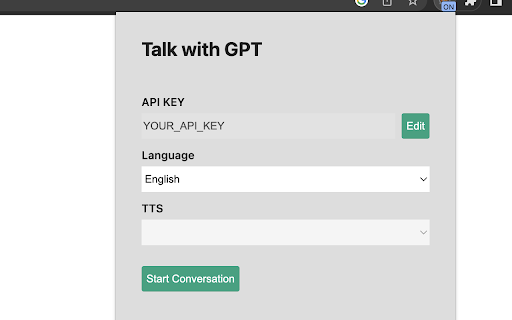
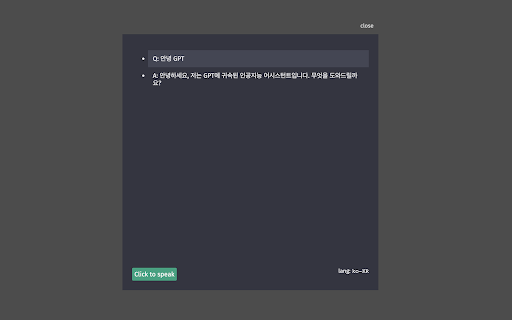
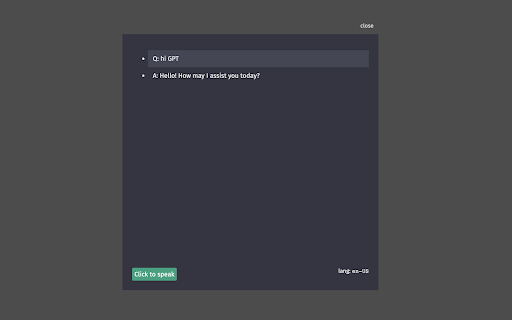

Extension to talk with GPT Talk-with-GPT is a Chrome extension that lets you have a conversation with the latest language model AI from OpenAI. With Talk-with-GPT, you can engage in a natural and engaging chat with GPT-3, using your voice or text input. The extension uses Chrome's text-to-speech and text recognition features to facilitate a conversation experience with the AI. To use Talk-with-GPT, simply register an OpenAI API key, and you're ready to go. The extension comes with a simple and intuitive user interface. Whether you're looking to have a casual conversation, practice your language skills, or just experiment with the latest in AI technology, Talk-with-GPT is the perfect tool for you. 1. Get API-KEY from open ai. 2. Open extension popup. 3. Register the key. 4. Select language if needed. 5. Click "Start conversation" button. 6. On the modal, click "click to speak" button and start the conversation. Talk-with-GPT는 OpenAI의 최신 언어 모델 AI와 대화할 수 있는 크롬 확장 프로그램입니다. Talk-with-GPT를 사용하면 음성 또는 텍스트 입력을 사용하여 GPT-3와 자연스러운 대화를 나눌 수 있습니다. 이 확장 프로그램은 크롬의 텍스트 음성 변환 및 텍스트 인식 기능을 사용하여 AI와 대화를 쉽게 할 수 있도록 도와줍니다. Talk-with-GPT를 사용하려면 OpenAI API 키를 등록하기만 하면 됩니다. 이 확장 프로그램은 간단하고 직관적인 사용자 인터페이스를 제공합니다. 캐주얼 대화, 언어 실력 향상, 최신 AI 기술 실험 등 다양한 용도로 Talk-with-GPT가 완벽한 도구입니다.

ChatGPT Bulk Delete
A Chrome extension to bulk delete ChatGPT conversations This Chrome extension is designed to help users quickly and efficiently delete conversations in the ChatGPT’s left sidebar. With the extension installed, users can add checkboxes to each conversation in the sidebar, select multiple conversations to delete or archive, and accomplish this with just a few clicks. Hold Shift and click to select multiple conversations for efficient bulk actions. This extension is particularly useful for users who frequently use ChatGPT and need to manage their conversations efficiently. Instead of deleting conversations one by one, users can remove multiple conversations at once, saving both time and effort. Additionally, this extension now offers a “bulk archive” feature for a one-time fee of $0.99 USD. This paid feature allows users to archive multiple conversations simultaneously, further enhancing the tool’s utility and convenience. The extension popup includes a small advertisement labeled “Ad” in the footer, linking to TubeVocab (https://www.tubevocab.com/), a third-party language-learning product. This ad helps support the continued development and free distribution of ChatGPT Bulk Delete. Clicking it is entirely optional and does not affect any of the extension’s core functionality.

ChatGPT Chats Delete
Browser extension to bulk delete or archive ChatGPT conversations easily. Are you tired of erasing ChatGPT chat lists one by one? "ChatGPT Conversation Bulk Delete" is a browser extension that helps you multi-select multiple conversations through a check box, and single-click Bulk Delete or Bulk Archive. Clean up your messy chat window list neatly and instantly! ■ Key Features: 1. Multi-Select Conversations: A checkbox is added to the left of the Conversations list for convenient selection of only the conversations you want. 2. Bulk Archive: Archive selected conversations in a single click. 3. Bulk Delete: permanently delete unnecessary conversations in one click. 4. Secure confirmation pop-up: To prevent accidental conversations from being deleted, a final confirmation pop-up appears that checks the selected list of conversations. 5. Multilingual Support: It automatically supports various language environments such as Korean, English, Japanese, Chinese, Spanish, and German. ■ Privacy & Security: This extension does not collect, store, or transfer any conversation or personal information to an external server. All processes work securely within your browser's local environment.

Wide GPT
Expand ChatGPT's screen instantly with 'Wide GPT' Chrome extension! No clicks needed, free and easy to install. Get more space now! You'll have more room to see and interact with your content with "Wide GPT," whether you're reading a story, writing code for your next big idea, or talking to AI. This extension is great for people who want to make the most of their workspace and avoid eye strain by not having to constantly scroll horizontally or resize their browser window. Simple to set up: just add "Wide GPT" to your Chrome browser, and you're good to go! You don't have to click any buttons or do anything else. The extension works in the background without being noticed and instantly makes ChatGPT's screen as big as it can be. As soon as you start, you'll be able to browse in a bigger and more immersive way. The best part? You can use "Wide GPT" for free. Why wait then? Get "Wide GPT" right now and start easily making the most of your screen space! Release log: 1.0.8 - Update the component selectors to follow the changes made by ChatGPT web interface. 1.0.7 - Fix the project page that was shrinking in the middle of the screen, now that page is ignored, no wide-screen will be applied to it. 1.0.5 - Fixed an issue with the enable/disable switch. - New version to try clearing the cache for Windows users who reported that the extension stopped working. 1.0.4 - Fixed the selectors to capture messages and make it wide again. 1.0.3 - Fixed the manifest.json to apply the extension on top of new ChatGPT URL. - Fixed the selectors to capture the prompt element textarea. 1.0.2 - Fixed manifest.json file to limit content access to https://chat.openai.com/ and cease requesting permission to access content on all websites. 1.0.1 - Enhanced element selector stability to prevent the extension from breaking when CSS classes are modified 1.0.0 - Added popup with preferences to: - Toggle the primary feature of the extension either inactive or active - Choose the width of the messages and prompt text input. - Buy me a coffee button.

Gippity Pruner - fix long GPT chats
Improve ChatGPT performance in long conversations, without losing your context! Gippity Pruner is a simple tool that hides your older ChatGPT messages from view and eliminates UI lag in long chats. Gippity Pruner only shows you messages that you want to see. This extension does not delete any messages, it just hides them from the chat view. Since ChatGPT still stores the full conversation history, you can still disable the pruning feature and see all your messages, and also get the full context in your responses. Pin Messages! You can also pin messages you want always in your conversation history, without needing to scroll way back up again and again!
