
bpmbhogdhpofgbmoobbfljkbhamhdamg
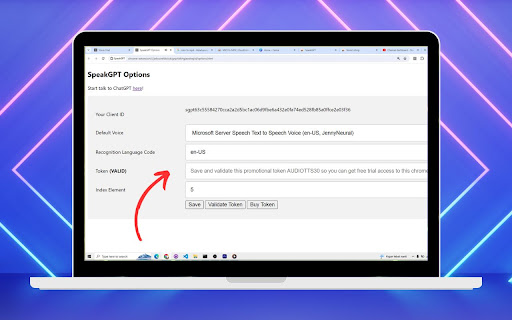

ChatGPT Voice for GPT3.5 and Non-Plus Subscriber Are you tired of typing out your questions and responses to ChatGPT? Well, get ready to have a live conversation with ChatGPT using the amazing SpeakGPT Chrome extension! This revolutionary tool allows you to effortlessly communicate with ChatGPT through voice recognition and text-to-speech technology. Now with Tiktok voice! All you have to do is click the microphone button, speak to ChatGPT, and listen to the response as if you're having a real conversation. It's that simple! And with the ability to customize voices, recognition language codes, and more, SpeakGPT is tailored to your unique preferences. This extension works like a charm on your mobile phone too! Just install it on your Kiwi Browser and voila! Now you can chat effortlessly with ChatGPT on the go! 🚀 Instructions: 1. Install SpeakGPT Chrome Extension (add to chrome) 2. Open SpeakGPT options page chrome-extension://ijnkocnekkckckignphbbhgjeodoejid/options.html or kiwi-extension://ijnkocnekkckckignphbbhgjeodoejid/options.html 3. Set voice, recognition language, token. 4. Save button 5. Validate Token button 6. Go to the talk interface chrome-extension://ijnkocnekkckckignphbbhgjeodoejid/talk.html or kiwi-extension://ijnkocnekkckckignphbbhgjeodoejid/talk.html 7. Hit microphone button and start talking to ChatGPT

ChatGPT Degrade Checker 降级检查
ChatGPT Downgrade Check Tool 🔧 / ChatGPT Service Status Monitoring🕵️♂️ A Chrome extension that displays PoW information and IP quality for ChatGPT. You can easily detect if the GPT model has been downgraded.

Audio Player for ChatGPT
Adds an audio player for ChatGPT's Read Aloud feature ChatGPT's "Read Aloud" is great, but the lack of basic controls can be frustrating. This extension solves that by adding a simple audio player with play/pause, a seek bar, and duration display. It leverages the browser's built-in audio controls, fulfilling a long-requested feature. This extension is open source at https://github.com/ian-speckart/chatgpt-audio-player

GPT Folders
Organize your ChatGPT and Claude conversations into folders 📂 GPT Folders - Organize Your ChatGPT & Claude Conversations! Tired of endless scrolling through your AI chat history? Get organized with GPT Folders! ✨ MAIN FEATURES: • Create custom folders to organize your conversations • Drag and drop chats into folders • Save frequently used prompts for quick access • Clean, modern interface that matches both ChatGPT and Claude's design 🎯 KEY BENEFITS: • Find important conversations instantly • Group related chats together • Access your favorite prompts with one click • Seamless integration with ChatGPT and Claude 💡 PERFECT FOR: • Professionals managing multiple projects • Students organizing research conversations • Writers keeping track of different topics • Anyone who wants a more organized AI chat experience 🔒 PRIVACY FIRST: • All data stored locally on your device • No external servers or data collection • Works entirely within your browser • No account required 🚀 GET STARTED: 1. Install the extension 2. Create your first folder 3. Drag chats into folders 4. Save your favorite prompts Make your AI chats work better for you with GPT Folders - your personal chat organizer! 💪 Actively maintained and regularly updated

Shortcuts for ChatGPT
Master ChatGPT with /shortcuts Unlock your creativity with ChatGPT's real-time, high-quality prompts! Shortcuts help you generate the perfect prompt based on the slash command you enter. For example, by typing '/poet' followed by a space, ChatGPT will provide a prompt that unleashes your inner poet. When the extension detects a slash command, it sends it to ChatGPT internally to produce an ideal prompt based on the command in real-time. So the number of possible shortcuts that you can generate is infinite. All you need is an API Key from OpenAI's platform (https://platform.openai.com/account/api-keys) and a valid payment method (https://platform.openai.com/account/billing/payment-methods). We understand that privacy is important to you, which is why our extension does not collect any of your data. Your API key is also securely stored in your browser. Feeling stuck? Need some inspiration? Use this prompt in ChatGPT to check examples of shortcuts that you can use with this extension: Create a markdown table that showcases 30 different roles for ChatGPT, including their descriptions. Simply connect the words in column 1 with hyphens and add a slash at the beginning.
