
pmhnadflnkmadcikaidjemonacknhkkh
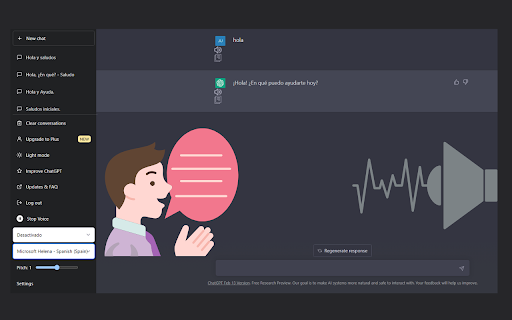


Desarrollado por Juan Camilo Pabon La extensión proporciona herramientas de lectura de texto e introducción de texto mediante voz lo cual facilita la interacción con la herramienta de ChatGPT. Tambien proporciona utilidades para poder copiar un texto y leerlo en altavoz.

Talk with GPT Extensions
Extension to talk with GPT Talk-with-GPT is a Chrome extension that lets you have a conversation with the latest language model AI from OpenAI. With Talk-with-GPT, you can engage in a natural and engaging chat with GPT-3, using your voice or text input. The extension uses Chrome's text-to-speech and text recognition features to facilitate a conversation experience with the AI. To use Talk-with-GPT, simply register an OpenAI API key, and you're ready to go. The extension comes with a simple and intuitive user interface. Whether you're looking to have a casual conversation, practice your language skills, or just experiment with the latest in AI technology, Talk-with-GPT is the perfect tool for you. 1. Get API-KEY from open ai. 2. Open extension popup. 3. Register the key. 4. Select language if needed. 5. Click "Start conversation" button. 6. On the modal, click "click to speak" button and start the conversation. Talk-with-GPT는 OpenAI의 최신 언어 모델 AI와 대화할 수 있는 크롬 확장 프로그램입니다. Talk-with-GPT를 사용하면 음성 또는 텍스트 입력을 사용하여 GPT-3와 자연스러운 대화를 나눌 수 있습니다. 이 확장 프로그램은 크롬의 텍스트 음성 변환 및 텍스트 인식 기능을 사용하여 AI와 대화를 쉽게 할 수 있도록 도와줍니다. Talk-with-GPT를 사용하려면 OpenAI API 키를 등록하기만 하면 됩니다. 이 확장 프로그램은 간단하고 직관적인 사용자 인터페이스를 제공합니다. 캐주얼 대화, 언어 실력 향상, 최신 AI 기술 실험 등 다양한 용도로 Talk-with-GPT가 완벽한 도구입니다.

Voice-to-ChatGPT
Enjoy chatting with ChatGPT using your voice. Enjoy chatting with ChatGPT using your voice. V2.0.0_20230319 New Freature: 1. New UI design that provides better experience. 2. Speaking for every question and answer. 3. Stop speaking for current voice output. Fix: 1. Fix the issue of speaking problems. V1.0.1_20230305 Voice-To-ChatGPT, Hold to Talk, and Release to Send. The "Vioce-to-Talk" extension allows you to interact with the ChatGPT language model through your microphone and hear its responses with a voice. This extension uses speech recognition and text-to-speech technologies from Google Chrome, and supports all major languages. To use it, you need to open the ChatGPT home page, Holding "Hold to Talk" button to talk, release the button to send. Also, you can cancel and edit if you want to. Please note: Voice-to-ChatGPT is inspired by Talk-to-ChatGPT and most souce code come from Voice-to-ChatGPT, thanks to Voice-to-ChatGPT.

TalkGPT
Talk with chat GPT. Convert your voice to text and automatically send it to chat GPT. When he has answered you, you will hear the text of his answer in the language in which you have configured your browser.

Two Way Voice for ChatGPT
This extension for ChatGPT allows you to ask using voice and listen to response. Discover the convenience of voice interactions with ChatGPT. This extension for ChatGPT website allows you to have conversations using your voice. Ask questions using your voice and you can listen to response, making it easy and convenient to get the information you need hands-free. Perfect for anyone who prefers to talk to ChatGPT using their voice. It can be your voice assistant. Get answers, discuss ideas, and explore topics with ease. Simply start the conversation mode. The extension will automatically manage turns between asking question and listening to the response once you've started the conversation mode. There are three conversation modes available: 1. Two-way conversation (Default) - You can ask question using voice and ChatGPT will respond with voice. 2. You talk & ChatGPT text response - You can ask question using voice and it will respond with text. Useful if you want to just read. 3. You type & ChatGPT voice response - You can ask question using typing and it will respond with voice. Useful if you want to listen on headphone and cannot speak out loud in quite place. The extension enables voice-based questions in various languages like Nepali, Chinese, and Korean. For instance, speaking in Nepali or Chinese generates the respective characters. Our extension utilizes your browser's built-in voice-to-text API, which may automatically download additional voices for text-to-speech. Download times vary based on your system and network conditions. Voice-to-text accuracy and performance rely on your machine's resources, which can decrease during high CPU usage. Please contact us if you've any questions or feedback. Note: The popup displayed for the extension has link. The link is https://linktr.ee/dhunju. This is link to similar extension that is created by us for similar AI site. The link is to the page that has list of extensions created by us for Edge and Chrome browser. Disclaimer: This extension is developed independently and is not affiliated with or endorsed by OpenAI in any way. "ChatGPT" is a trademark of OpenAI, and its use is subject to OpenAI's permission. Any references are solely for the purpose of describing the functionality of this extension. For official information, please visit OpenAI's website.
