
jcmmegbigehepgkipgbbeppciahdocko
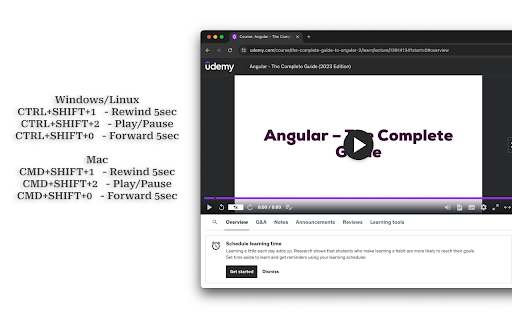
A Chrome extension designed for Udemy learners. It enables global keyboard shortcuts for playback, this is especially handy when you're following instructions (like coding in an editor) and Udemy is playing on a separate monitor or split screen. Without this extension, you'd have to switch to the Udemy tab or monitor to control playback. It is very useful in case you find yourself constantly pausing/playing, or rewinding videos. *NOTE: It will only work if one tab of Udemy is opened. Close multiple tabs and Reload the video page if it's not working*

Udemy Course Progress
If you like to see exactly how much you have progressed in your Udemy courses, this extension is for you. As bonus, see course total time, total time completed and how long it takes to progress 1%

Udemy Enhancer
A useful tool to improve the user experience of Udemy. This extension offers features to improve your user experience on the Udemy website. Attention: These features only appear on the lecture page. Current features: 1. The user can extend video size to fill the entire webpage, similar to Youtube's theater mode. 2. Picture-in-Picture 3. The user can use the mouse to capture an area and then take a screenshot of the selected area. Press Ctrl+C to cancel. 4. The user can adjust the video play speed. To set the minimum and maximum speed and the slider interval, right-click the extension icon and select the option page to update. Udemy may update its code and make the extension features not working. If you encounter any issues or want to contribute to the extension, please visit the repository and open an issue. https://github.com/a90100/udemy-enhancer If this extension greatly improves your experience, please consider giving it a five-star review! If you encounter any issues, please let me know. Thank you!

Udemy Media Control
Control Udemy video playback with media keys (F7, F8, F9) Transform your Udemy learning experience with native keyboard shortcuts that actually work! 🔑 THE PROBLEM: Udemy doesn't support media keys by default. Your F7, F8, and F9 keys do nothing, forcing you to constantly reach for your mouse to control video playback. ✨ THE SOLUTION: This extension enables native media key support on Udemy, giving you seamless video control without interrupting your learning flow. ⚠️ NEW EXTENSION NOTICE: Chrome may show a security warning during install. This is normal for new extensions - just click "Continue to install". Fully safe and Google-approved! 🎯 WHAT IT DOES: • F7 - Seek backward 10 seconds (perfect for replaying concepts) • F8 - Play/pause video instantly • F9 - Seek forward 10 seconds (skip repetitive parts) • Works automatically on all Udemy courses • No configuration needed - install and use immediately 💻 CROSS-PLATFORM COMPATIBILITY: • Windows: All three keys (F7/F8/F9) work perfectly • Mac: All three keys (F7/F8/F9) • No flickering or conflicts with Udemy's player 🚀 WHY YOU NEED THIS: ✓ Learn faster with fluid video navigation ✓ Stay focused without mouse interruptions ✓ Review difficult concepts effortlessly ✓ Professional-grade media control experience ✓ Works with any Udemy course instantly ✓ Smart tab detection - works even with multiple Udemy courses open 🔒 PRIVACY & PERMISSIONS EXPLAINED: This extension requires "tabs" permission to track which Udemy tab you're currently using, ensuring media keys control the right video when you have multiple tabs open. We ONLY access Udemy.com tabs - never your browsing history or other websites. The extension is completely local and collects zero personal data. • ✓ Only works on Udemy.com (nowhere else) • ✓ No data collection or tracking • ✓ No external servers or analytics • ✓ Tabs permission used solely for multi-tab media control • ✓ Open source and transparent functionality Perfect for students, professionals, and lifelong learners who want efficient, distraction-free video control during online courses. Install now and experience Udemy the way it should work!

Udemy Remaining Time Calculator
Udemy Remaining Time Calculator: Optimize Udemy learning with real-time progress updates. Features: • See time left for entire course. • Track section progress effortlessly. • Works with any Udemy business account • Ultra lightweight Chrome extension focused only on essentials. No tracking, no analytics, no unnecessary background work. Just fast and clean performance. • Fully open source and community driven. If you have an idea, improvement, or want to contribute, feel free to jump in and help shape the project together 💙 Hey everyone! 🌟 Exciting news! 🚀 We've got an awesome extension to share with you - it's all about keeping track of your Udemy course time! 🕒✨ But guess what? It's not just an extension, it's a cool, open-source project that's ready to grow with YOUR help! 🌱💻 Join us on this amazing journey by contributing to the project on GitHub: https://github.com/edenizk/udemyRemainingTimerExtention🤝🌐 Your coding skills are super welcome, but don't worry if coding isn't your thing! 🙌💡 Drop your fantastic ideas here: https://github.com/edenizk/udemyRemainingTimerExtention/issues/new 🚀🌈 Let's make this extension even more awesome together! 🚀🎉 #OpenSourceMagic ✨🌟 Features: Real-Time Section Progress: Keep tabs on your course advancement with the ability to see the exact time remaining for the current section. Stay in control and make informed decisions on your study strategy. Holistic Course Countdown: Plan your learning journey effectively by accessing the total time left for the entire course. Gain a comprehensive overview and manage your schedule efficiently to meet your academic goals. Visual and Text generated by AI 🙂 Disclaimer: This extension is not developed or endorsed by Udemy. It is an open-source tool created independently. This extension is not affiliated with, supported by, or connected to Udemy in any way. Be aware that any issues or concerns related to its functionality are the sole responsibility of the extension's developers. If you have any questions, concerns, or if you wish to request the removal of this extension, please contact us via email at edenizk.work.sub@gmail.com. We will promptly address your inquiry and take appropriate action.
