
ncfomdkhmodhjcnabelemeokekkoennd
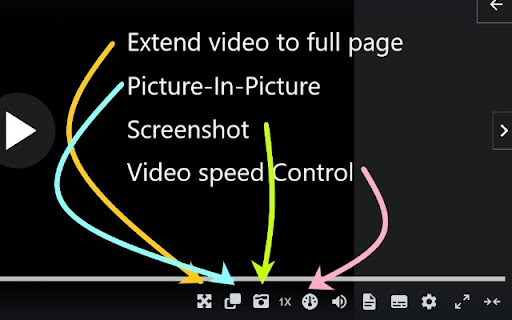
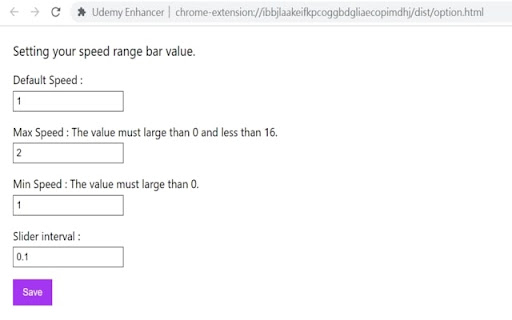
A useful tool to improve the user experience of Udemy. This extension offers features to improve your user experience on the Udemy website. Attention: These features only appear on the lecture page. Current features: 1. The user can extend video size to fill the entire webpage, similar to Youtube's theater mode. 2. Picture-in-Picture 3. The user can use the mouse to capture an area and then take a screenshot of the selected area. Press Ctrl+C to cancel. 4. The user can adjust the video play speed. To set the minimum and maximum speed and the slider interval, right-click the extension icon and select the option page to update. Udemy may update its code and make the extension features not working. If you encounter any issues or want to contribute to the extension, please visit the repository and open an issue. https://github.com/a90100/udemy-enhancer If this extension greatly improves your experience, please consider giving it a five-star review! If you encounter any issues, please let me know. Thank you!

Reddit Enhancement Suite
A suite of modules that enhance your Reddit browsing experience Reddit Enhancement Suite is a community-driven unofficial browser extension for Reddit. Please note that RES is specifically designed to work on OLD reddit. Most functionality will not work on the redesign. NOTE: Reddit Enhancement Suite is developed independently, and is not officially endorsed by or affiliated with Reddit.

Udemy Picture-in-Picture
This is a picture-in-picture extension for use on Udemy This Google extension adds a Picture in Picture button to Udemy's video controls. Unlike the generic Picture in Picture feature, it automatically switches between videos in Udemy courses and will also skip over assignments and text-only, non-video content and continue video playback only.

Udemy Plus
Udemy Plus adds new features on top of your favorite Udemy.

Udemy Reset Progress
Udemy Reset Progress Web Extension Reset or mark complete your Udemy course progress with a single click. Whether you want to re-watch a course from scratch or mark everything as done — Udemy Reset Progress handles it instantly. Some users experienced unexpected logouts when resetting large courses. Version 2.0 introduces smart pacing that adjusts speed based on your course size, so Udemy never sees suspicious activity: • Auto — Automatically picks the best speed for your course. Recommended for most users. • Turbo — Fastest speed for small courses (under 50 lectures). • Balanced — Reliable speed with batch cooldowns. Great for medium courses. • Safe — Slowest and most reliable. Best for large courses (200+ lectures). • Custom — Full control over delay, batch size, and cooldown timing. 1. Open any Udemy course page 2. Click the extension icon in your toolbar 3. Choose "Clear Progress" to reset or "Mark All Complete" to finish 4. Done — progress updates instantly on the page • Two actions — Reset all progress or mark every lecture complete • Smart pacing — Auto-adjusts speed to avoid rate-limiting and session issues • Custom mode — Fine-tune delay (50–1000ms) and batch size (5–50) for full control • Lightweight — Under 85 KiB total, no background scripts, no bloat • Private — Zero data collection, zero analytics, zero tracking, zero network requests • Open source — Full source code on GitHub (AGPL-3 license) • Cross-browser — Works on Chrome, Firefox, and Edge If you experience unexpected logouts or errors, open Settings (gear icon) and switch to Safe mode or increase the delay in Custom mode. This gives Udemy more time to process each request. Questions or feedback? Visit our GitHub page: github.com/Shramkoweb/udemy-reset-progress
