
jckclcmljepgcioamcfdjfgfclcdgkhe
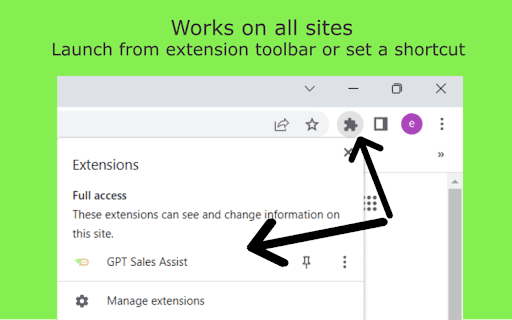
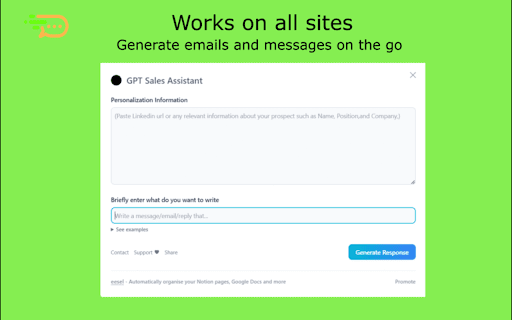

Streamline Your Sales With ChatGPT. Introducing GPT Sales Assistant, a privacy-friendly Chrome extension that uses AI to generate entire emails and messages. It works on all websites and has enhanced support for Gmail. ✔️ Outcompetes all other tools in the market with the highest quality responses ✔️ Works on all websites, and even better on Gmail ✔️ Supports all languages Visit our website at https://gptsalesassistant.com and check out our product demo HOW TO USE ON ALL SITES: 1) Click on the GPT Sales Assistant extension icon 2) A popup window will appear 3) Briefly enter what you want to write about and hit the "Generate Response" button. HOW TO USE ON GMAIL: To generate an email reply in Gmail: 1) Go to Gmail, open an email, and reply to it. 2) Click the GPT Sales Assistant extension button in the Gmail reply box. 3) Briefly enter what you want to reply to and hit the "Generate Reply" button. To generate a new email in Gmail: 1) Go to Gmail, compose a new email. 2) Click the GPT Sales Assistant extension button in the Gmail textbox. 3) Briefly enter what you want to write an email about and hit the "Generate Email" button.

SurfGPT: Chat with any website!
A ChatGPT powered extension which lets you ask contextual questions on any website. Are you tired of wading through endless walls of text online? Introducing SurfGPT – a groundbreaking Chrome extension that brings the ChatGPT magic to every webpage. 🌐 SurfGPT's Unmatched Features: - 🧑🔧 Prompts designed by a Conversational AI Engineer for all types of summarizations (Tutorials, Threads, Articles). - 🚀 Contextual Q&A assistance on any webpage! - 🔑 Enter your own API key for unlimited usage (no caps!) - ⚙️ Breaks down articles into parts to avoid token limits. Perfect For: - 🌪️ Intuitively summarizing articles, tutorials, and conversations in a flash. - 🤔 Asking contextual questions within any webpage. - 💬 Getting response suggestions for threads. - ⚡️ Revving up your research sessions. For the curious: 🤔 Why not GPT-4? SurfGPT was original designed with GPT-4, but while testing itself it was clear that the cost-benefit didn't make sense. It was 15 times more expensive, leading to about 10 cents spent per page on average. So I spent extra effort designing the prompts to get almost similar results with ChatGPT. 🤔 How does it work? SurfGPT scrapes the content of your current webpage and passes it along with your queries to generate contextual answers for you! 🔮 What does the future hold? There's many exciting things planned for the roadmap (eg. Multilingual support and Multimedia analysis, including research papers, presentations, excel, audio and video) which will be published for everyone to view AND have a say in!

Syncia - Power of ChatGPT on any website
Syncia is a browser extension that allows you to use Open AI's GPT in any website. Syncia enables users to chat with ChatGPT by opening a sidebar on any website by using the shortcut ctrl+shift+x. In addition, it provides a floating menu underneath any selected text on any website that allows users to generate text summaries, check grammar issues, and customise text length so on ! 🦾 Features 🗨️ Chat with ChatGPT through a sidebar. 🔑 Use your own Open AI API key. 📜 Quick menu underneath any selected text which allows you to summarise, simplify language, translate, and more. 🗂️ Allows to store custom prompts and use them with quick menu. 💯 Fully customisable settings page. 🔐 Secure and fully Free and open source forever. (Please consider giving this project a star 🌟 and contributing 💖 to support the project.) For more info check out https://github.com/Royal-lobster/Syncia Note: If shortcut is not working, Enter "chrome://extensions/shortcuts", under Syncia set new keyboard shortcut for "Open the sidebar"

ChatGPT Assistant Plus
Maximize Your ChatGPT: Search Integration, Run from the Context Menu, Talk with LLM in the Popup Introducing ChatGPT Assistant Plus — the ultimate browser extension to supercharge your experience with AI-powered conversations. Whether you're a power user or just starting out, this tool brings intelligent interaction right where you need it. 💬 Popup Chat Interface: Access ChatGPT directly from the extension popup. No need to open new tabs—start a conversation anytime, instantly. 🔎 Address Bar (Omnibox) Integration: Type "gpt" and hit space in your browser's address bar to launch ChatGPT. Get quick answers, insights, or assistance while staying in your workflow. 🖱️ Right-Click Context Menu: Activate ChatGPT on any webpage using the context menu. Whether you're researching, drafting, or editing, it’s just a right-click away. 🚀 Fast, Lightweight, and Reliable: ChatGPT Assistant Plus is built for performance. It's responsive, secure, and designed for daily use by professionals and enthusiasts alike. 🌐 Seamless Web Integration: This extension lets you invoke ChatGPT contextually—whether you're writing emails, browsing articles, or working in online editors. 🎯 Boost Your Productivity: Let ChatGPT assist you in brainstorming ideas, answering questions, summarizing content, and more—all without breaking your browsing rhythm. Download ChatGPT Assistant Plus and elevate your online conversations with the most intuitive and accessible ChatGPT experience available.

ChatGPT for Google: Search GPT
Integrate ChatGPT into your search engine! Access ChatGPT on any website. The ultimate browser extension for anyone seeking fast and accurate information. Powered by With ChatGPT, you'll never have to waste time scrolling through countless search engine results again. Instead, you'll see ChatGPT's response right alongside your regular search engine results, allowing you to quickly and easily find the information you need. Chat directly with the AI model, allowing you to ask questions and get answers in a natural, human-like way. And with support for all popular search engines, including Google, Bing, and DuckDuckGo, you'll be able to access ChatGPT no matter which search engine you prefer. Please note that extension does not support or endorse the use of other ChatGPT extensions in parallel. To ensure the best experience, please uninstall any other ChatGPT extensions before installing this one.
