
mlkjjjmhjijlmafgjlpkiobpdocdbncj

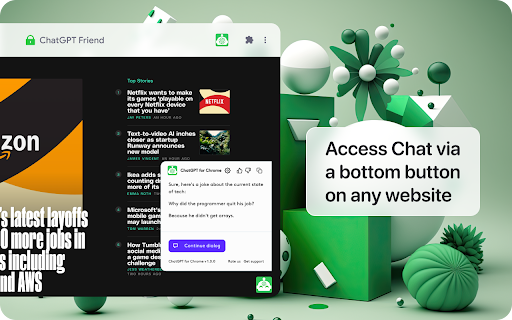
Integrate ChatGPT into your search engine! Access ChatGPT on any website. The ultimate browser extension for anyone seeking fast and accurate information. Powered by With ChatGPT, you'll never have to waste time scrolling through countless search engine results again. Instead, you'll see ChatGPT's response right alongside your regular search engine results, allowing you to quickly and easily find the information you need. Chat directly with the AI model, allowing you to ask questions and get answers in a natural, human-like way. And with support for all popular search engines, including Google, Bing, and DuckDuckGo, you'll be able to access ChatGPT no matter which search engine you prefer. Please note that extension does not support or endorse the use of other ChatGPT extensions in parallel. To ensure the best experience, please uninstall any other ChatGPT extensions before installing this one.

Definio AI: Multi-Modal AI Sidebar
Definio runs every LLM model from one sidebar. Throw your question at any of them, switch on a whim, never open a new tab. Definio AI is a powerful AI assistant that brings multiple language models together in a single browser extension—helping you explore, reason, and research faster, directly within your browsing flow. 🚀 CHAT WITH THE TOP AI MODELS – ALL IN ONE PLACE: Models from all major providers. 🧠 ASK BETTER QUESTIONS, GET SMARTER ANSWERS: Select any text on a page and start a conversation with multiple AI agents at once. Cross-check facts, get diverse insights, or bring specialised models into the discussion—right from your browser sidebar. ⚡ BUILT FOR DEEP THINKING AND FAST WORK: Use AI to break down dense content, summarize complex topics, compare perspectives, or brainstorm ideas—all without switching tabs. Definio adapts to your browsing context for precise, real-time assistance. 📷 COMPUTER VISION & SCREENSHOTS: Capture the active tab or snip a region with one click and drop it straight into the chat. Vision-capable models read the screenshot for you—ask "what does this chart say," "translate this menu," "what's broken in this UI," or "summarise the page I just captured." You can also drop in your own image files (PNG, JPG, WebP) and combine selected text, screenshots, and typed questions in the same message for richer prompts. ⌨️ CHAT SHORTCUTS – TYPE "/" TO RUN COMMANDS: - /new — start a new chat - /model — switch the AI model mid-conversation - /search — toggle web search on or off - /think — toggle extended thinking on or off - /theme — flip between dark and light mode - /capture — screenshot the visible tab - /snip — screenshot a region you draw Plus Alt+Shift+O (Option+Shift+O on Mac) to open the side panel from anywhere—rebindable in chrome://extensions/shortcuts. 🔄 YOUR AI WORKFLOW, SUPERCHARGED: Whether you're a student, researcher, or professional, Definio helps you turn questions into knowledge. Use customizable shortcuts to boost productivity—summarize articles, extract key points, or auto-respond to content. 💡 WHY DEFINIO? Unlike traditional AI chatbots, Definio lets you bring multiple minds into the room. It's not about one model's opinion—it's about reaching clarity through comparison, consensus, and control. 📝 Whether you're researching, learning, or need quick explanations — Definio AI Chat is your intelligent companion right in your browser. Multiple Access Options: - Keyboard Shortcut: Press Alt+Shift+O (default shortcut, customizable in Chrome extensions settings) to open the AI Chat side panel instantly - Right-click Menu: Right-click anywhere on any webpage and select "Open Chat" to launch the AI Chat side panel - Extension Icon: Click the Definio AI extension icon in your browser toolbar to open the side panel Quick Access Methods: - Once the side panel is open, you can select any text on the page to automatically send it to the AI Chat for analysis or questions - Use the right-click "Open Chat" option for instant access without needing to select text first - The side panel stays open as you navigate between different websites, keeping your chat history accessible Chrome Limitations: - ⚠️ The extension does not work with PDF files viewed in the browser - ⚠️ For best experience with text selection, open the side panel first and then select the text you want to discuss with AI - Privacy First: Unlike popup extensions, Definio AI works in its own dedicated space without injecting content into web pages - Non-Intrusive Design: The side panel never covers or alters the content you're reading - Better Workflow: Ask questions about what you're reading without losing your place in the text or having floating boxes interrupt your flow - Persistent Chat: Keep your AI conversation visible while continuing to read and navigate the web - Seamless Integration: Instantly discuss any text you encounter while browsing

ChatGPT For Chrome - ChatGPT assistant
This is an extension that show response from ChatGPT alongside Google, Bing, DuckDuckGo and other search engines Features: * Supports all popular search engines * Supports official OpenAI API * Access ChatGPT from extension popup * Markdown rendering * Code highlights * Dark mode * Feedback to improve ChatGPT * Custom trigger mode * Copy to clipboard 1. What is ChatGPT? ChatGPT is a language model developed by OpenAI, it's a type of AI that is able to understand and generate human-like text. It's been trained on a vast amount of text data from the internet, so it has a good understanding of various topics and it can perform various natural language processing tasks such as language translation, text summarization, and text completion. Essentially, it's a computer program that can communicate with people in a way that feels natural and human-like. 2. What is ChatGPT for Google? ChatGPT for Google is a browser extension that enhance search engines with the power of ChatGPT. It works by showing ChatGPT response alongside normal search engine results. 3. Is ChatGPT for Google free to use? Yes, the extension is free to use. 4. What search engines are supported? Currently, ChatGPT for Google supports Google, Bing, DuckDuckGo and more search engines 5. Do I need a ChatGPT/OpenAI account? Yes, you need to have a ChatGPT account to use this extension. You can create an account for free at chat.openai.com

Smart Search Assistant: AI Partner Check
Verify stores acroos the web, find active coupons and shop safely. Check partners for a smarter shopping experience! Upgrade your search experience with the ultimate shopping companion. Smart Search Assistant seamlessly integrates with Google and Bing to help you identify trusted retailers, find hidden rewards, and avoid suspicious websites before you even click. Whether you're a savvy shopper looking for the best deals, a digital marketer tracking competitor promotions, or an e-commerce specialist verifying brand authenticity, Smart Search Assistant is your essential sidekick. We combine security, marketing insights, and savings into one lightweight tool. Key Features: ✅ Verified Partner Status Our backend service automatically checks search results against a massive database of official retail partners. If you see the Verified badge, you’re looking at a trusted store with an established reputation. 💰 Instant Rewards & Coupons Stop hunting for promo codes! Simply hover over the verification badge to see active coupons and available rewards programs. Get the best deals delivered directly to your search results. 🛡️ Anti-Phishing & Security Shop with confidence. The assistant highlights verified official domains, helping you stay away from deceptive sites and unofficial resellers. 🚀 Seamless Integration Designed with a "Clean Tech" aesthetic, our badges fit perfectly into your search page. No cluttered UI, no intrusive pop-ups—just essential information when you need it most. How it Works: When you search for products or brands, the extension securely checks the displayed links via our SmartSearcher API. It identifies which stores offer official rewards and highlights them, ensuring you never miss a chance to save money or shop securely. 📌 Note: Smart Search Assistant participates in affiliate programs. By clicking on affiliate links marked with Сheck Mark icon on marketplace pages, you support project development and growth at no additional cost to yourself. We’re transparent about our Affiliate ties—details are in the extension and shared before installation, compliant with all regulations. By installing this extension, you consent to affiliate redirects. Your cashback from services such as Letyshops, ePN Cashback, kopikot, skidka, and others remains unaffected. "What's New" (for Version 1.0.5) - Integrated real-time store verification via SmartSearcher API. - Added "Verified" badges for official partner stores on Google and Bing. - New "Glassmorphism" tooltips showing active coupons and rewards. - Added a toggle switch in the popup for full user control.

ChatSider AI Copilot : ChatGPT & Claude
ChatSider: GPT & Claude Sidebar is an assistant for AI writing, translating, ChatGPT for Bing and more. ChatSider is a ChatGPT & Claude sidebar and AI co-pilot software. This remarkable AI co-pilot software is proficient in solving any of your questions or inquiries. Its capabilities are not limited to answering questions, but it can also improve essays or articles, generate work reports, translate content in any language, provide entertainment through interactive games, and much more based on your requirements. ChatSider AI Copilot uses OpenAI's ChatGPT3.5, GPT - 4, Claude to provide you with advanced AI intelligence, and here are its highlight features: 🔜 Sider Sidebar Response: the ChatSider will be displayed in the sidebar of your browser at all times, making it easy for you to get quick answers to a variety of questions while browsing any page, currently powered by the official ChatGPT-3.5, GPT - 4, Claude . 🏷 Quick Response for Selected Text: When you select text on a web page, you can quickly perform translation, expand text, answer, touch-up, etc. without spending time opening a new page. 📄 Intelligent optimization of articles: essays, blogs, social media platform posts, and almost any type of article can be optimized and expanded in one click with ChatGPT's content touch-up feature. ✒️ authentic translation: you can use ChatSider's intelligent translation function to translate authentic foreign language content recognized by locals, say goodbye to machine translation and be more accurate than translation software! 📝Study Helper: Whether you are an elementary school student, a secondary school student or a college student, you can get detailed answers to your homework problems with the help of ChatSider. 📚 A must-have for working people: work daily weekly reports, video scripts, PPT outlines are generated in one click, resume optimization, brainstorming to solve inspiration depletion. 🔍 Enhanced Search Page: Support for All Popular Search Engines (Google, Bing, DuckDuckGo, etc.). ChatGPT for Bing, ChatGPT for Google How to use ChatSider:Free ChatGPT Sidebar&AI Copilot❓ 1⃣️ Click the extension button to show the ChatGPT sidebar and ask ChatGPT questions at any time; 2⃣️ Select the built-in useful templates to generate answers in one click. You can also customize your own template! 3⃣️ Check the text on the page to quickly enable the AI Copilot. Why use ChatSider:Free ChatGPT Sidebar&AI Copilot❓ 🌟ChatSider will always be present in the browser sidebar to take care of issues for you. 🌟 ChatSider can help you write, translate, summarize, rewrite, explain or answer any question with one click. 🌟 Built-in more than ten commonly used templates help you get higher quality answers. 🌟 No need to log in to your ChatGPT(OpenAI) account, return answers as fast as ChatGPT Plus. 🌟 Supports viewing chat history to avoid losing useful answers. 📝ChatSider:Free ChatGPT Sidebar&AI Copilot's feature list: Sidebar function that can be turned on at any time 1. You can chat with ChatGPT in any website at any time. support use of GPT-3.5, GPT - 4, Claude ; 2. You can customize the prompts to ask GPT-3.5, GPT - 4, Claude questions. 3. Support all history chat queries. Quick processing functions 1. Optimize, translate, expand, etc. text selected in a web page; 2. Small browser memory footprint and lag-free Chatgpt experience. Built-in super templates 1. Built-in more than ten kinds of practical templates, support for thesis touch-up, resume optimization, code interpretation, etc.. 2. If you are not satisfied with the official templates, you can also customize the templates to serve you better. All the above features support GPT-3.5, GPT - 4, Claude , you are completely free to use. Frequently used questions: Q: What is the relationship between ChatGPT Sidebar&AI Copilot and ChatGPT? A: ChatGPT Sidebar&AI Copilot and ChatGPT helps you use the official Openai's ChatGPT feature in the browser sidebar. Q: Will more AI models be added in the future? A: Yes, we will try to develop more AI models online, such as Bard, New Bing ...... ChatSider:ChatGPT Sidebar&AI Copilot is free to use anytime and is a great alternative to Monica. We utilize OpenAI's ChatGPT service to help you with your daily life, studies, work and more.
