
ecnknpjoomhilbhjipoipllgdgaldhll
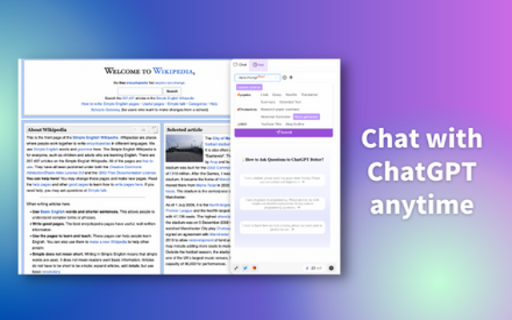
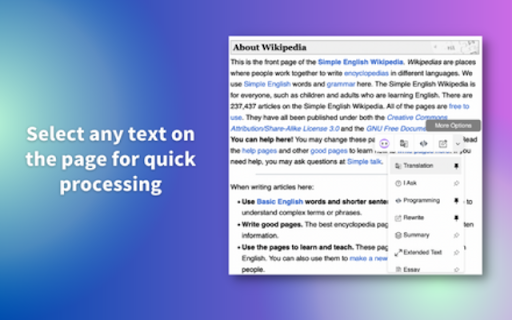
ChatSider: GPT & Claude Sidebar is an assistant for AI writing, translating, ChatGPT for Bing and more. ChatSider is a ChatGPT & Claude sidebar and AI co-pilot software. This remarkable AI co-pilot software is proficient in solving any of your questions or inquiries. Its capabilities are not limited to answering questions, but it can also improve essays or articles, generate work reports, translate content in any language, provide entertainment through interactive games, and much more based on your requirements. ChatSider AI Copilot uses OpenAI's ChatGPT3.5, GPT - 4, Claude to provide you with advanced AI intelligence, and here are its highlight features: 🔜 Sider Sidebar Response: the ChatSider will be displayed in the sidebar of your browser at all times, making it easy for you to get quick answers to a variety of questions while browsing any page, currently powered by the official ChatGPT-3.5, GPT - 4, Claude . 🏷 Quick Response for Selected Text: When you select text on a web page, you can quickly perform translation, expand text, answer, touch-up, etc. without spending time opening a new page. 📄 Intelligent optimization of articles: essays, blogs, social media platform posts, and almost any type of article can be optimized and expanded in one click with ChatGPT's content touch-up feature. ✒️ authentic translation: you can use ChatSider's intelligent translation function to translate authentic foreign language content recognized by locals, say goodbye to machine translation and be more accurate than translation software! 📝Study Helper: Whether you are an elementary school student, a secondary school student or a college student, you can get detailed answers to your homework problems with the help of ChatSider. 📚 A must-have for working people: work daily weekly reports, video scripts, PPT outlines are generated in one click, resume optimization, brainstorming to solve inspiration depletion. 🔍 Enhanced Search Page: Support for All Popular Search Engines (Google, Bing, DuckDuckGo, etc.). ChatGPT for Bing, ChatGPT for Google How to use ChatSider:Free ChatGPT Sidebar&AI Copilot❓ 1⃣️ Click the extension button to show the ChatGPT sidebar and ask ChatGPT questions at any time; 2⃣️ Select the built-in useful templates to generate answers in one click. You can also customize your own template! 3⃣️ Check the text on the page to quickly enable the AI Copilot. Why use ChatSider:Free ChatGPT Sidebar&AI Copilot❓ 🌟ChatSider will always be present in the browser sidebar to take care of issues for you. 🌟 ChatSider can help you write, translate, summarize, rewrite, explain or answer any question with one click. 🌟 Built-in more than ten commonly used templates help you get higher quality answers. 🌟 No need to log in to your ChatGPT(OpenAI) account, return answers as fast as ChatGPT Plus. 🌟 Supports viewing chat history to avoid losing useful answers. 📝ChatSider:Free ChatGPT Sidebar&AI Copilot's feature list: Sidebar function that can be turned on at any time 1. You can chat with ChatGPT in any website at any time. support use of GPT-3.5, GPT - 4, Claude ; 2. You can customize the prompts to ask GPT-3.5, GPT - 4, Claude questions. 3. Support all history chat queries. Quick processing functions 1. Optimize, translate, expand, etc. text selected in a web page; 2. Small browser memory footprint and lag-free Chatgpt experience. Built-in super templates 1. Built-in more than ten kinds of practical templates, support for thesis touch-up, resume optimization, code interpretation, etc.. 2. If you are not satisfied with the official templates, you can also customize the templates to serve you better. All the above features support GPT-3.5, GPT - 4, Claude , you are completely free to use. Frequently used questions: Q: What is the relationship between ChatGPT Sidebar&AI Copilot and ChatGPT? A: ChatGPT Sidebar&AI Copilot and ChatGPT helps you use the official Openai's ChatGPT feature in the browser sidebar. Q: Will more AI models be added in the future? A: Yes, we will try to develop more AI models online, such as Bard, New Bing ...... ChatSider:ChatGPT Sidebar&AI Copilot is free to use anytime and is a great alternative to Monica. We utilize OpenAI's ChatGPT service to help you with your daily life, studies, work and more.

Copilot: AI Study Assistant | GPT-5, Claude & Gemini for Students
Your AI tutor, built into Chrome. Generate study notes, flashcards, quizzes, concept maps & active recall in seconds. Copilot by Paradigm – Your AI-Powered Study Sidebar 🎓 Copilot isn't just another AI sidebar. It's a complete learning workspace that turns any webpage into a study session, any document into flashcards, and any topic into a mastered skill — all without leaving your browser. ⎯⎯⎯⎯⎯⎯⎯⎯⎯⎯⎯⎯⎯⎯⎯⎯⎯⎯⎯⎯⎯⎯⎯⎯⎯⎯⎯⎯⎯⎯⎯⎯⎯⎯⎯⎯⎯⎯⎯⎯⎯⎯⎯⎯⎯⎯⎯⎯ 📚 Scholar — Study Smarter, Not Harder Upload a PDF, paste your notes, or feed it any topic — Scholar transforms them into interactive flashcards, quizzes, concept maps, and active recall sessions. Level up from Novice to Master with gamified learning 🏆 Earn XP, track streaks, and unlock achievements as you go. Built on proven techniques like active recall and spaced repetition — because reading isn't studying. ⎯⎯⎯⎯⎯⎯⎯⎯⎯⎯⎯⎯⎯⎯⎯⎯⎯⎯⎯⎯⎯⎯⎯⎯⎯⎯⎯⎯⎯⎯⎯⎯⎯⎯⎯⎯⎯⎯⎯⎯⎯⎯⎯⎯⎯⎯⎯⎯ 💬 Chat — Your AI Research Partner Ask questions, summarise webpages, and extract key concepts from any site you're on — instantly. Choose from the world's leading AI models — GPT, Claude, Gemini & Grok — all from one place. Edit messages, branch conversations, and listen with text-to-speech. It's the smartest conversation you'll have today. ⎯⎯⎯⎯⎯⎯⎯⎯⎯⎯⎯⎯⎯⎯⎯⎯⎯⎯⎯⎯⎯⎯⎯⎯⎯⎯⎯⎯⎯⎯⎯⎯⎯⎯⎯⎯⎯⎯⎯⎯⎯⎯⎯⎯⎯⎯⎯⎯ ✍️ Compose — Write With Confidence Essays, emails, research papers — Compose drafts, outlines, and gives feedback in your chosen tone. Get three alternative versions to pick from, or let it refine what you've already written. ⎯⎯⎯⎯⎯⎯⎯⎯⎯⎯⎯⎯⎯⎯⎯⎯⎯⎯⎯⎯⎯⎯⎯⎯⎯⎯⎯⎯⎯⎯⎯⎯⎯⎯⎯⎯⎯⎯⎯⎯⎯⎯⎯⎯⎯⎯⎯⎯ 🎨 Artist — Create Without Limits Generate stunning images with DALL·E, Stable Diffusion, Flux & Grok. From concept art to study diagrams, bring your ideas to life with a single prompt. ⎯⎯⎯⎯⎯⎯⎯⎯⎯⎯⎯⎯⎯⎯⎯⎯⎯⎯⎯⎯⎯⎯⎯⎯⎯⎯⎯⎯⎯⎯⎯⎯⎯⎯⎯⎯⎯⎯⎯⎯⎯⎯⎯⎯⎯⎯⎯⎯ ⚡ Why Students & Self-Learners Choose Paradigm ✅ Works on any website — no tab switching, no context lost ✅ Turn lectures, articles & PDFs into quiz-ready material in seconds ✅ Active recall & spaced repetition built into your study session ✅ Track your progress with XP, streaks & achievements ✅ Access premium AI models from one unified sidebar ✅ Dark mode, fast & lightweight ⎯⎯⎯⎯⎯⎯⎯⎯⎯⎯⎯⎯⎯⎯⎯⎯⎯⎯⎯⎯⎯⎯⎯⎯⎯⎯⎯⎯⎯⎯⎯⎯⎯⎯⎯⎯⎯⎯⎯⎯⎯⎯⎯⎯⎯⎯⎯⎯ 🎯 Study less. Remember more. That's the Paradigm shift. For users aged 16 and over.

AI Assistant for Chrome | SidebarGPT
Access AI language model everywhere with SidebarGPT for Chrome. Enhance writing and communication skills with AI tech. SidebarGPT - AI Assistant for Chrome is a powerful browser extension that brings the convenience and efficiency of virtual assistant technology to your web browsing experience. By installing this extension, you can easily access AI, a cutting-edge language model that has been trained by OpenAI, as a sidebar on every website you visit. With AI by your side, you can get quick and accurate answers to all of your questions, without ever having to leave the website you're on. Whether you need help with a complex research topic, want to know more about a particular product or service, or just need some general advice or guidance, AI is there to help. One of the great things about this extension is how easy it is to use. Simply type in your question or query, and AI will use its advanced natural language processing capabilities to provide you with a response. The assistant is designed to be highly intuitive and responsive, so you can get the information you need quickly and easily. Another benefit of using this extension is that it can help you save time and be more productive. Instead of wasting time searching for answers on different websites or trying to navigate complex research topics on your own, you can rely on AI to provide you with accurate and useful information, all from the comfort of your web browser. Overall, the SidebarGPT - AI Assistant for Chrome is an incredibly useful tool for anyone who wants to improve their web browsing experience and get more done in their day. With its advanced features and intuitive design, this extension is a must-have for anyone who wants to stay informed and up-to-date in today's fast-paced digital world.

Javy: GPT-4 powered assistant
GPT-4 powered tool for quick access to the answer to any question Javy brings the power of OpenAI's language model to your browser. With this extension, you can have a virtual assistant at your fingertips, ready to answer questions, provide information, and complete tasks. Simply type in your query, and GPT-4 will generate a response, offering you relevant and accurate information in a matter of seconds. Whether you need help with homework, want to find the latest news, or just need a quick translation, GPT-4 has you covered. The extension utilizes cutting-edge AI technology to understand natural language and deliver high-quality results. Download the GPT-4 powered assistant today and experience the future of search.

Definio AI: Multi-Modal AI Sidebar
Definio runs every LLM model from one sidebar. Throw your question at any of them, switch on a whim, never open a new tab. Definio AI is a powerful AI assistant that brings multiple language models together in a single browser extension—helping you explore, reason, and research faster, directly within your browsing flow. 🚀 CHAT WITH THE TOP AI MODELS – ALL IN ONE PLACE: Models from all major providers. 🧠 ASK BETTER QUESTIONS, GET SMARTER ANSWERS: Select any text on a page and start a conversation with multiple AI agents at once. Cross-check facts, get diverse insights, or bring specialised models into the discussion—right from your browser sidebar. ⚡ BUILT FOR DEEP THINKING AND FAST WORK: Use AI to break down dense content, summarize complex topics, compare perspectives, or brainstorm ideas—all without switching tabs. Definio adapts to your browsing context for precise, real-time assistance. 📷 COMPUTER VISION & SCREENSHOTS: Capture the active tab or snip a region with one click and drop it straight into the chat. Vision-capable models read the screenshot for you—ask "what does this chart say," "translate this menu," "what's broken in this UI," or "summarise the page I just captured." You can also drop in your own image files (PNG, JPG, WebP) and combine selected text, screenshots, and typed questions in the same message for richer prompts. ⌨️ CHAT SHORTCUTS – TYPE "/" TO RUN COMMANDS: - /new — start a new chat - /model — switch the AI model mid-conversation - /search — toggle web search on or off - /think — toggle extended thinking on or off - /theme — flip between dark and light mode - /capture — screenshot the visible tab - /snip — screenshot a region you draw Plus Alt+Shift+O (Option+Shift+O on Mac) to open the side panel from anywhere—rebindable in chrome://extensions/shortcuts. 🔄 YOUR AI WORKFLOW, SUPERCHARGED: Whether you're a student, researcher, or professional, Definio helps you turn questions into knowledge. Use customizable shortcuts to boost productivity—summarize articles, extract key points, or auto-respond to content. 💡 WHY DEFINIO? Unlike traditional AI chatbots, Definio lets you bring multiple minds into the room. It's not about one model's opinion—it's about reaching clarity through comparison, consensus, and control. 📝 Whether you're researching, learning, or need quick explanations — Definio AI Chat is your intelligent companion right in your browser. Multiple Access Options: - Keyboard Shortcut: Press Alt+Shift+O (default shortcut, customizable in Chrome extensions settings) to open the AI Chat side panel instantly - Right-click Menu: Right-click anywhere on any webpage and select "Open Chat" to launch the AI Chat side panel - Extension Icon: Click the Definio AI extension icon in your browser toolbar to open the side panel Quick Access Methods: - Once the side panel is open, you can select any text on the page to automatically send it to the AI Chat for analysis or questions - Use the right-click "Open Chat" option for instant access without needing to select text first - The side panel stays open as you navigate between different websites, keeping your chat history accessible Chrome Limitations: - ⚠️ The extension does not work with PDF files viewed in the browser - ⚠️ For best experience with text selection, open the side panel first and then select the text you want to discuss with AI - Privacy First: Unlike popup extensions, Definio AI works in its own dedicated space without injecting content into web pages - Non-Intrusive Design: The side panel never covers or alters the content you're reading - Better Workflow: Ask questions about what you're reading without losing your place in the text or having floating boxes interrupt your flow - Persistent Chat: Keep your AI conversation visible while continuing to read and navigate the web - Seamless Integration: Instantly discuss any text you encounter while browsing
