
hfcjiddbkafhefceljaickkkoblbmibd

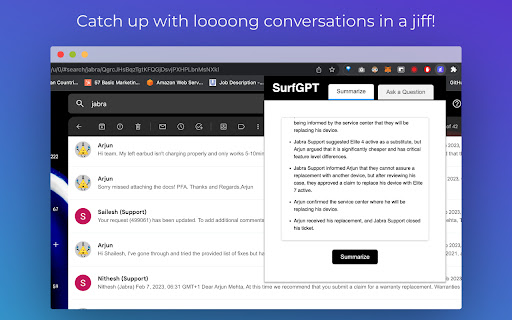

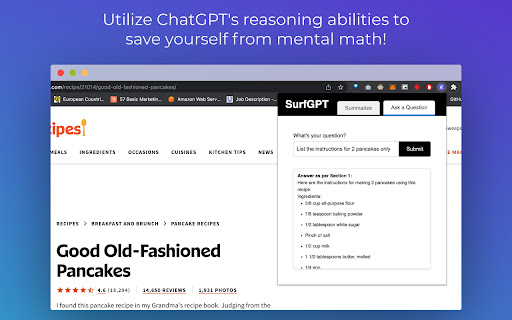

A ChatGPT powered extension which lets you ask contextual questions on any website. Are you tired of wading through endless walls of text online? Introducing SurfGPT – a groundbreaking Chrome extension that brings the ChatGPT magic to every webpage. 🌐 SurfGPT's Unmatched Features: - 🧑🔧 Prompts designed by a Conversational AI Engineer for all types of summarizations (Tutorials, Threads, Articles). - 🚀 Contextual Q&A assistance on any webpage! - 🔑 Enter your own API key for unlimited usage (no caps!) - ⚙️ Breaks down articles into parts to avoid token limits. Perfect For: - 🌪️ Intuitively summarizing articles, tutorials, and conversations in a flash. - 🤔 Asking contextual questions within any webpage. - 💬 Getting response suggestions for threads. - ⚡️ Revving up your research sessions. For the curious: 🤔 Why not GPT-4? SurfGPT was original designed with GPT-4, but while testing itself it was clear that the cost-benefit didn't make sense. It was 15 times more expensive, leading to about 10 cents spent per page on average. So I spent extra effort designing the prompts to get almost similar results with ChatGPT. 🤔 How does it work? SurfGPT scrapes the content of your current webpage and passes it along with your queries to generate contextual answers for you! 🔮 What does the future hold? There's many exciting things planned for the roadmap (eg. Multilingual support and Multimedia analysis, including research papers, presentations, excel, audio and video) which will be published for everyone to view AND have a say in!

ChatGPT Sheets – Use ChatGPT for Sheets
Boost your Google Sheets with ChatGPT! Get instant answers, copy-paste solutions, and easy shortcuts with ChatGPT Sheets! Looking to elevate your business using ChatGPT for Google Sheets?🚀 The ChatGPT Extension for Google Sheets revolutionizes your workflow. HOW DOES ChatGPT HELP YOUR BUSINESS? ➡️Get instant results. ⏱️Our ChatGPT for Sheets extension enables a swift conversation window. ➡️Efficient copy-paste solutions. 🗓️ChatGPT for Google Sheets easily transfers new knowledge to your spreadsheet. ➡️User-friendly shortcuts. 🎯Every feature of ChatGPT for Sheets was implemented with YOU in mind. Wait no longer to boost your business! Let our ChatGPT in Google Sheets Extension let your productivity soar!🚀📈 In today's digital age, businesses are constantly in need of seamless tools and technologies that can simplify data handling and analytics. Amidst a plethora of available extensions and tools, the ChatGPT Extension for Google Sheets stands out as a beacon of innovation. Let's dive deeper into what makes this extension a game-changer for professionals across industries.🌟 MAIN FEATURES AND ADVANTAGES OF ChatGPT: 1. Seamless Integration🔗: The data analytics landscape is constantly evolving, making it essential for businesses to be equipped with tools that enable smooth transitions. Enter ChatGPT Extension for Google Sheets. This tool allows users to seamlessly integrate AI capabilities into their Google Sheets environment, eliminating the hassles of shifting between platforms and ensuring effortless information interpretation. 2. Dynamic Data Conversations💬: Gone are the days when you had to manually interpret complex data. With the ChatGPT Google spreadsheet, real-time interactions with your data are now possible. Imagine having an intelligent conversation with your spreadsheets, asking questions and receiving answers in real-time. This revolutionizes data understanding, making it more intuitive and actionable. 3. Collaboration Made Easy🤝: Modern businesses thrive on teamwork. The ChatGPT Extension for Google Sheets acts as a bridge, connecting team members and enabling them to derive insights from shared data effortlessly. It fosters a collaborative environment where numbers tell a story that everyone can understand. 4. Top-Tier Security🔐: Data security is a top concern for businesses today. With the ChatGPT Chrome Extension, there's no need to compromise on safety. Your data remains under stringent protection protocols, ensuring that you can analyze, share, and interpret your data with total peace of mind. The age of AI-powered solutions is here. These intelligent systems are not just about automation; they redefine how we perceive and interact with data. Among the forefront of these advancements is the ChatGPT Extension for Google spreadsheets. HERE'S HOW: 🎯Tailored AI Responses: GPT for Google spreadsheets isn’t just another tool. It actively learns and provides customized answers, ensuring precision, relevance, and clarity in every response.🌠 ♟️Broad Compatibility: In a diverse data landscape, the GPT for Sheets Extension stands out with its ability to accept a wide range of data formats and structures. This versatility ensures that no matter how your data is structured, the tool can handle it. 📊 🏄🏻♂️User-Centric Design: Beyond its technical prowess, every facet of the ChatGPT Extension for Google tables has been meticulously crafted with users in mind. The design emphasizes a user-friendly experience, ensuring that even those without a technical background can harness its power effortlessly. 👤 WHY EMBRACE ChatGPT FOR GOOGLE SHEETS? 🤔 In an era where data is the new gold, having tools that streamline its analysis is invaluable. The ChatGPT Extension offers: 1. Intelligent Data Processing: This isn’t just another analytics tool. The AI for Google Tables delves deep, offering not just numbers, but valuable insights that can shape business strategies. 🧠 2. Plug and Play: Simplicity is at the core of the ChatGPT plugin for Google Sheets. Without any complex setups, it integrates smoothly into your workflow. ⚙️ 3. Diverse Use Cases: Whether you’re a budding startup or a multinational corporation, ChatGPT for Google Sheets adapts to your unique requirements, proving its versatility across varied business landscapes. CONCLUSION: 💡 We stand on the brink of a new era in information analytics. Integrating AI with traditional spreadsheet tools like Google Sheets isn't just about staying updated; it's about anticipating the future. By investing in the ChatGPT for spreadsheets extension, you’re not just enhancing your data interpretation abilities; you’re also paving the way for unprecedented insights and business growth. 🚀 Dive into the realm of advanced data analytics with ChatGPT for Google Sheets. Embrace the future, redefine your data journey, and witness the revolution. Join the revolution. Download and use with pleasure!🔥📥

ChatExtension - A ChatGPT Extension
A Chrome extension to interact with ChatGPT for All Websites. ChatExtension is an innovative browser add-on that empowers users with AI-powered assistance while they browse the web. By leveraging the advanced capabilities of OpenAI's ChatGPT API, the extension can answer any question with current page contenxt. Key features of this extension include: 1. Instant Summaries: With just one click, users can generate concise summaries of web pages, enabling them to quickly understand the main points without having to read the entire content. 2. Intelligent Assistance: The extension integrates a user-friendly chat interface that allows users to communicate with GPT3.5 AI model and ask questions about the content they are browsing, getting instant answers and insights. 3. Wide Range of Use Cases: From summarizing news articles and research papers to getting quick answers and insights on complex topics, this extension is a versatile tool that can benefit users across various fields and industries. By installing this extension , users can enhance their browsing experience with AI-powered assistance that helps them save time, improve productivity, and gain a deeper understanding of the content they encounter online. The extension's convenient, user-friendly interface and powerful AI capabilities make it an essential tool for modern web users who seek to make the most out of their time on the internet.

Syncia - Power of ChatGPT on any website
Syncia is a browser extension that allows you to use Open AI's GPT in any website. Syncia enables users to chat with ChatGPT by opening a sidebar on any website by using the shortcut ctrl+shift+x. In addition, it provides a floating menu underneath any selected text on any website that allows users to generate text summaries, check grammar issues, and customise text length so on ! 🦾 Features 🗨️ Chat with ChatGPT through a sidebar. 🔑 Use your own Open AI API key. 📜 Quick menu underneath any selected text which allows you to summarise, simplify language, translate, and more. 🗂️ Allows to store custom prompts and use them with quick menu. 💯 Fully customisable settings page. 🔐 Secure and fully Free and open source forever. (Please consider giving this project a star 🌟 and contributing 💖 to support the project.) For more info check out https://github.com/Royal-lobster/Syncia Note: If shortcut is not working, Enter "chrome://extensions/shortcuts", under Syncia set new keyboard shortcut for "Open the sidebar"

WebChatGPT: Prompt library with web access
Augment your ChatGPT prompts with relevant web search results through web browsing. This free extension adds relevant web results to your prompts to ChatGPT for more accurate and up-to-date conversations. It also provides a free one-click ChatGPT prompt library with hundreds of high-quality prompts that can revolutionize your daily tasks and assist in solving your small business problems with one click. Furthermore, it includes a useful prompt management tool that allows you to create and utilize your own prompt templates in ChatGPT to speed up repetitive tasks as you work. 1️⃣ Web access - Get web results for your queries - Scrape entire search result pages for full insights - Extract webpage text from any url 2️⃣ One-click prompts - One-click ChatGPT prompts library - Run prompts that perform web searches and live crawling - Manage your own prompts 3️⃣ Search with AI - Get AI-powered search answers right beside your search results - Powered by ChatGPT, Claude, Bard, Bing AI - Compatible with all popular search platforms ---- Why You Need WebChatGPT: It's similar to the web browsing features rolled out to ChatGPT Plus users by OpenAI, allowing your ChatGPT to access the internet and provide accurate results and source links. However, it's faster, lighter, more controllable, and available to all ChatGPT users - both Free and Plus! For ChatGPT Plus users, you can't always be sure if GPT-4 with browsing will return the results from the article you want to work on or the results of a repetitive crawl of an irrelevant set of pages, depending on its decisions. WebChatGPT gives you complete control over what gets included in your prompts. Moreover, it works perfectly well with GPT-3.5, enabling ChatGPT Plus users to reserve the highly limited GPT-4 usage by using WebChatGPT for browsing. Revolutionize your everyday tasks with One-Click ChatGPT Prompts. Turn hours-long tasks into minutes using our expanding collection of prompts for marketing, sales, copywriting, operations, productivity, and customer support prompts. Easily add and use your own prompts for ChatGPT to expedite your daily repetitive tasks and supercharge your work productivity. 💬 Join our Discord server for support and discussions: https://discord.gg/hjvAtVNtHa 🤔 Why is the extension asking for access to all websites permission? 👉 The extension requires access to all websites because there is no backend server to process web requests, and everything happens locally in the browser. There are two modes: web searching, and extracting webpage text from URLs. Web searching requires access to the search engine, while URL text extraction requires access to any website. This is why the access to all websites permission is required. 🤔 The extension does not work, the toolbar does not show up. What can I do? 👉 Some other ChatGPT extensions are known to interfere with WebChatGPT. We're trying to increase compatibility with other extensions. Meanwhile, if you are experiencing issues with the toolbar not showing up, please try disabling any other ChatGPT extensions that you have installed and reloading the page. If you continue to experience issues, feel free to reach out to us on our Discord server for assistance – https://discord.gg/nmCjvyVpnB. - Support all popular search engines like Google, Bing, DuckDuckGo, Yahoo! Search, and more - Conversational web browsing that knows when and how to browse the internet to answer questions about recent topics and events - Better prompts for ChatGPT Plus Plugins
