
jdlajiedllgccbefigcffcelchfbinni
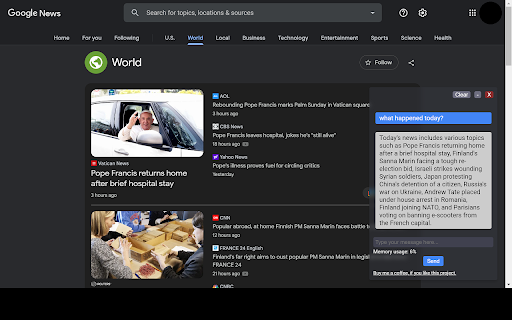


A Chrome extension to interact with ChatGPT for All Websites. ChatExtension is an innovative browser add-on that empowers users with AI-powered assistance while they browse the web. By leveraging the advanced capabilities of OpenAI's ChatGPT API, the extension can answer any question with current page contenxt. Key features of this extension include: 1. Instant Summaries: With just one click, users can generate concise summaries of web pages, enabling them to quickly understand the main points without having to read the entire content. 2. Intelligent Assistance: The extension integrates a user-friendly chat interface that allows users to communicate with GPT3.5 AI model and ask questions about the content they are browsing, getting instant answers and insights. 3. Wide Range of Use Cases: From summarizing news articles and research papers to getting quick answers and insights on complex topics, this extension is a versatile tool that can benefit users across various fields and industries. By installing this extension , users can enhance their browsing experience with AI-powered assistance that helps them save time, improve productivity, and gain a deeper understanding of the content they encounter online. The extension's convenient, user-friendly interface and powerful AI capabilities make it an essential tool for modern web users who seek to make the most out of their time on the internet.

TurboGPT For ChatGPT
Introducing TurboGPT - the ultimate productivity Chat GPT Chrome extension designed to supercharge your writing experience. With TurboGPT, you can quickly generate text snippets, article summaries, and even entire articles using cutting-edge AI technology. Powered by OpenAI's Chat GPT-3 language model, TurboGPT offers lightning-fast writing suggestions and automated content creation for all your writing needs. Whether you're a blogger, content marketer, or just looking to write more efficiently, TurboGPT is the perfect tool to help you boost your writing speed and quality. TurboGPT is incredibly easy to use. Simply install the extension, and you'll have access to a powerful AI writing assistant right in your browser. With intuitive prompts and real-time suggestions, TurboGPT can help you write better and faster than ever before. So why waste time struggling with writer's block or staring at a blank page? Install TurboGPT today and start writing with the speed and confidence of a professional writer.

Syncia - Power of ChatGPT on any website
Syncia is a browser extension that allows you to use Open AI's GPT in any website. Syncia enables users to chat with ChatGPT by opening a sidebar on any website by using the shortcut ctrl+shift+x. In addition, it provides a floating menu underneath any selected text on any website that allows users to generate text summaries, check grammar issues, and customise text length so on ! 🦾 Features 🗨️ Chat with ChatGPT through a sidebar. 🔑 Use your own Open AI API key. 📜 Quick menu underneath any selected text which allows you to summarise, simplify language, translate, and more. 🗂️ Allows to store custom prompts and use them with quick menu. 💯 Fully customisable settings page. 🔐 Secure and fully Free and open source forever. (Please consider giving this project a star 🌟 and contributing 💖 to support the project.) For more info check out https://github.com/Royal-lobster/Syncia Note: If shortcut is not working, Enter "chrome://extensions/shortcuts", under Syncia set new keyboard shortcut for "Open the sidebar"

Vio - Your ChatGPT Companion
AI companion powered by ChatGPT that give your instant answers and help generating text on any page. Introducing Vio🤖, your ultimate ChatGPT companion powered by ChatGPT AI (including GPT-4) to deliver instant summarization, explanations, translations, rewriting, and text composition on any website!🌐 No more toggling between different tabs or apps, as everything you need is now just a click away. 💻 With Vio, everything you need is right there at your fingertips. And with its intuitive interface and easy-to-use features, Vio makes it easier than ever to write like a pro. Features: ✅ Support both ChatGPT web application access and OpenAI Chat API key ✅ Quick access to ChatGPT at the side of your screen by clicking the Vio floating button at the side 📌 or pressing Cmd + B for Mac and Ctrl + B for Windows/Linux ✅ Quick lookup by selecting text ✅ AI characters to assist you in various task (Eg. Math tutor, Personal trainer, UI designer etc) ✅ Summarize lengthy articles and explain difficult topics ✅ Translation on any page 🌎 ✅ Improve your writing 📝 with the help of AI with grammar checking and paraphrasing ✅ Generate emails, posts, and messages in the tone you prefer. ✅ AI copywriter to compose articles and Facebook advertisements. ✅ Easy copy paste of response and also download of images. ✅ Support for GPT 3.5 and GPT 4 (for Pro users 🚀) Use Vio as your reading companion 📖: * Summarize articles * Explain articles, words, or even code * Translate to any language * List key takeaways * Shorten or lengthen your text Or use Vio as your writing companion ✍️: * Write reply to emails or messages. * Compose emails 📧, messages 💬 , social media posts, and captions * Assist in writing Facebook ads. * Rewrite your content with a different tone * Make text shorter or longer * Fix grammar and spelling. Vio has got you covered. 😊

ChatGPT, Bing & Bard For Chrome: Kursor
Discover an unparalleled web browsing experience with Kursor, the comprehensive solution for all your online communication needs. Summarize, translate, rephrase, correct grammar, and create content with just one click. Experience the future of web surfing with Kursor, powered by GPT-AI ! Kursor utilizes the power of OpenAI's GPT- AI to revolutionize your browsing, ensuring seamless integration and the latest technology. 💸 100% Free and Unlimited Use Kursor is entirely free to use, with no restrictions on the number of searches you can perform. 🖱️ One-Click Functionality Effortlessly select any text on the web and access Kursor's powerful features like summarizing, translating, rephrasing, and grammar correction with just one click. 🔎 ChatGPT for LinkedIn: Gain valuable insights into job opportunities by seamlessly integrating LinkedIn's job data, helping you stay informed and connected in the professional world. 🌐 50+ Language Translations Translate text into over 50 languages, breaking down language barriers and accessing content from around the globe. 🎭 10+ Tonalities for Rephrasing Rephrase text in more than 10 different tonalities, giving your content a unique and customized feel. 💬 AI-Driven Chat Ask questions and resolve queries instantly with our AI chat window powered by ChatGPT. 📝 Versatile Composition Functionality Compose emails, messages, paragraphs, tweets, articles, or blog posts with specified objectives, length, and tone. 🔥 Easy Access to Third Window Open the third window effortlessly using cmd + shift (for Mac) / ctrl + shift (for Windows). ⚡ Swift Response Time Enjoy smooth and timely responses with our seamless integration of GPT technology. 📧 Contact Us for Support Reach out to our team anytime at contact@kursor.in for any assistance or inquiries. Install Kursor now and elevate your web browsing experience with the power of ChatGPT!
