
iocnlgcooancaojnpkonjpcocmcjkgle
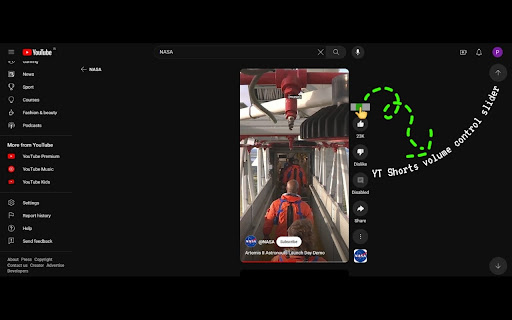
Allows a slider based controlling volume in youtube shorts and Removes Sponsored posts too Frustrated by the lack of volume control and constant barrage of sponsored shorts disrupting your flow? Look no further! This Chrome extension puts you in the driver's seat of your YouTube Shorts experience. Enjoy precise volume control with a handy slider, letting you fine-tune the audio to your liking. No more scrambling to adjust the system volume in a panic when a blaring short explodes onto your screen. But that's not all! This lightweight extension also acts as a sponsor shield, seamlessly filtering out sponsored content so you can binge uninterrupted on the good stuff. Worried about privacy? Rest assured, this extension stays focused on its core mission: enhancing your Shorts experience. It doesn't store or access any of your personal information, so you can relax and enjoy a smoother, frustration-free Shorts adventure. This extension caters to everyone who is searching for a extension to control the volume of youtube shorts in their PC. This functionaility is currently missing on web based UI on laptops and PCs.

Youtube Short Controller
The extension will add to the Youtube Short player an overlay with video control functions including stop playing, fast forward or rewind the video for a period of time that can be set in the settings popup.

Controls for Instagram Videos
This tiny and efficient extension adds standard video playback controls to Instagram™ videos. Normally, all you can do with an Instagram™ video is play or pause it, but this extension will expose the native HTML 5 video player which has a seek bar (aka video scrubber), a volume control, a play/pause button, Picture-In-Picture (floating video) button, fullscreen video button, and on *some* videos it will also display a download button! The extension automatically runs and works on all web pages that embed Instagram™ videos! How to use it: 1) Load any web page that contains an Instagram video 2) Click the video to make it play 3) That's it - the extension will automatically detect the video and will reveal the control buttons. Options: -Control volume and playback speed via hotkey. -Remember your volume and playback speed for future videos. See the extension config page via right-clicking the extension icon in your browser bar, then select "Options". Or, just navigate to chrome://extensions/ Notes: - After you install the extension, make sure to reload the page for any browser tabs that were opened before installing the extension. The extension will not run in those tabs until you do so. - The download video button doesn't work on many videos anymore due to recent instagram changes, but it does still work on *some*. - On pages where instagram auto plays videos as you scroll, such as on your home page feed, make sure to play/pause the video by clicking in the center of the video, instead of using the button at the lower left. Otherwise, when scrolling, the video may not stay paused. Wondering why the extension is broken so much lately? Read https://rehfeld.us/browser-extensions/controls-for-instagram/instagram-changes Issues currently being worked on: -Remember volume and playback speed not working in some cases. -The volume mute/buttons on the video vs the Instagram GUI aren't always in sync. -On stories, you must use the instagram play/pause button because the button on the video doesn't work. Legal: Instagram™ is a registered trademark. This extension was developed independently of Instagram, by someone who is not related or affiliated with Instagram, without any help or endorsement from them. --------- Changelog --------- Feb 5th, 2023 V1.33 - Fix for not being able to click controls on some videos on home feed. Also make background shade which covers most of the video on reels pages less visually disruptive. Feb 2nd, 2023 V1.32 - Another potential fix for some users not seeing controls on some videos. Also, add support for reels. Nov 24th, 2022 V1.30 - More reliably adjust video height on story videos. Also, potential fix for some users not seeing controls on some videos. Nov 18th, 2022 V1.29 - Fix video controls not being easily clickable for certain videos. Also, new features: configurable hotkeys for volume and video speed (right the extension icon > options). Jun 22nd, 2022 V1.28 - Upgrade to manifest v3. This is a technical change, and should not affect any functionality. Jun 17th, 2022 V1.27 - Make videos stay paused when scrolling on home page if you pause the video by clicking in the center of the video (pausing via the tiny pause button in the lower left will not work). Also, fix bug preventing users with a non-english browser language from using core features. Jun 2nd, 2022 V1.25 - Adapt to recent instagram updates, fixing sudden lack of video controls. Also, resize the video upwards a bit on stories so the video controls arent covered by instagram comment/like buttons. Aug 17th, 2020 V1.23 - Potential Bugfix for disappearing videos/images on some pages. Aug 5th, 2020 V1.21 - Bugfix for disappearing videos on some pages. Jul 18th, 2020 V1.19 - On some Story videos, resize the video a bit so the "Send Message" text box doesn't overlay the video controls. 2nd attempt. May 11th, 2020 V1.18 - Undo previous change to Story videos, which affected some non-story videos and broke them. May 9th, 2020 V1.17 - On some stories, move the video a bit so the "Send Message" text box doesn't overlay the video controls. Oct 30, 2019 V1.14 - Add ability to set video playback speed. Also, enable the "remember volume" feature by default. Sept 29, 2019 V1.13 - Add ability to automatically remember the volume of videos. Jun 8, 2019 V1.11 - Update to react to Instagram changes, fixing support for stories page. V1.3 - Renamed Extension. V1.1 - Improve compatibility to work on more sites, including instagram.com website and other, non instagram.com sites.

Better YouTube Shorts
Take back the controls on YouTube Shorts with playback, volume, progress bar and more! Notice: This extension is currently unmaintained, expect bugs and issues. If you are interested in maintaining this repository, please create an issue or submit changes via PR in GitHub or contact me@ynshung.com. ⏭️ Control your YouTube Shorts just like a normal YouTube video! Features include progress bar, seeking, playback speed, auto skip and more. You can also customize the keybinds to your liking! List of features: - Progress bar at the bottom with time and duration - Seeking 5 seconds backward and forward with arrow keys (adjustable time) - Mini timestamp and speed above the like button (can be scrolled on!) - Fullscreen support with F key and double click - Decrease and increase playback speed with keys U and O - Click the speed button to revert to normal speed or toggle between different speeds - Toggle to auto skip short when current one ends - Control volume with the volume slider or with - and =, mute audio with M - Customizable keybinds - 🌐 Supports more than 10 languages! Extra features: - Start short from beginning with J - Go to the next or previous frame of the video - Set default playback rate when first opening shorts - Auto skip short with likes below custom threshold (e.g. 500 likes) - Auto open comment section on each short - Hide overlay on shorts (title, channel, etc.) - Go to the next frame or previous frame with . and , while paused - View counter and upload date above video title Fully open-source with MIT License: https://github.com/ynshung/better-yt-shorts If you have any suggestions or feedback, please let us know here: https://github.com/ynshung/better-yt-shorts#issues--suggestion

Better Shorts Player
Better Shorts Player adds the ability to scrub through a shorts video, play, pause, adjust volume and mute the video. The controls fade away when not being hovered on as to not be intrusive to the video.
