
eigfbedabacomcacemdnkelnlhgbiacn
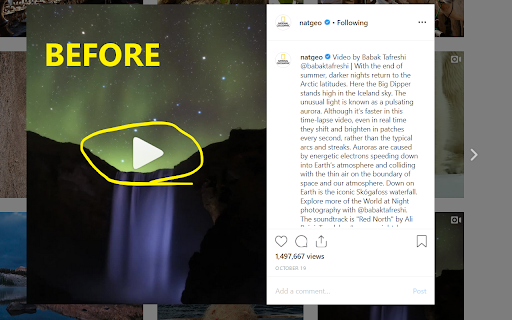


This tiny and efficient extension adds standard video playback controls to Instagram™ videos. Normally, all you can do with an Instagram™ video is play or pause it, but this extension will expose the native HTML 5 video player which has a seek bar (aka video scrubber), a volume control, a play/pause button, Picture-In-Picture (floating video) button, fullscreen video button, and on *some* videos it will also display a download button! The extension automatically runs and works on all web pages that embed Instagram™ videos! How to use it: 1) Load any web page that contains an Instagram video 2) Click the video to make it play 3) That's it - the extension will automatically detect the video and will reveal the control buttons. Options: -Control volume and playback speed via hotkey. -Remember your volume and playback speed for future videos. See the extension config page via right-clicking the extension icon in your browser bar, then select "Options". Or, just navigate to chrome://extensions/ Notes: - After you install the extension, make sure to reload the page for any browser tabs that were opened before installing the extension. The extension will not run in those tabs until you do so. - The download video button doesn't work on many videos anymore due to recent instagram changes, but it does still work on *some*. - On pages where instagram auto plays videos as you scroll, such as on your home page feed, make sure to play/pause the video by clicking in the center of the video, instead of using the button at the lower left. Otherwise, when scrolling, the video may not stay paused. Wondering why the extension is broken so much lately? Read https://rehfeld.us/browser-extensions/controls-for-instagram/instagram-changes Issues currently being worked on: -Remember volume and playback speed not working in some cases. -The volume mute/buttons on the video vs the Instagram GUI aren't always in sync. -On stories, you must use the instagram play/pause button because the button on the video doesn't work. Legal: Instagram™ is a registered trademark. This extension was developed independently of Instagram, by someone who is not related or affiliated with Instagram, without any help or endorsement from them. --------- Changelog --------- Feb 5th, 2023 V1.33 - Fix for not being able to click controls on some videos on home feed. Also make background shade which covers most of the video on reels pages less visually disruptive. Feb 2nd, 2023 V1.32 - Another potential fix for some users not seeing controls on some videos. Also, add support for reels. Nov 24th, 2022 V1.30 - More reliably adjust video height on story videos. Also, potential fix for some users not seeing controls on some videos. Nov 18th, 2022 V1.29 - Fix video controls not being easily clickable for certain videos. Also, new features: configurable hotkeys for volume and video speed (right the extension icon > options). Jun 22nd, 2022 V1.28 - Upgrade to manifest v3. This is a technical change, and should not affect any functionality. Jun 17th, 2022 V1.27 - Make videos stay paused when scrolling on home page if you pause the video by clicking in the center of the video (pausing via the tiny pause button in the lower left will not work). Also, fix bug preventing users with a non-english browser language from using core features. Jun 2nd, 2022 V1.25 - Adapt to recent instagram updates, fixing sudden lack of video controls. Also, resize the video upwards a bit on stories so the video controls arent covered by instagram comment/like buttons. Aug 17th, 2020 V1.23 - Potential Bugfix for disappearing videos/images on some pages. Aug 5th, 2020 V1.21 - Bugfix for disappearing videos on some pages. Jul 18th, 2020 V1.19 - On some Story videos, resize the video a bit so the "Send Message" text box doesn't overlay the video controls. 2nd attempt. May 11th, 2020 V1.18 - Undo previous change to Story videos, which affected some non-story videos and broke them. May 9th, 2020 V1.17 - On some stories, move the video a bit so the "Send Message" text box doesn't overlay the video controls. Oct 30, 2019 V1.14 - Add ability to set video playback speed. Also, enable the "remember volume" feature by default. Sept 29, 2019 V1.13 - Add ability to automatically remember the volume of videos. Jun 8, 2019 V1.11 - Update to react to Instagram changes, fixing support for stories page. V1.3 - Renamed Extension. V1.1 - Improve compatibility to work on more sites, including instagram.com website and other, non instagram.com sites.

ReelControl
Add a progress bar and playback controls to YouTube Shorts, Instagram, and Facebook Reels. Take back control of videos on the web by reversing the (very) annoying trend of social media platforms removing the native progress bar in an effort to keep you hooked. ReelControl adds a progress bar and playback controls anywhere they should rightfully be! That is, on Instagram, YouTube Shorts, or Facebook Reels. Adding progress bars and video controls back in lets you: - Know the time commitment before watching - Rewind when you miss something - Skip ahead and go back without having to start over I initially built this for myself and found that not only is it a little bit more enjoyable if I do ever end up on those videos, but I notice myself spending a lot less time on them without having to explicitly block them. I spend less time on my phone too, since I am now used to having that progress bar and just get frustrated and leave immediately when I remember it's not there. - Instagram has a pretty clean video interface, so we only add the native video controls. - YouTube does have its own progress bar, but it's proprietary and hidden from immediate view, making it impossible to quickly see the video's length as opposed to the native controls which work _for_ the user. - Facebook Reels have a crazy amount of clutter, and also no progress bar or video controls. - Facebook's HTML structure is extremely obfuscated, so we just removed all the clutter and added a progress bar. If anyone wants to add more fine-grained control, PRs are most welcome here! Open source, PRs and issues are welcome @ https://github.com/darajava/reel-control/ Built with love by Soliloquy Apps ❤️ Like this extension? We also built AudioDiary--a super smart voice-powered journal that's gotten lots of love from its users.

Instagram Video Controller
Control Instagram video playback, volume, speed, side box, and video information more easily. - The video controller is automatically activated for videos on Reels / reel / post pages. - On Reels pages, the publisher, text content, video, and related areas are separated. - The "See more" button is clicked automatically so the full content is always expanded. - Volume values are saved and loaded automatically. - A volume slider and playback speed buttons are provided at the bottom of the split screen, making speed adjustment easy. ※ Autoplay with sound unmuted is restricted by the Chrome Autoplay Policy. >> https://developer.chrome.com/blog/autoplay/ ● This extension is continuously improving, and your feedback is welcome. You can contribute through ratings and reviews, or contact us for collaboration.

Instagram Fullscreen Viewer
Enables fullscreen mode for Instagram videos, reels, and images with enhanced controls Enhance your Instagram browsing experience with true fullscreen mode for videos, reels, and images! Features: • View Instagram videos and reels in proper fullscreen mode • Click on images to view them in fullscreen with advanced zoom capabilities • Zoom in/out on images using mouse wheel for detailed viewing • Drag and pan around zoomed images for precise navigation • Maintains zoom level and position between interactions • Video controls with play/pause and volume adjustment • Simple and intuitive interface - just click to enter/exit fullscreen • Works on Instagram feed, profiles, and explore pages Perfect for enjoying Instagram content without distractions, overlays, or UI elements getting in the way. This extension is lightweight and respects your privacy - it doesn't collect any data or require any permissions beyond what's needed to function. ☕ Support the Project: If you find this extension useful, please consider supporting its development! Your contribution helps keep the extension free and actively maintained.

Controls for YouTube™ Shorts
Add controls for videos of YouTube™ shorts, including shortcuts! Options: - Always visible controls: it's not necessary to hover over the video for the controls to appear. - Hide title and channel: when not hovering over the video, this option will hide the video information that overlays the video. - Control volume with Arrow Up/Down: allow you to control the volume with arrow keys without holding shift/cmd, it is optional, as many users use it to scroll between shorts. - Disable infinite loop. Keyboard shortcuts: - Left/Right arrow keys to backward/forward the video by 5 seconds. - Shift/Cmd + Up/Down arrow keys to increase/decrease the volume. - "M" to mute/unmute the video. - Spacebar to pause/resume the video.
