
bagcbccbbigjaicnmlcllplhjdfjeimn
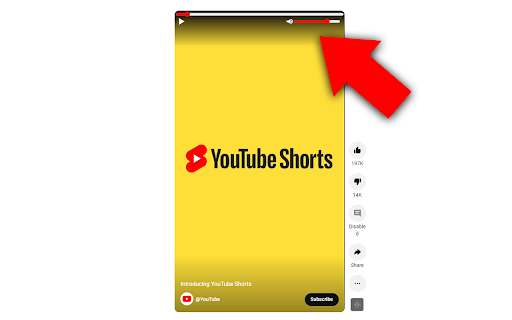

Better Shorts Player adds the ability to scrub through a shorts video, play, pause, adjust volume and mute the video. The controls fade away when not being hovered on as to not be intrusive to the video.

YouTube Shorts Speed
Control playback speed of YouTube Shorts Add a speed slider to Youtube Shorts

YouTube Shorts to Video Player
This extension helps you in watching YouTube Shorts by adding features like rewinding, speed controls, skipping, etc. Introducing "YouTube Shorts to Video Player" – the ultimate extension to supercharge your YouTube Shorts experience! Are you tired of not having control over your YouTube Shorts playback? Frustrated by the lack of essential features like rewinding, skipping, and speed controls? Look no further! With my innovative extension, you can now enjoy YouTube Shorts like never before. Here's what "YouTube Shorts to Video Player" brings to the table: - Rewind and Skip: Easily navigate through the Short videos by rewinding or skipping to any desired moment. No more missing out on exciting or impactful parts! - Speed Controls: Adjust the playback speed to your preference. Speed up the Shorts for a quick overview or slow them down for a more detailed analysis. The choice is yours! - Volume Controls: You can now adjust the volume of the Shorts rather than just muting, unmuting it! Get ready for a whole new level of control and immersion. Install "YouTube Shorts to Video Player" now and embrace the future of YouTube Shorts viewing! Note: "YouTube Shorts to Video Player" is a third-party extension and is not affiliated with or endorsed by YouTube.

YoutubeShortTimeController
You can control the current time of YouTube Shorts with a mouse click. You can click on the video playback bar at the bottom of YouTube Shorts to change the time.

Classic View for YouTube Shorts
Watch YouTube Shorts in full screen view. Pin it to your tool bar for easy access. Watch YouTube Shorts in the normal, full-screen player automatically. Tired of the TikTok-style Shorts player? Classic View restores the traditional YouTube viewing experience you love. With a brand new, modern design and powerful new features, taking control of your playback has never been easier. Auto-Forward: Automatically redirect every Short to the classic video player. No clicks needed. Modern UI: A sleek, dark-mode interface to manage your settings. Native Experience: Enjoy full player controls (scrubbing, volume, speed) that the Shorts player hides. 💎 PRO FEATURES (New!): Smart Whitelist: Want to keep Shorts for specific creators? Add Channel Names or Video IDs to your whitelist, and Classic View will let them play as Shorts while converting everything else. HOW TO USE: Install the extension. Pin it to your toolbar. Open the menu to toggle "Auto-Forward" on/off. (Optional) Upgrade to Pro to unlock the Smart Whitelist!
